
使用/Paketo.io为GitHub容器注册表链接配置自定义容器映像标签
我使用https://start.spring.io/创建了一个简单的Spring应用程序。现在,我希望使用Paketo.io / Cloud对spring-boot-maven-plugin的支持来构建容器映像,并使用GitHub操作将其推送到GitHub容器注册表。
我的pom.xml看起来是这样的:
<?xml version="1.0" encoding="UTF-8"?>
<project xmlns="http://maven.apache.org/POM/4.0.0" xmlns:xsi="http://www.w3.org/2001/XMLSchema-instance"
    xsi:schemaLocation="http://maven.apache.org/POM/4.0.0 https://maven.apache.org/xsd/maven-4.0.0.xsd">
    <modelVersion>4.0.0</modelVersion>
    <parent>
        <groupId>org.springframework.boot</groupId>
        <artifactId>spring-boot-starter-parent</artifactId>
        <version>2.4.3</version>
        <relativePath/> <!-- lookup parent from repository -->
    </parent>
    <groupId>io.jonashackt</groupId>
    <artifactId>helloworld</artifactId>
    <version>0.0.1-SNAPSHOT</version>
    <name>helloworld</name>
    <description>Demo project for Spring Boot</description>
    <properties>
        <java.version>15</java.version>
    </properties>
    <dependencies>
        <dependency>
            <groupId>org.springframework.boot</groupId>
            <artifactId>spring-boot-starter-web</artifactId>
        </dependency>

        <dependency>
            <groupId>org.springframework.boot</groupId>
            <artifactId>spring-boot-starter-test</artifactId>
            <scope>test</scope>
        </dependency>
    </dependencies>

    <build>
        <plugins>
            <plugin>
                <groupId>org.springframework.boot</groupId>
                <artifactId>spring-boot-maven-plugin</artifactId>
            </plugin>
        </plugins>
    </build>
</project>我成功地在我的mvn spring-boot:build-image操作工作流中使用GitHub命令创建了一个Docker映像。我也成功的将其推送到GitHub容器注册表(遵循本指南)了。下面是我的build.yml工作流:
name: publish

on: [push]

jobs:
  publish:
    runs-on: ubuntu-latest

    steps:
    - uses: actions/checkout@v2

    - name: Set up JDK 15
      uses: actions/setup-java@v1
      with:
        java-version: 15

    - name: Build the hello-world Docker image
      run: |
        echo 'Login to GitHub Container Registry'
        echo $CR_PAT | docker login ghcr.io -u jonashackt --password-stdin

        echo 'Build a container image from our Spring Boot app using Paketo.io / Cloud Native Build Packs'
        mvn spring-boot:build-image --batch-mode --no-transfer-progress

        echo 'tag Paketo build image to have the right GitHub Container Registry coordinates'
        docker tag helloworld:0.0.1-SNAPSHOT ghcr.io/jonashackt/helloworld:latest

        docker push ghcr.io/jonashackt/helloworld:latest
      env:
CR_PAT: ${{ secrets.CR_PAT }}但是Container映像并没有链接到GitHub存储库。因为这必须在Dockerfile中使用特定的符合OCI的Dockerfile来完成。
LABEL org.opencontainers.image.source="https://github.com/jonashackt/helloworld"如何使用could / Paketo与LABEL一起配置此spring-boot-maven-plugin?
回答 1
Stack Overflow用户
发布于 2021-03-11 14:56:48
当spring-boot-maven-plugin透明地包装Paketo.io /时,最好的方法是从https://paketo.io/docs开始。有一个一节,介绍如何将自定义标签应用于应用程序图像。
Paketo用户可以使用图像标签Buildpack向应用程序映像添加标签。
由于org.opencontainers.image.source是一个特定于OCI的标签,图像标签构建包将为我们设置正确的标签.我们所要做的就是将一个环境变量传递给我们以BP_OCI_作为前缀的Paketo构建。看看文档中可能存在的OCI特定标签。例如,如果我们运行以下Paketo构建:
pack build spring-boot-buildpack
  --path . \
  --builder paketobuildpacks/builder:base \
--env "BP_OCI_DESCRIPTION=Demo Application"生成的应用程序映像将具有一个用值LABEL定义的org.opencontainers.image.description Demo Application。因此,为了设置org.opencontainers.image.source,我们需要为我们的Paketo构建定义环境变量BP_OCI_SOURCE!
但是在这里使用spring-boot-maven-plugin时,我们需要在pom.xml中配置这个环境变量,因为我们不直接与Paketo交互。文献资料告诉我们,我们可以使用configuration标记中的image.env标记来定义
应该传递给构建器的环境变量。
为了将特定于OCI的LABEL org.opencontainers.image.source https://github.com/yourGitHubUserOrOrgaName/yourRepositoryName配置为Paketo使用spring maven-plugin构建的应用程序映像,将以下标记添加到您的pom.xml (这里还有包含pom.xml的一个完全可理解的示例项目 ):
<build>
        <plugins>
            <plugin>
                <groupId>org.springframework.boot</groupId>
                <artifactId>spring-boot-maven-plugin</artifactId>
                <configuration>
                    <image>
                        <env>
                            <BP_OCI_SOURCE>https://github.com/yourGitHubUserOrOrgaName/yourRepositoryName</BP_OCI_SOURCE>
                        </env>
                    </image>
                </configuration>
            </plugin>
        </plugins>
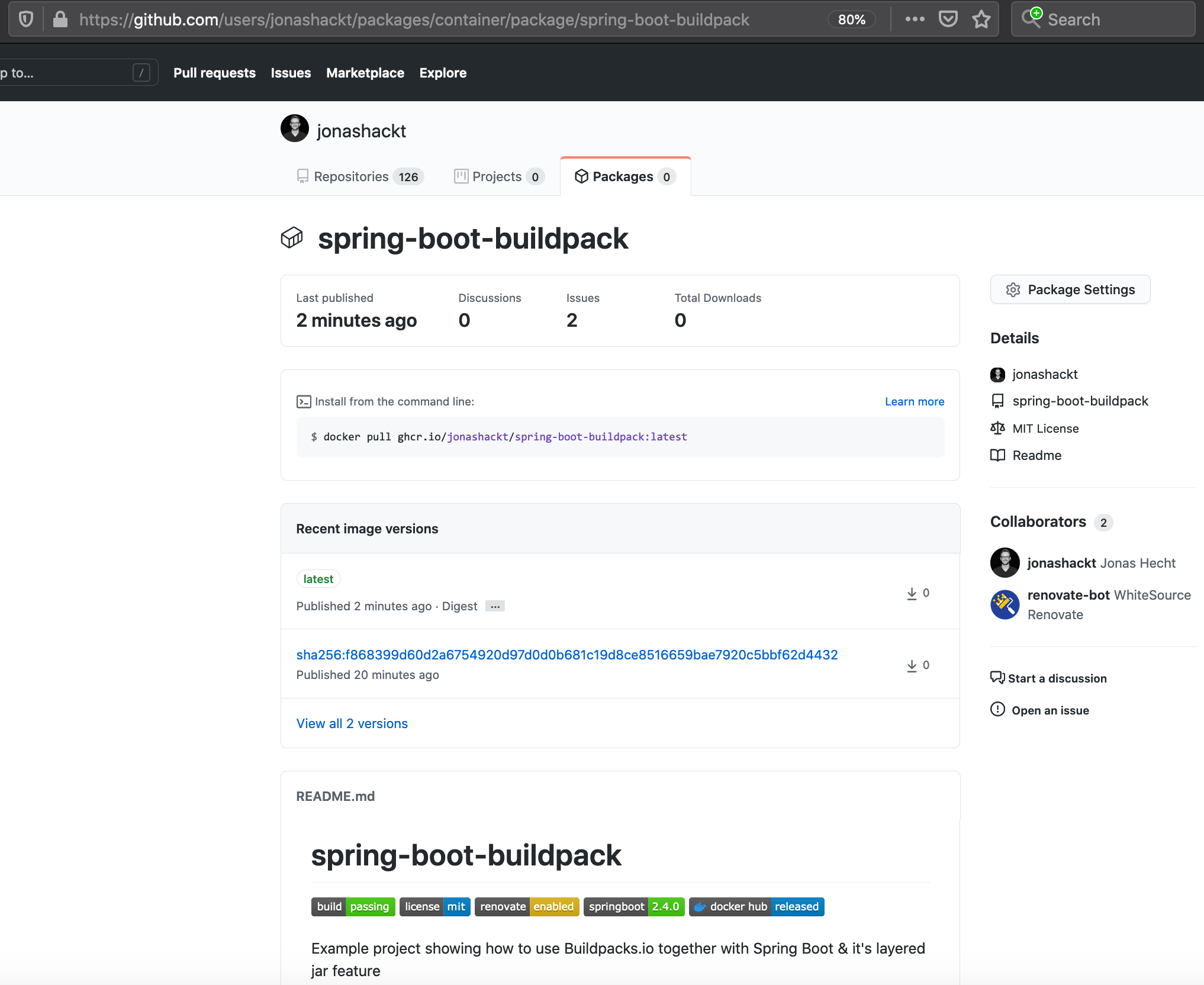
</build>现在,您的映像将链接到您的GitHub存储库。如果您查看您的帐户包并单击构建映像,您应该会看到映射的所有README.md信息如下:
https://stackoverflow.com/questions/66585031
复制相似问题
腾讯云开发者

Copyright © 2013 - 2026 Tencent Cloud. All Rights Reserved. 腾讯云 版权所有
深圳市腾讯计算机系统有限公司 ICP备案/许可证号:粤B2-20090059  粤公网安备44030502008569号
腾讯云计算(北京)有限责任公司 京ICP证150476号 | 京ICP备11018762号