
如何使用MacOS看到CLion上的内存泄漏?
我不知道如何才能在CLion上看到MacOS上的内存泄漏,大Sur使用CLion,我已经尝试过这样的方法:
与大苏尔
不兼容
来自Clang的
- 泄密消毒液--据CLion
的一名支持人员称,这显然与MacOS不兼容
- in CLion,我用CMakeLists.txt编写了以下命令:
set(CMAKE_C_FLAGS "${CMAKE_C_FLAGS} -fsanitize=address -g")
然后我在“首选项”菜单中编写了“地址消毒器”部分中的“->消毒液”:
detect_stack_use_after_return=1
基于CLion支持页面,他们说地址消毒液中包括了泄漏消毒液。。
回答 3
Stack Overflow用户
发布于 2021-07-28 01:22:27
假设您已经安装了xcode命令行developer工具,请在CLion中打开一个终端窗口并尝试以下命令,其中程序名是您正在构建的程序的名称:
leaks -atExit -- cmake-build-debug/programname您可以得到如下输出:
leaks Report Version: 4.0
Process 69522: 214 nodes malloced for 21 KB
Process 69522: 1 leak for 1008 total leaked bytes.

1 (1008 bytes) ROOT LEAK: 0x14c6067f0 [1008]Stack Overflow用户
发布于 2021-03-12 12:21:51
通常,您可以在编译期间使用libasan (https://www.osc.edu/resources/getting_started/howto/howto_use_address_sanitizer),但是在MacOS上有一些额外的步骤:
https://clang.llvm.org/docs/AddressSanitizer.html (在此页面中搜索“MacOS”以获得概览):
内存泄漏检测
有关AddressSanitizer中检漏器的更多信息,请参见LeakSanitizer。在Linux上,泄漏检测默认是打开的,可以使用ASAN_OPTIONS=detect_leaks=1在macOS上启用;但是,在其他平台上还不支持它。
来源:https://clang.llvm.org/docs/AddressSanitizer.html
还请参阅Mac OS: Leaks Sanitizer和https://developer.apple.com/documentation/xcode/diagnosing_memory_thread_and_crash_issues_early
Stack Overflow用户
发布于 2021-10-20 15:54:42
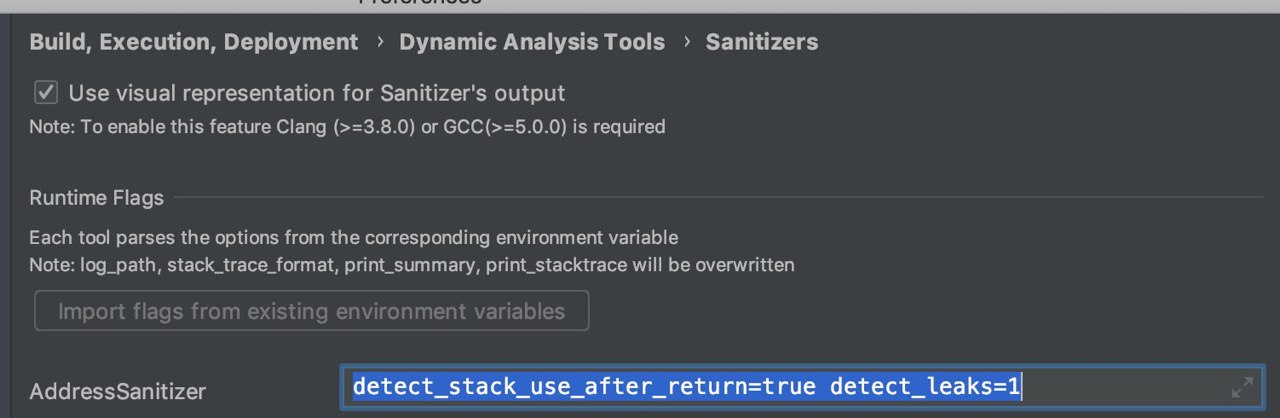
在“首选项”/“生成、执行、部署”CMake -> Cmake选项中使用
-DCMAKE_BUILD_TYPE=ASAN -DCMAKE_CXX_COMPILER=/usr/local/opt/llvm/bin/clang++和
https://stackoverflow.com/questions/66599589
复制相似问题
腾讯云开发者

Copyright © 2013 - 2026 Tencent Cloud. All Rights Reserved. 腾讯云 版权所有
深圳市腾讯计算机系统有限公司 ICP备案/许可证号:粤B2-20090059  粤公网安备44030502008569号
腾讯云计算(北京)有限责任公司 京ICP证150476号 | 京ICP备11018762号