
如何使用网站加速VBA脚本的处理?
我有一个VBA脚本,它允许我计算两个城市之间以kms表示的距离:
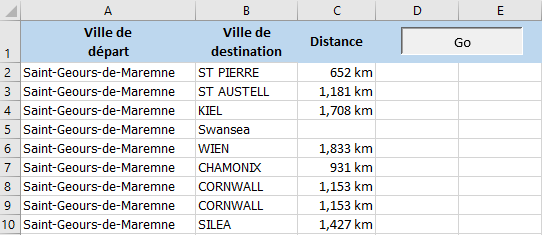
这个脚本是正确的,问题是我所给出的城市列表是5000多个城市。
当我按下"GO“按钮时,处理开始,Excel文件冻结,在它完成之前是不可能看到处理过程的,它需要将近1小时。
是否有可能提高我的脚本的处理速度,还是由于我的互联网连接的速度?
大约3000座城市的脚本停止了,因为处理太长了。我怎么才能解决这个问题?
Option Explicit

Public Const DIST = "http://www.distance2villes.com/recherche?source="


Sub Distance()
Dim lg As Integer, i As Integer
Dim Url As String, Txt As String

    With Sheets("Feuil1")
        lg = .Cells(Rows.Count, 1).End(xlUp).Row
        For i = 2 To lg
            Url = DIST & .Range("A" & i).Value & "&destination=" & .Range("B" & i).Value
            With CreateObject("WINHTTP.WinHTTPRequest.5.1")
                .Open "GET", Url, False
                .send
                Txt = .responseText
            End With

            ' Only set the value if we got a response
            If Txt <> vbNullString Then .Range("C" & i).Value = Split(Split(Txt, "id=""distanciaRuta"">")(1), "</strong>")(0)

            ' Clear our variable before next
            Txt = vbNullString
        Next i
    End With
End Sub回答 3
Stack Overflow用户
发布于 2021-03-13 21:51:35
GetElementById (vs双分裂)
这里的问题是,网站在某种程度上取决于城市之间的距离,比如巴黎-伦敦产生了大约90k个字符,而巴黎-符拉迪沃斯托克140万characters.
- Using a generates (
MSXML2.XMLHTTP)则提高了大约10%的效率。
代码
Option Explicit

Sub Distance()

    Const DIST1 As String = "http://www.distance2villes.com/recherche?source="
    Const DIST2 As String = "&destination="
    Const DIST3 As String = "distanciaRuta"
    Const wsName As String = "Feuil1"

    'Dim w As Object: Set w = CreateObject("WINHTTP.WinHTTPRequest.5.1")
    Dim w As Object: Set w = CreateObject("MSXML2.XMLHTTP")
    Dim h As Object: Set h = CreateObject("htmlfile")

    Dim ws As Worksheet: Set ws = ThisWorkbook.Worksheets(wsName)
    Dim rg As Range
    Set rg = ws.Range("A2", ws.Cells(ws.Rows.Count, "A").End(xlUp).Offset(, 1))
    Dim Data As Variant: Data = rg.Value

    Dim isFound As Boolean: isFound = True
    Dim i As Long
    Dim Url As String
    Dim S As String

    For i = 1 To UBound(Data, 1)
        If Len(Data(i, 1)) > 0 And Len(Data(i, 2)) > 0 Then
            Url = DIST1 & Data(i, 1) & DIST2 & Data(i, 2)
            w.Open "GET", Url, False
            w.Send
            h.body.innerHTML = w.responseText
            On Error GoTo NotFoundError
            S = h.getElementById(DIST3).innerText
            On Error GoTo 0
            If isFound Then
                Data(i, 1) = Replace(Left(S, Len(S) - 3), ",", "")
            Else
                Data(i, 1) = ""
                isFound = True
            End If
        Else
            Data(i, 1) = ""
        End If
    Next
    rg.Columns(1).Offset(, 2).Value = Data

    Exit Sub

NotFoundError:
    isFound = False
    Resume Next

End SubStack Overflow用户
发布于 2021-03-13 20:41:51
尝试重用请求对象(未经测试)
Sub Distance()
    Dim lg As Integer, i As Integer
    Dim Url As String, Txt As String
    Dim objReq as WINHTTP.WinHTTPRequest
    Set objReq = new WINHTTP.WinHTTPRequest

    With Sheets("Feuil1")
        lg = .Cells(Rows.Count, 1).End(xlUp).Row
        For i = 2 To lg
            If i Mod 10 = 0 Then Application.Statusbar = i & " of " & lg
            Url = DIST & .Range("A" & i).Value & "&destination =" & .Range("B" & i).Value
            With objReq
                .Open "GET", Url, False
                .send
                Txt = .responseText
            End With

            ' Only set the value if we got a response
            If Txt <> vbNullString Then .Range("C" & i).Value = Split(Split(Txt, "id=""distanciaRuta"">")(1), "</strong>")(0)

            ' Clear our variable before next
            Txt = vbNullString
        Next i
    End With
End SubStack Overflow用户
发布于 2021-03-14 08:00:00
您可以在异步模式下运行,这允许您同时运行多个调用,这将(理论上)允许您更快地处理整个列表-例如
http://dailydoseofexcel.com/archives/2006/10/09/async-xmlhttp-calls/
作为一个简单的例子:
Option Explicit

Public Const DIST = "http://www.distance2villes.com/recherche?source="

Dim requests As Collection

Sub Distance()
    Dim i As Long, r

    r = Rnd() ' "cachebuster" for testing...

    Set requests = New Collection
    With Sheets("Data")
        For i = 2 To 13
            .Range("C" & i).Value = "Waiting"
            SendRequest i, DIST & .Range("A" & i).Value & _
                           "&destination=" & .Range("B" & i).Value & "&v=" & r
        Next i
    End With

End Sub

'create a request object and matching handler,
'  add the handler to the "requests" collection,
'  send the request
Sub SendRequest(rowNum As Long, URL As String)
    Dim req As New MSXML2.XMLHTTP
    Dim handler As New asyncHandler
    handler.rowNum = rowNum          'store the row number for the request
    handler.Initialize req
    req.OnReadyStateChange = handler
    req.Open "GET", URL, True
    requests.Add handler, (CStr("Row" & rowNum))
    req.send
End Sub

'called from each instance of `handler` as it completes
Sub SetResult(txt, rowNum)
    Sheets("Data").Cells(rowNum, "C").Value = txt
    requests.Remove CStr("Row" & rowNum)
    Debug.Print "requests queue - " & requests.count
End Sub"Handler“类asyncHandler (请参阅链接以获得所需的额外步骤):
Option Explicit

Public rowNum As Long

Dim m_xmlHttp As MSXML2.XMLHTTP

Public Sub Initialize(ByRef xmlHttpRequest As MSXML2.XMLHTTP)
   Set m_xmlHttp = xmlHttpRequest
End Sub

Sub OnReadyStateChange()
    Dim v
    If m_xmlHttp.readyState = 4 Then
        If m_xmlHttp.Status = 200 Then
            On Error Resume Next
            v = Split(Split(m_xmlHttp.responseText, _
                            "id=""distanciaRuta"">")(1), "</strong>")(0)
            On Error GoTo 0
            SetResult v, rowNum 'update the sheet
        Else
            SetResult m_xmlHttp.statusText, rowNum
        End If
    End If
End Subhttps://stackoverflow.com/questions/66616878
复制相似问题
腾讯云开发者

Copyright © 2013 - 2026 Tencent Cloud. All Rights Reserved. 腾讯云 版权所有
深圳市腾讯计算机系统有限公司 ICP备案/许可证号:粤B2-20090059  粤公网安备44030502008569号
腾讯云计算(北京)有限责任公司 京ICP证150476号 | 京ICP备11018762号