
Terraform启用VM Insight
有人设法通过terraforms为VM启用了吗?
我能够创建一个VM,启用日志,但不能启用洞察力。
我见过这个问题:但找不到明确的答案。如何使用terraform启用azure vm应用程序洞察力监视代理
下面是我在测试中使用的完整的terraform脚本,我直接在蔚蓝云外壳上运行它。
    # Configure the Azure provider
provider "azurerm" {
    # The "feature" block is required for AzureRM provider 2.x.
    features {}
}
variable "prefix" {
  default = "tfvmex"
}

resource "azurerm_resource_group" "main" {
  name     = "${var.prefix}-resources"
  location = "West Europe"
}

resource "azurerm_virtual_network" "main" {
  name                = "${var.prefix}-network"
  address_space       = ["10.0.0.0/16"]
  location            = azurerm_resource_group.main.location
  resource_group_name = azurerm_resource_group.main.name
}

resource "azurerm_subnet" "internal" {
  name                 = "internal"
  resource_group_name  = azurerm_resource_group.main.name
  virtual_network_name = azurerm_virtual_network.main.name
  address_prefixes     = ["10.0.2.0/24"]
}

resource "azurerm_network_interface" "main" {
  name                = "${var.prefix}-nic"
  location            = azurerm_resource_group.main.location
  resource_group_name = azurerm_resource_group.main.name

  ip_configuration {
    name                          = "testconfiguration1"
    subnet_id                     = azurerm_subnet.internal.id
    private_ip_address_allocation = "Dynamic"
  }
}

resource "azurerm_virtual_machine" "main" {
  name                  = "${var.prefix}-vm"
  location              = azurerm_resource_group.main.location
  resource_group_name   = azurerm_resource_group.main.name
  network_interface_ids = [azurerm_network_interface.main.id]
  vm_size               = "Standard_DS1_v2"

  # Uncomment this line to delete the OS disk automatically when deleting the VM
  # delete_os_disk_on_termination = true

  # Uncomment this line to delete the data disks automatically when deleting the VM
  # delete_data_disks_on_termination = true

  storage_image_reference {
    publisher = "Canonical"
    offer     = "UbuntuServer"
    sku       = "16.04-LTS"
    version   = "latest"
  }
  storage_os_disk {
    name              = "myosdisk1"
    caching           = "ReadWrite"
    create_option     = "FromImage"
    managed_disk_type = "Standard_LRS"
  }
  os_profile {
    computer_name  = "hostname"
    admin_username = "testadmin"
    admin_password = "Password1234!"
  }
  os_profile_linux_config {
    disable_password_authentication = false
  }
  tags = {
    environment = "staging"
  }
}

resource "azurerm_storage_account" "main" {
  name                     = "omstesttest22"
  resource_group_name      = azurerm_resource_group.main.name
  location                 = "westus"
  account_tier             = "Standard"
  account_replication_type = "GRS"

  tags = {
    environment = "staging"
  }
}

resource "azurerm_log_analytics_workspace" "law02" {
  name                = "${var.prefix}-logAnalytics"
 location            = azurerm_resource_group.main.location
  resource_group_name = azurerm_resource_group.main.name
 sku                 = "PerGB2018"
  retention_in_days   = 30
}


resource "azurerm_log_analytics_solution" "example" {
  solution_name         = "ContainerInsights"
  location              = azurerm_resource_group.main.location
  resource_group_name   = azurerm_resource_group.main.name
  workspace_resource_id = azurerm_log_analytics_workspace.law02.id
  workspace_name        = azurerm_log_analytics_workspace.law02.name

  plan {
    publisher = "Microsoft"
    product   = "OMSGallery/ContainerInsights"
  }
}

#===================================================================
# Set Monitoring and Log Analytics Workspace
#===================================================================
resource "azurerm_virtual_machine_extension" "oms_mma02" {
  name                       = "test-OMSExtension"
virtual_machine_id         =  azurerm_virtual_machine.main.id
  publisher                  = "Microsoft.EnterpriseCloud.Monitoring"
  type                       = "OmsAgentForLinux"
  type_handler_version       = "1.12"
  auto_upgrade_minor_version = true

  settings = <<SETTINGS
    {
      "workspaceId" : "${azurerm_log_analytics_workspace.law02.workspace_id}"
    }
  SETTINGS

  protected_settings = <<PROTECTED_SETTINGS
    {
      "workspaceKey" : "${azurerm_log_analytics_workspace.law02.primary_shared_key}"
    }
  PROTECTED_SETTINGS
}
希望一切都很清楚。谢谢!
回答 5
Stack Overflow用户
发布于 2021-03-16 06:35:24
从文档中,VM洞察力要求在要监视的每台虚拟机上安装以下两个代理。
- 日志分析代理。从虚拟机或虚拟机缩放集收集事件和性能数据,并将其传递到Log工作区。Azure资源上日志分析代理的部署方法使用Windows和Linux的VM扩展。
- 依赖代理。收集已发现的有关虚拟机上运行的进程和外部进程依赖项的数据,这些数据由VM洞察中的Map功能使用。依赖代理依赖于Log代理将其数据传递给Azure Monitor。Azure资源上依赖代理的部署方法使用Windows和Linux的VM扩展。
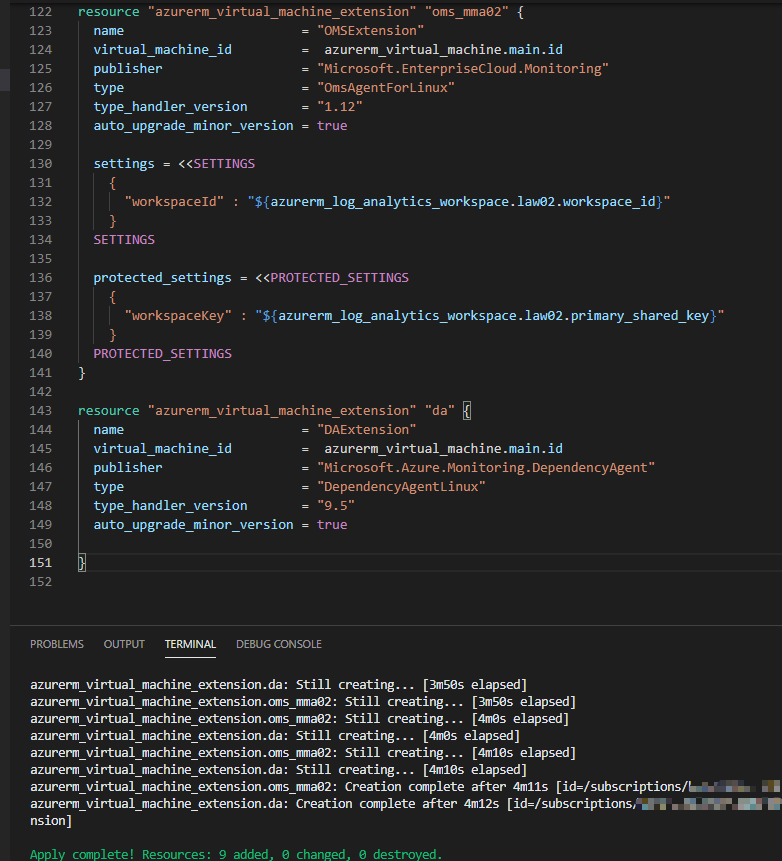
验证之后,可以将DependencyAgent扩展添加到现有代码中。
resource "azurerm_virtual_machine_extension" "da" {
  name                       = "DAExtension"
  virtual_machine_id         =  azurerm_virtual_machine.main.id
  publisher                  = "Microsoft.Azure.Monitoring.DependencyAgent"
  type                       = "DependencyAgentLinux"
  type_handler_version       = "9.5"
  auto_upgrade_minor_version = true

}
有关更多信息,请阅读为VM洞察力配置日志分析工作区和启用VM洞察客户健康(预览)
Stack Overflow用户
发布于 2022-01-21 14:02:04
使用Terraform:部署它:
部署日志分析工作区和与工作区关联的VMInsights解决方案。
resource "azurerm_log_analytics_workspace" "law" {
  name                      = "LogAnalyticsWorkspace"
  location                  = "Your location"
  resource_group_name       = "Your resource group"
  sku                       = "PerGB2018"
  retention_in_days         = "your retention in days"
  internet_ingestion_enabled= true
  internet_query_enabled    = false
  tags                      = "Your tags"
}

resource "azurerm_log_analytics_solution" "vminsights" {
  solution_name         = "VMInsights"
  location              = "Your location"
  resource_group_name   = "Your resource group"
  workspace_resource_id = azurerm_log_analytics_workspace.law.id
  workspace_name        = azurerm_log_analytics_workspace.law.name
  tags                  = "Your tags"

  plan {
    publisher = "Microsoft"
    product   = "OMSGallery/VMInsights"
  }
}
使用OMSAgent和DependencyAgentWindows扩展像往常一样部署VM:
resource "azurerm_windows_virtual_machine" "vm" {
   ......
   ......
}面向Windows的OMS:https://learn.microsoft.com/en-us/azure/virtual-machines/extensions/oms-windows
resource "azurerm_virtual_machine_extension" "omsext" {
  name                  = "OMSExtension"
  virtual_machine_id    = azurerm_windows_virtual_machine.vm.id
  publisher             = "Microsoft.EnterpriseCloud.Monitoring"
  type                  = "MicrosoftMonitoringAgent"
  type_handler_version  = "1.0"
  auto_upgrade_minor_version = true

  settings = <<SETTINGS
    {
        "workspaceId": "${azurerm_log_analytics_workspace.law.id}"
    }
  SETTINGS
  protected_settings = <<PROTECTED_SETTINGS
    {
      "workspaceKey": "${azurerm_log_analytics_workspace.law.primary_shared_key}"
    }
  PROTECTED_SETTINGS

  tags                       = "Your tags"
}用于Windows的DA代理:https://learn.microsoft.com/en-us/azure/virtual-machines/extensions/agent-dependency-windows
resource "azurerm_virtual_machine_extension" "DAAgent" {
  name                       = "DAAgentExtension"
  virtual_machine_id         = azurerm_windows_virtual_machine.vm.id
  publisher                  = "Microsoft.Azure.Monitoring.DependencyAgent"
  type                       = "DependencyAgentWindows"
  type_handler_version       = "9.10"
  auto_upgrade_minor_version = true
  tags                       = "Your tags"
}Stack Overflow用户
发布于 2022-06-15 01:17:17
微软已经改变了MicrosoftMonitoringAgent扩展所需的设置,@Bill指定的terraform从2022年6月起就不再工作了。为我工作的地形是:
# Import the subscription and resource groups
data "azurerm_subscription" "current" {
}

data "azurerm_resource_group" "rg" {
  name = "rg-name"
  provider = azurerm
}

resource "random_password" "windowsvm-password" {
  length           = 24
  special          = false
}

# Define the VM itself
resource "azurerm_windows_virtual_machine" "windowsvm-c" {
  name                            = "mywindowsvm"
  computer_name                   = "mywindowsvm"
  resource_group_name             = data.azurerm_resource_group.rg.name
  location                        = data.azurerm_resource_group.rg.location
  size                            = "Standard_B2s"
  admin_username                  = "adminlogin"
  admin_password                  = random_password.windowsvm-password.result
  identity { type = "SystemAssigned" }

  network_interface_ids = [
    azurerm_network_interface.windowsvm-c-nic.id,
  ]
  os_disk {
    caching              = "ReadWrite"
    storage_account_type = "Standard_LRS"
  }

  source_image_reference {
    publisher = "MicrosoftWindowsServer"
    offer     = "WindowsServer"
    sku       = "2022-datacenter-azure-edition-core"
    version   = "latest"
  }

  patch_mode          = "AutomaticByPlatform"
  hotpatching_enabled = true
}


# Add logging and monitoring
resource "azurerm_log_analytics_workspace" "law" {
  name                      = "vmloganalytics"
  resource_group_name       = data.azurerm_resource_group.rg-c.name
  location                  = data.azurerm_resource_group.rg-c.location
  sku                       = "PerGB2018"
  retention_in_days         = 365
  internet_ingestion_enabled= true
  internet_query_enabled    = false
}

resource "azurerm_log_analytics_solution" "vminsights" {
  solution_name         = "vminsights"
  resource_group_name   = data.azurerm_resource_group.rg-c.name
  location              = data.azurerm_resource_group.rg-c.location
  workspace_resource_id = azurerm_log_analytics_workspace.law.id
  workspace_name        = azurerm_log_analytics_workspace.law.name
  plan {
    publisher = "Microsoft"
    product   = "VMInsights"
  }
}

# This extension is needed for other extensions
resource "azurerm_virtual_machine_extension" "daa-agent" {
  name                       = "DependencyAgentWindows"
  virtual_machine_id         = azurerm_windows_virtual_machine.windowsvm-c.id
  publisher                  = "Microsoft.Azure.Monitoring.DependencyAgent"
  type                       = "DependencyAgentWindows"
  type_handler_version       = "9.10"
  automatic_upgrade_enabled  = true
  auto_upgrade_minor_version = true
}


# Add logging and monitoring extensions
resource "azurerm_virtual_machine_extension" "monitor-agent" {
  depends_on = [  azurerm_virtual_machine_extension.daa-agent  ]
  name                  = "AzureMonitorWindowsAgent"
  virtual_machine_id    = azurerm_windows_virtual_machine.windowsvm-c.id
  publisher             = "Microsoft.Azure.Monitor"
  type                  = "AzureMonitorWindowsAgent"
  type_handler_version  =  "1.5"
  automatic_upgrade_enabled  = true
  auto_upgrade_minor_version = true
}


resource "azurerm_virtual_machine_extension" "msmonitor-agent" {
  depends_on = [  azurerm_virtual_machine_extension.daa-agent  ]
  name                  = "MicrosoftMonitoringAgent"  # Must be called this
  virtual_machine_id    = azurerm_windows_virtual_machine.windowsvm-c.id
  publisher             = "Microsoft.EnterpriseCloud.Monitoring"
  type                  = "MicrosoftMonitoringAgent"
  type_handler_version  =  "1.0"
  # Not yet supported
  # automatic_upgrade_enabled  = true
  # auto_upgrade_minor_version = true
  settings = <<SETTINGS
    {
        "workspaceId": "${azurerm_log_analytics_workspace.law.id}",
        "azureResourceId": "${azurerm_windows_virtual_machine.windowsvm-c.id}",
        "stopOnMultipleConnections": "false"
    }
  SETTINGS
  protected_settings = <<PROTECTED_SETTINGS
    {
      "workspaceKey": "${azurerm_log_analytics_workspace.law.primary_shared_key}"
    }
  PROTECTED_SETTINGS
}
请注意"msmonitor-agent“下面的扩展设置。
https://stackoverflow.com/questions/66633650
复制相似问题
腾讯云开发者

Copyright © 2013 - 2026 Tencent Cloud. All Rights Reserved. 腾讯云 版权所有
深圳市腾讯计算机系统有限公司 ICP备案/许可证号:粤B2-20090059  粤公网安备44030502008569号
腾讯云计算(北京)有限责任公司 京ICP证150476号 | 京ICP备11018762号