
524多路连接超时错误
我正在使用JMeter测试服务器性能,以模拟大量用户在短时间内访问我们的数字海洋服务器。当我将JMeter设置为200个用户并在基于Laravel的网页上进行测试时,每个页面都能正常工作。当我将用户数增加到500个时,我开始得到524个错误。
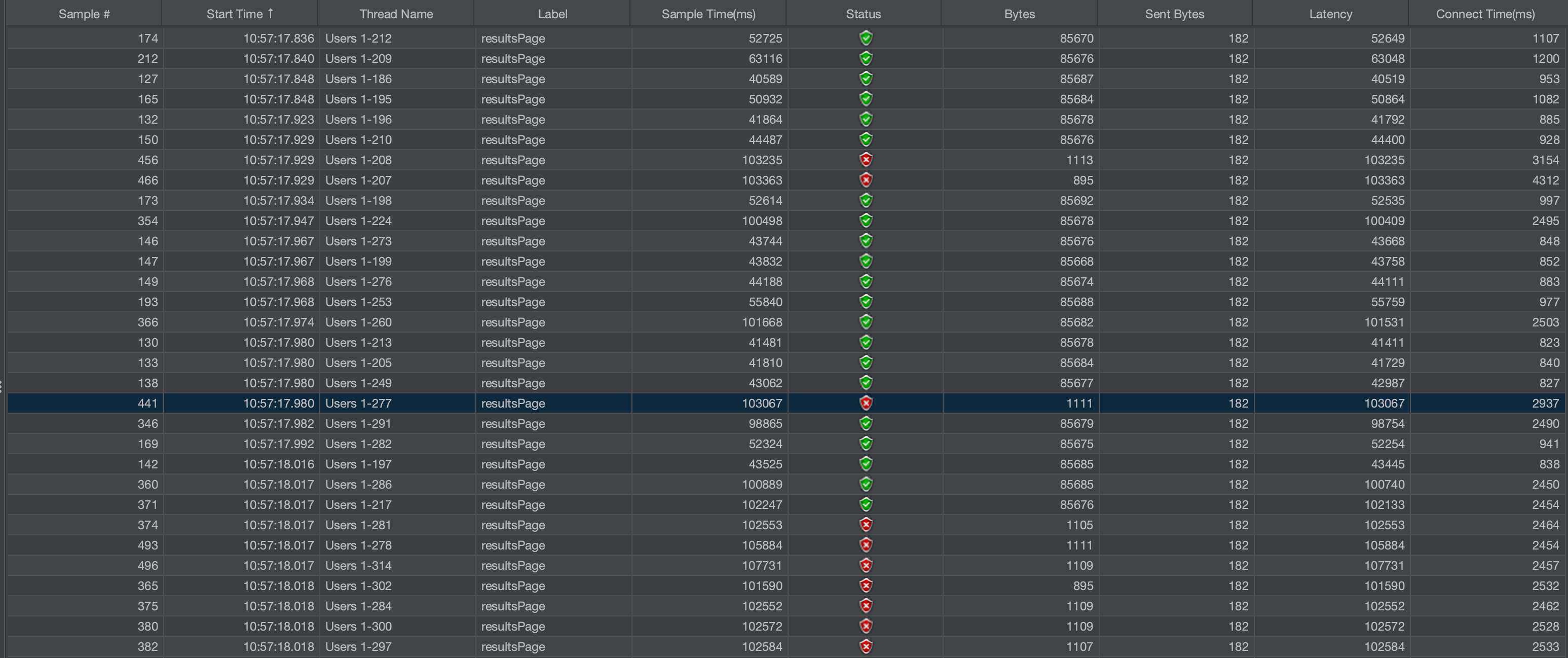
服务器CPU永远不会超过10%,内存也是30%,因此服务器有足够的能量。前几百个请求正确处理,但随后出现524个错误。与屏幕截图中显示的成功请求相比,失败的请求具有更高的延迟和连接。知道我该从哪里开始找问题吗?
我的conf文件在可用的站点上
位置~.php$ {
try_files $uri =404;

fastcgi_pass unix:/var/run/php-fpm/xxxxxxxxxxxx.com.sock;
fastcgi_index index.php;
}
我的nginx.conf设置
fastcgi_buffers 8 128k;
  fastcgi_buffer_size 256k;

  client_header_timeout 3000;
  client_body_timeout 3000;
  fastcgi_read_timeout 3000;
client_max_body_size 32m;我的/etc/sysctl.conf文件设置,取自这篇文章,之前收到504个错误https://www.digitalocean.com/community/questions/getting-nginx-fpm-sock-error
# sysctl settings are defined through files in
# /usr/lib/sysctl.d/, /run/sysctl.d/, and /etc/sysctl.d/.
#
# Vendors settings live in /usr/lib/sysctl.d/.
# To override a whole file, create a new file with the same in
# /etc/sysctl.d/ and put new settings there. To override
# only specific settings, add a file with a lexically later
# name in /etc/sysctl.d/ and put new settings there.
#
# For more information, see sysctl.conf(5) and sysctl.d(5).

### IMPROVE SYSTEM MEMORY MANAGEMENT ###

# Increase size of file handles and inode cache
fs.file-max = 2097152

# Do less swapping
vm.swappiness = 10
vm.dirty_ratio = 60
vm.dirty_background_ratio = 2

### GENERAL NETWORK SECURITY OPTIONS ###

# Number of times SYNACKs for passive TCP connection.
net.ipv4.tcp_synack_retries = 2

# Allowed local port range
net.ipv4.ip_local_port_range = 2000 65535

# Protect Against TCP Time-Wait
net.ipv4.tcp_rfc1337 = 1

# Decrease the time default value for tcp_fin_timeout connection
net.ipv4.tcp_fin_timeout = 15

# Decrease the time default value for connections to keep alive
net.ipv4.tcp_keepalive_time = 300
net.ipv4.tcp_keepalive_probes = 5
net.ipv4.tcp_keepalive_intvl = 15

### TUNING NETWORK PERFORMANCE ###

# Default Socket Receive Buffer
net.core.rmem_default = 31457280

# Maximum Socket Receive Buffer
net.core.rmem_max = 12582912

# Default Socket Send Buffer
net.core.wmem_default = 31457280

# Maximum Socket Send Buffer
net.core.wmem_max = 12582912

# Increase number of incoming connections
net.core.somaxconn = 65535

# Increase number of incoming connections backlog
net.core.netdev_max_backlog = 65535

# Increase the maximum amount of option memory buffers
net.core.optmem_max = 25165824

# Increase the maximum total buffer-space allocatable
# This is measured in units of pages (4096 bytes)
net.ipv4.tcp_mem = 65535 131072 262144
net.ipv4.udp_mem = 65535 131072 262144

# Increase the read-buffer space allocatable
net.ipv4.tcp_rmem = 8192 87380 16777216
net.ipv4.udp_rmem_min = 16384

# Increase the write-buffer-space allocatable
net.ipv4.tcp_wmem = 8192 65535 16777216
net.ipv4.udp_wmem_min = 16384

# Increase the tcp-time-wait buckets pool size to prevent simple DOS attacks
net.ipv4.tcp_max_tw_buckets = 1440000
net.ipv4.tcp_tw_recycle = 1
net.ipv4.tcp_tw_reuse = 1
将此添加到/etc/security/limits.conf s.conf中
nginx           soft    nofile          2097152
nginx           hard    nofile          2097152
www-data        soft    nofile          2097152
www-data        hard    nofile          2097152
我的php-fpm.d conf文件设置
pm = static
pm.max_children = 40
pm.start_servers = 8
pm.min_spare_servers = 4
pm.max_spare_servers = 8
; number of processes to process before respawning. Lower number if you have memory leaks, but each respawn takes time
pm.max_requests=50
; pm.process_idle_timeout=10

chdir = /

php_admin_value[disable_functions] = exec,passthru,shell_exec,system
php_admin_flag[allow_url_fopen] = on
php_admin_flag[log_errors] = on

php_admin_value[post_max_size] = 8M
php_admin_value[upload_max_filesize] = 8M回答 1
Stack Overflow用户
发布于 2021-03-16 11:58:10
HTTP 524错误cloudflare是否特定 -它们不是由您自己的nginx安装生成的。Cloudflare放弃了等待后端服务的响应,这可能是因为可用于服务请求的fpm子级的数量较少。
524超时 Cloudflare能够完成到源服务器的TCP连接,但没有收到及时的HTTP响应。
如果您正在测试自己的服务器设置,请不要通过指向cloudflare的端点。
http服务器的一般“后端超时”响应是504网关超时。
https://stackoverflow.com/questions/66654648
复制相似问题
腾讯云开发者

Copyright © 2013 - 2026 Tencent Cloud. All Rights Reserved. 腾讯云 版权所有
深圳市腾讯计算机系统有限公司 ICP备案/许可证号:粤B2-20090059  粤公网安备44030502008569号
腾讯云计算(北京)有限责任公司 京ICP证150476号 | 京ICP备11018762号