
只显示一个属性,但保存整个对象(反应最终形式+下移)
只显示一个属性,但保存整个对象(反应最终形式+下移)
提问于 2021-03-16 11:23:30
这个问题可能已经解决了,但我发现的例子对我没有多大帮助。
- 下移版本:6.1.0
- 节点版本:14.15.4
- npm版本:6.14.10
- react版本: 17.0.1
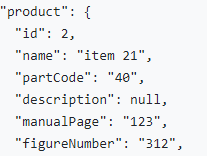
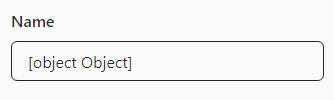
您所做的:试图在输入字段中显示一个对象属性,但是我希望保存整个对象
发生了什么:对象保存得很好,但我不能在输入中只显示一个属性
<Field
  name={`${name}.product`}
  items={productList}
  index={index}
  component={DownShiftInput}
  placeholder="Name"
/>;
const itemToString = item => {
  return item ? item : '';
};

const DownShiftInput = ({
  input,
  meta,
  placeholder,
  items,
  index,
  ...rest
}) => (
  <Control name={placeholder} my={4}>
    <FormLabel htmlFor={placeholder}>{placeholder}</FormLabel>
    <Downshift
      {...input}
      onInputValueChange={inputValue => {
        input.onChange(inputValue);
      }}
      itemToString={itemToString}
      selectedItem={input.value}
    >
      {({
        getInputProps,
        getItemProps,
        getLabelProps,
        isOpen,
        inputValue,
        highlightedIndex,
        selectedItem,
      }) => {
        const filteredItems = matchSorter(items, inputValue, {
          keys: ['name'],
          maxRanking: matchSorter.rankings.STARTS_WITH,
        });
        return (
          <div className="downshift" style={{ position: 'relative' }}>
            <Input
              {...getInputProps({
                name: input.name,
                placeholder,
              })}
            />
            {isOpen && !!filteredItems.length && (
              <div
                className="downshift-options"
                style={{
                  background: 'white',
                  position: 'absolute',
                  top: '100%',
                  left: 15,
                  right: 0,
                  zIndex: 4,
                }}
              >
                {filteredItems.map((item, index) => {
                  return (
                    <div
                      {...getItemProps({
                        key: item.id,
                        index,
                        item,
                        style: {
                          backgroundColor:
                            highlightedIndex === index ? 'lightgray' : 'white',
                          fontWeight: selectedItem === item ? 'bold' : 'normal',
                        },
                      })}
                    >
                      {item.name}
                    </div>
                  );
                })}
              </div>
            )}
          </div>
        );
      }}
    </Downshift>
    <Error name={placeholder} />
  </Control>
);
谢谢!
回答 1
Stack Overflow用户
回答已采纳
发布于 2021-03-16 12:57:36
用户lcordier42 on 下移位github的解决方案
<Input {...getInputProps({ name: input.name, placeholder, value: selectedItem.name, })} />
页面原文内容由Stack Overflow提供。腾讯云小微IT领域专用引擎提供翻译支持
原文链接:
https://stackoverflow.com/questions/66654259
复制相关文章
相似问题
腾讯云开发者

Copyright © 2013 - 2026 Tencent Cloud. All Rights Reserved. 腾讯云 版权所有
深圳市腾讯计算机系统有限公司 ICP备案/许可证号:粤B2-20090059  粤公网安备44030502008569号
腾讯云计算(北京)有限责任公司 京ICP证150476号 | 京ICP备11018762号