
wxPython -向ScrolledPanel添加BoxSizer
wxPython -向ScrolledPanel添加BoxSizer
提问于 2021-03-17 13:29:20
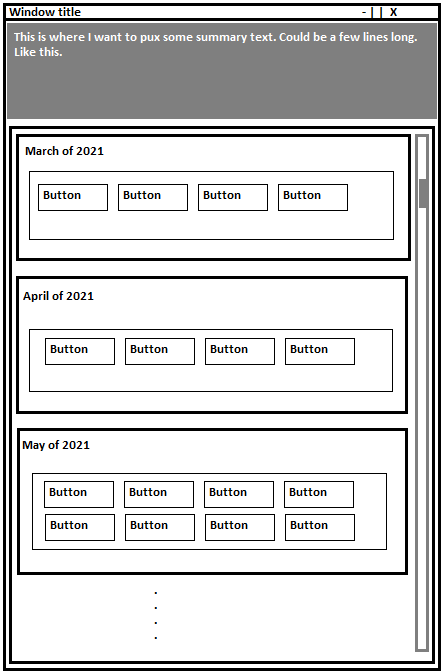
我正在建造一个窗口,在那里我想要建立一个非常简单的日历。每当有一个新的月时,我都要在_organizeData,的循环中添加一些按钮到GridSizer中,该按钮位于一个垂直框中,顶部有一个文本。我无法理解将这个垂直BoxSizer (vBox)添加到scrollPanel中。self.data将是这样的结构,一个字典列表:
[{'date':'14-03-2021',‘xyValue’:[01:00,02:00,.,18.5,17.2,.]}
import wx
import wx.lib.scrolledpanel as scrolled

class GraphCalendar(wx.Frame):
    def __init__(self, parent, data):
        wx.Frame.__init__(self, parent)

        self.data = data
        self.consumption = []
        self.text = wx.StaticText(self, wx.ID_ANY, label="This is a test")
        self.scrollPanel = scrolled.ScrolledPanel(self, wx.ID_ANY, size=((400, 600)), style=wx.SUNKEN_BORDER)
        self.scrollPanel.SetupScrolling()

        self.topVerticalBox = wx.BoxSizer(wx.VERTICAL)
        self.topVerticalBox.Add(self.text, flag=wx.EXPAND)
        self.topVerticalBox.Add(self.scrollPanel)

        self.Center()

        self._organizeData()

    def _organizeData(self):

        currentMonth = ''

        for i in range(0, len(self.data)):
            words = self.data[i]['date'].split('-')  # words -> [0]day, [1]month and [2]year.

            if currentMonth != words[1]:
                currentMonth = words[1]
                vBox = wx.BoxSizer(wx.VERTICAL)
                # Name of the month / year.
                text = wx.StaticText(self, wx.ID_ANY, f"{(words[1])} of {words[2]}")
                # Grid where the button of the days will be added
                gridSizer = wx.GridSizer(rows=5, cols=5, hgap=5, vgap=5)

                vBox.Add(text, wx.ID_ANY)
                vBox.Add(gridSizer, wx.ID_ANY)


            # Create the button of the day and add it to the gridSizer.
            button = wx.Button(self, 1000 + i, label=words[0], size=((20, 20)))
            button.Bind(wx.EVT_BUTTON, self.OnButtonClicked)
            gridSizer.Add(button, border=5)

        self.SetSizerAndFit(self.topVerticalBox)


    def OnButtonClicked(self, event):
        """ Funcao chamada quando um botao e apertado. """

        event.GetEventObject()
        print(event.GetId())

app = wx.App()
frame = GraphCalendar(None, data=[{'date': '14-03-2021', 'xyValues': [['01:00', '02:00'], [18.5, 17.2]]}, {'date': '15-04-2021', 'xyValues': [['01:00', '02:00'], [19.5, 18.2]]}])
frame.Show()
app.MainLoop()
这是所需的输出:
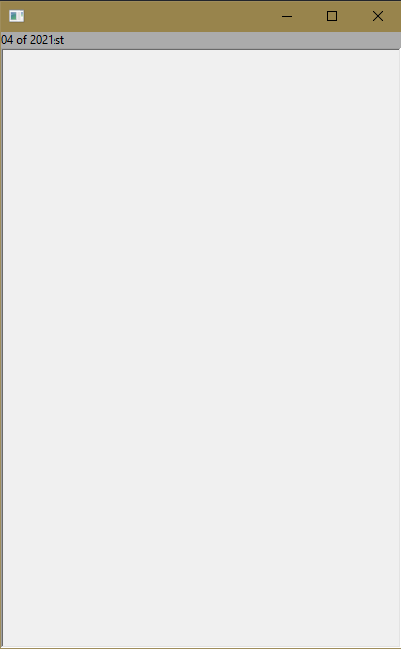
上面的代码就是这样产生的:
回答 1
Stack Overflow用户
回答已采纳
发布于 2021-03-18 11:11:10
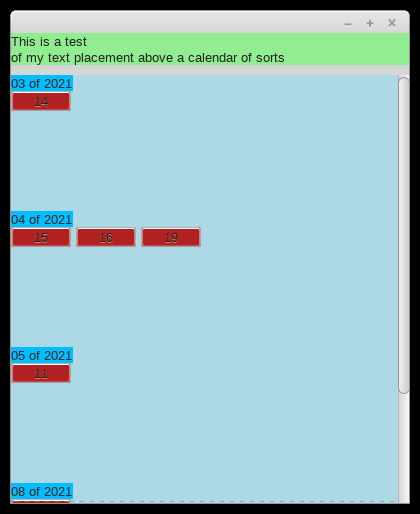
我不知道这是否是最终的解决方案,但它应该会给你指明正确的方向。
我为滚动面板添加了一个额外的sizer (如我的注释中提到的),并在向wx.ID_ANY中添加条目时删除了proportion参数的错误分配(天知道sizer对类似于-31000的部分的想法是什么)。
在开始之前,您可能需要考虑重组您的数据,因为尽管如此,它还是有点笨拙。
import wx
import wx.lib.scrolledpanel as scrolled

class GraphCalendar(wx.Frame):
    def __init__(self, parent, data):
        wx.Frame.__init__(self, parent)

        self.data = data
        self.consumption = []
        self.text = wx.StaticText(self, wx.ID_ANY, label="This is a test\nof my text placement above a calendar of sorts")
        self.text.SetBackgroundColour("lightgreen")
        self.scrollPanel = scrolled.ScrolledPanel(self, wx.ID_ANY, size=((400, 600)), style=wx.SUNKEN_BORDER)
        self.scrollPanel.SetupScrolling()

        self.topVerticalBox = wx.BoxSizer(wx.VERTICAL)
        self.sp_vbox1 = wx.BoxSizer(wx.VERTICAL)

        self.scrollPanel.SetSizer(self.sp_vbox1)
        self._organizeData()

        self.topVerticalBox.Add(self.text, flag=wx.EXPAND)
        self.topVerticalBox.AddSpacer(10)
        self.topVerticalBox.Add(self.scrollPanel)
        self.SetSizer(self.topVerticalBox)

        self.Center()

    def _organizeData(self):

        currentMonth = ''

        for d in self.data:
            words = d['date'].split('-')  # words -> [0]day, [1]month and [2]year.

            if currentMonth != words[1]:
                if currentMonth != '':
                    self.sp_vbox1.Add(vBox)
                currentMonth = words[1]
                vBox = wx.BoxSizer(wx.VERTICAL)
                # Name of the month / year.
                text = wx.StaticText(self.scrollPanel, wx.ID_ANY, f"{(words[1])} of {words[2]}")
                # Grid where the button of the days will be added
                gridSizer = wx.GridSizer(rows=5, cols=5, hgap=5, vgap=5)

                vBox.Add(text)
                vBox.Add(gridSizer)


            # Create the button of the day and add it to the gridSizer.
            button = wx.Button(self.scrollPanel, wx.ID_ANY, label=words[0], size=((60, 20)))
            button.Bind(wx.EVT_BUTTON, self.OnButtonClicked)
            gridSizer.Add(button, border=5)

        self.sp_vbox1.Add(vBox)


    def OnButtonClicked(self, event):
        """ Funcao chamada quando um botao e apertado. """

        event.GetEventObject()
        print(event.GetId())

app = wx.App()
frame = GraphCalendar(None, data=[{'date': '14-03-2021', 'xyValues': [['01:00', '02:00'], [18.5, 17.2]]}, {'date': '15-04-2021', 'xyValues': [['01:00', '02:00'], [19.5, 18.2]]}, {'date': '16-04-2021', 'xyValues': [['01:00', '02:00'], [19.5, 18.2]]}, {'date': '19-04-2021', 'xyValues': [['01:00', '02:00'], [19.5, 18.2]]}, {'date': '11-05-2021', 'xyValues': [['01:00', '02:00'], [19.5, 18.2]]}, {'date': '15-08-2021', 'xyValues': [['01:00', '02:00'], [19.5, 18.2]]}])
frame.Show()
app.MainLoop()
页面原文内容由Stack Overflow提供。腾讯云小微IT领域专用引擎提供翻译支持
原文链接:
https://stackoverflow.com/questions/66674111
复制相关文章
相似问题
腾讯云开发者

Copyright © 2013 - 2026 Tencent Cloud. All Rights Reserved. 腾讯云 版权所有
深圳市腾讯计算机系统有限公司 ICP备案/许可证号:粤B2-20090059  粤公网安备44030502008569号
腾讯云计算(北京)有限责任公司 京ICP证150476号 | 京ICP备11018762号