
使用Powershell在Exchange online中批量编辑自定义属性(脚本不按预期工作)
使用Powershell在Exchange online中批量编辑自定义属性(脚本不按预期工作)
提问于 2021-03-18 02:06:40
希望在我的powershell脚本上得到一些帮助。基本上有一个脚本,我用它来为多个用户批量编辑Azure中的字段,它工作得很好。我试图通过Exchange为多个用户编辑自定义属性,但它不起作用。我猜这对EO不起作用。这里的目标是提取一个csv,它有2列(用户电子邮件地址为"userprincipalname",还有一列表示我想为“customattribute1”添加的值)任何帮助都是非常感谢的。
# Connect to ExchangeOnline
Connect-ExchangeOnline

# Get CSV content
$CSVrecords = Import-Csv C:\pathtofile.csv

# Create arrays for skipped and failed users
$SkippedUsers = @()
$FailedUsers = @()

# Loop trough CSV records
foreach ($CSVrecord in $CSVrecords) {
    $upn = $CSVrecord.UserPrincipalName
    $user = Get-Mailbox -Filter "userPrincipalName eq '$upn'"
    if ($user) {
        try{
        $user | Set-Mailbox -customattribute1 $CSVrecord.customattribute1
        } catch {
        $FailedUsers += $upn
        Write-Warning "$upn user found, but FAILED to update."
        }
    }
    else {
        Write-Warning "$upn not found, skipped"
        $SkippedUsers += $upn
    }
}回答 1
Stack Overflow用户
回答已采纳
发布于 2021-03-18 05:33:36
我认为可能有两个点导致无法设置customattribute1。
过滤器表达式应该是:"userPrincipalName -eq '$upn'"
- Seems I在导入文件时找不到
-Delimiter参数,这将导致unbale正确地拉出列值。
试试下面的代码,这些代码非常适合我:
Connect-ExchangeOnline

$SkippedUsers = @()
$FailedUsers = @()

$CSVrecords = Import-Csv "C:\Users\Administrator\Desktop\test.csv" -Delimiter ","
foreach($CSVrecord in $CSVrecords ){
    $upn = $CSVrecord.UserPrincipalName
    $user = Get-Mailbox -Filter "userPrincipalName -eq '$upn'"
    if ($user) {
        try{
        $user | Set-Mailbox -customattribute1 $CSVrecord.customattribute1
        } catch {
        $FailedUsers += $upn
        Write-Warning "$upn user found, but FAILED to update."
        }
    }
    else {
        Write-Warning "$upn not found, skipped"
        $SkippedUsers += $upn
    }
}
我的测试.csv文件:
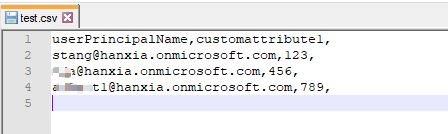
运行PS命令后,尝试获取测试用户的customattribute1:

如果你还有其他问题,请告诉我。
页面原文内容由Stack Overflow提供。腾讯云小微IT领域专用引擎提供翻译支持
原文链接:
https://stackoverflow.com/questions/66683783
复制相关文章
相似问题
腾讯云开发者

Copyright © 2013 - 2026 Tencent Cloud. All Rights Reserved. 腾讯云 版权所有
深圳市腾讯计算机系统有限公司 ICP备案/许可证号:粤B2-20090059  粤公网安备44030502008569号
腾讯云计算(北京)有限责任公司 京ICP证150476号 | 京ICP备11018762号