
如何去除<img>占用的额外区域?
如何去除<img>占用的额外区域?
提问于 2021-03-26 18:18:01
我是个初学者。我正在练习HTML和CSS。我有麻烦了。我用了一个<div>作为图像。在<div>内部,我用<img>拍摄了图像。但我面临着一个问题。<img>拍摄的每一张图像都是从图像底部的额外区域中提取出来的。
这是一个输出图像。我用红色标出了这个区域。
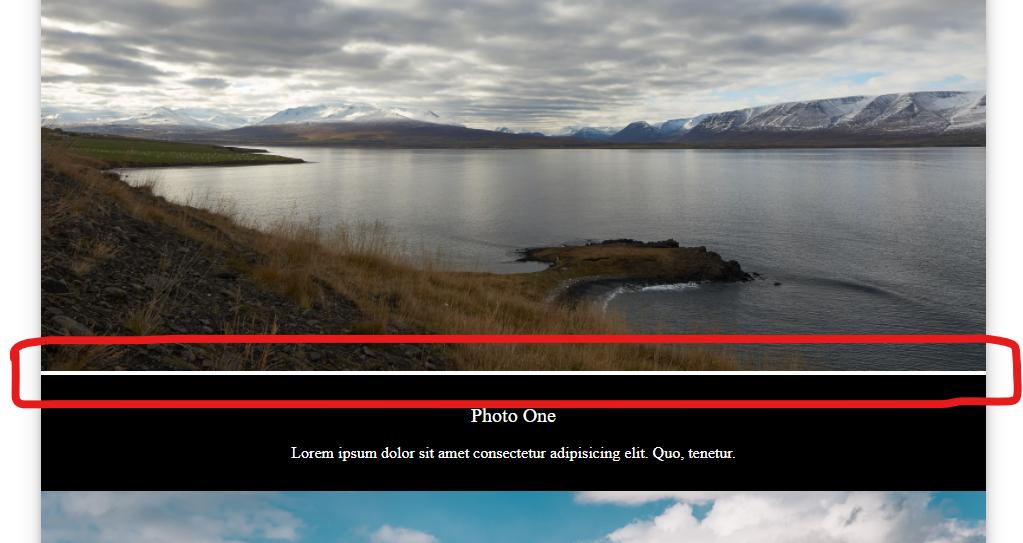
我的HTML和CSS:
* {
    margin: 0;
    padding: 0;
    box-sizing: border-box;
}
/* ---------------------------- Top -------------------------------- */
.top {
    display: flex;
    margin: 0 15%;
    box-shadow: 0 4px 8px 0 rgba(0, 0, 0, 0.2), 0 6px 20px 0 rgba(0, 0, 0, 0.19);
}
.top .part1 {
    width: 40%;
    height: 100vh;
    text-align: center;
    padding: 5%;
    display: flex;
    flex-direction: column;
    align-items: center;
    justify-content: center;
}
.top .part1 .title {
    font-size: 45px;
}
.top .part1 .subtitle {
    font-size: 20px;
    padding-bottom: 12%;
}
.top .part1 a {
    text-decoration: none;
    color: black;
}
.top .part1 .btn {
    padding: 4% 10%;
    border: 1px solid black;
    border-radius: 50px;
}
.top .part2 {
    width: 60%;
    background: url(./images/top.jpg) no-repeat center center/cover;
}
/* -------------------------------- Work --------------------------------------------- */
.work {
    margin: 0 15%;
    box-shadow: 0 4px 8px 0 rgba(0, 0, 0, 0.2), 0 6px 20px 0 rgba(0, 0, 0, 0.19);
}
/* --------------------------------- Our Work -------------------------------------------- */
.our-work {
    width: 100%;
    padding: 2.5%;
    text-align: center;
    background: #333;

}
.our-work p {
    border-left: 1px dotted white;
    border-right: 1px dotted white;
    display: inline-block;
    padding: 0 1%;
    color: white;
    font-size: 20px;
}
/* ---------------------------- Image ------------------------------------------------- */
img {
    width: 100%;
}
/* ---------------------------- Image Text ----------------------------------------------- */
.image-text {
    padding: 3%;
    background: #000;
    color: white;
    text-align: center;
}
/* ---------------------------- Image Text Head ------------------------------------------ */
.image-text .head {
    font-size: 20px;
    padding-bottom: 2%;
}
/* ---------------------------- Image Text Text ------------------------------------------ */
.image-text .text {
    font-size: 16px;
}<!DOCTYPE html>
<html lang="en">
<head>
<meta charset="UTF-8">
<meta http-equiv="X-UA-Compatible" content="IE=edge">
<meta name="viewport" content="width=device-width, initial-scale=1.0">
<title>Acme Photography</title>
<link rel="stylesheet" href="./styles.css">
</head>
<body>
<div class="top">
<div class="part1">
<p class="title">ACME</p>
<p class="title">PHOTOGRAPHY</p>
<p class="subtitle">Beautiful Natural Photography</p>
<a href="#" class="btn">View Work</a>
</div>
<div class="part2"></div>
</div>
<div class="work">
<div class="our-work"><p>Our Work</p></div>
<div class="image1"><img src="./images/1.jpg" alt=""></div>
<div class="image-text">
<p class="head">Photo One</p>
<p class="text">Lorem ipsum dolor sit amet consectetur adipisicing elit. Quo, tenetur.</p>
</div>
<div class="image2"><img src="./images/2.jpg" alt=""></div>
<div class="image-text">
<p class="head">Photo Two</p>
<p class="text">Lorem ipsum dolor sit amet consectetur adipisicing elit. Quo, tenetur.</p>
</div>
<div class="image3"><img src="./images/3.jpg" alt=""></div>
<div class="image-text">
<p class="head">Photo Three</p>
<p class="text">Lorem ipsum dolor sit amet consectetur adipisicing elit. Quo, tenetur.</p>
</div>
<div class="image4"><img src="./images/4.jpg" alt=""></div>
<div class="image-text">
<p class="head">Photo Four</p>
<p class="text">Lorem ipsum dolor sit amet consectetur adipisicing elit. Quo, tenetur.</p>
</div>
<div class="image5"><img src="/images/5.jpg" alt=""></div>
<div class="image-text">
<p class="head">Photo Five</p>
<p class="text">Lorem ipsum dolor sit amet consectetur adipisicing elit. Quo, tenetur.</p>
</div>
</div>
</body>
</html>
我怎么才能解决呢?请帮帮我。
回答 2
Stack Overflow用户
回答已采纳
发布于 2021-03-26 18:21:45
默认情况下,<img>标记具有display: inline-block CSS属性。
若要删除底部空间,请将CSS display: block应用于图像,如下所示:
img {
  display: block;
  width: 100%;
}Stack Overflow用户
发布于 2021-03-26 18:28:35
您可以尝试将其放在css中:
img {
    width: 100%;
    top: 0;
}
我不知道,试试吧。
页面原文内容由Stack Overflow提供。腾讯云小微IT领域专用引擎提供翻译支持
原文链接:
https://stackoverflow.com/questions/66822339
复制相关文章
相似问题
腾讯云开发者

Copyright © 2013 - 2026 Tencent Cloud. All Rights Reserved. 腾讯云 版权所有
深圳市腾讯计算机系统有限公司 ICP备案/许可证号:粤B2-20090059  粤公网安备44030502008569号
腾讯云计算(北京)有限责任公司 京ICP证150476号 | 京ICP备11018762号