
XDebug无法从码头容器连接到客户端
我没有几个停靠容器: php、nginx、mariadb、redis、adminer,并尝试用PhpStorm和Xdebug调试一些PHP代码。
主机(联想T490笔记本电脑):
$ hostname
T490


$ docker -v
Docker version 20.10.5, build 55c4c88


$ docker-compose -v
docker-compose version 1.24.1, build 4667896b


$ cat /etc/lsb-release
DISTRIB_ID=neon
DISTRIB_RELEASE=20.04
DISTRIB_CODENAME=focal
DISTRIB_DESCRIPTION="KDE neon User Edition 5.21"


$ php -v
PHP 7.4.16 (cli) (built: Mar  5 2021 07:54:20) ( NTS )
Copyright (c) The PHP Group
Zend Engine v3.4.0, Copyright (c) Zend Technologies
    with Zend OPcache v7.4.16, Copyright (c), by Zend Technologies


$ lsof -i :9003 | grep LISTEN
java    14868 kane   48u  IPv6 401093      0t0  TCP *:9003 (LISTEN)


$ cat /etc/hosts
127.0.0.1       localhost
127.0.1.1       T490

# The following lines are desirable for IPv6 capable hosts
::1     ip6-localhost ip6-loopback
fe00::0 ip6-localnet
ff00::0 ip6-mcastprefix
ff02::1 ip6-allnodes
ff02::2 ip6-allrouters

172.17.0.1 foo.pl adm.foo.pl api.foo.pl
PhpStorm 2020.3.3配置:
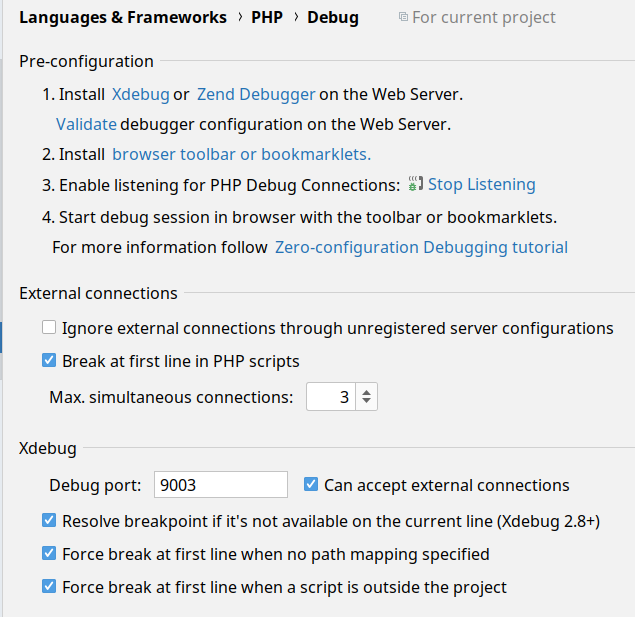
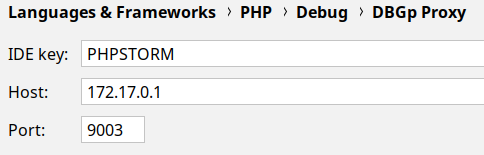
Docker-compose.yml
version: "3"
services:
  php-7.4:
    extra_hosts:
      - "host.docker.internal:host-gateway"
    build: ./docker-images/php-7.4
    image: ap/php:7.4
    container_name: foo-php-7.4
    environment:
      - GITHUB_API_TOKEN=${GITHUB_API_TOKEN}
      - XDEBUG_IDEKEY=${XDEBUG_IDEKEY}
    volumes:
      - ~/.composer-docker/cache:/root/.composer/cache:delegated
      - ~/.gitconfig:/root/.gitconfig
      - ${WORKSPACE_DIR}:/var/www
      - ~/.ssh:/root/ssh:ro
      - ./docker/php/conf.d/xdebug.ini:/usr/local/etc/php/conf.d/docker-php-ext-xdebug.ini
XDebug在DockerFile中通过以下方式安装:
RUN pecl install xdebug \
    && docker-php-ext-enable xdebug
.env
GITHUB_API_TOKEN=
WORKSPACE_DIR=/home/kane/workspace

XDEBUG_IDEKEY=PHPSTORM

COMPOSE_PROJECT_NAME=yii2fpm
COMPOSE_FILE=docker-compose.yml
X_LEGACY_GD_LIB=1
PHP_CGI_PASS=php-7.4:9000
NGINX_PORT=80
NGINX_SSL_PORT=443
DB_PORT=3306
ADMINER_PORT=8182
xdebug.ini
zend_extension=xdebug

[xdebug]
xdebug.mode=develop,debug
xdebug.client_host=172.17.0.1
xdebug.start_with_request = yes
装船后,装在集装箱里:
# route
Kernel IP routing table
Destination     Gateway         Genmask         Flags Metric Ref    Use Iface
default         T490            0.0.0.0         UG    0      0        0 eth0
172.18.0.0      0.0.0.0         255.255.0.0     U     0      0        0 eth0


# ping T490
PING T490 (127.0.1.1) 56(84) bytes of data.
64 bytes from T490 (127.0.1.1): icmp_seq=1 ttl=64 time=0.057 ms


# ping 172.17.0.1
PING 172.17.0.1 (172.17.0.1) 56(84) bytes of data.
64 bytes from 172.17.0.1: icmp_seq=1 ttl=64 time=0.145 ms


# telnet 172.17.0.1 9003
Trying 172.17.0.1...


# telnet T490 9003
Trying 127.0.1.1...
telnet: Unable to connect to remote host: Connection refused


# php -v
PHP 7.4.16 (cli) (built: Mar 13 2021 02:52:33) ( NTS )
Copyright (c) The PHP Group
Zend Engine v3.4.0, Copyright (c) Zend Technologies
    with Zend OPcache v7.4.16, Copyright (c), by Zend Technologies
with Xdebug v3.0.3, Copyright (c) 2002-2021, by Derick Rethans当我去http://adm.foo.pl/ (带cookie XDEBUG_SESSION:"PHPSTORM")时,码头日志上写着:
NOTICE: PHP message: Xdebug: [Step Debug] Time-out connecting to debugging client, waited: 200 ms. Tried: 172.17.0.1:9003 (through xdebug.client_host/xdebug.client_port) :-(
将xdebug.ini更改为:
zend_extension=xdebug

[xdebug]
xdebug.mode=develop,debug
xdebug.discover_client_host = yes
xdebug.start_with_request = yes
上面写着:
NOTICE: PHP message: Xdebug: [Step Debug] Could not connect to debugging client. Tried: 172.18.0.1:9003 (from REMOTE_ADDR HTTP header), localhost:9003 (fallback through xdebug.client_host/xdebug.client_port) :-(
在add之后,extra_host说:
NOTICE: PHP message: Xdebug: [Step Debug] Time-out connecting to debugging client, waited: 200 ms. Tried: host.docker.internal:9003 (through xdebug.client_host/xdebug.client_port) :-(
请帮助:-)
回答 2
Stack Overflow用户
发布于 2021-03-27 13:15:08
多么悲伤..。通常我在Centos7上工作,所以我通过firewall-cmd而不是ufw (在Ubuntu/Debian上)寻找防火墙。
$ sudo ufw allow 9003现在一切都开始正常运作了。
Stack Overflow用户
发布于 2021-03-27 11:22:43
在Linux上使用Docker,您可以
https://github.com/docker/for-linux/issues/264#issuecomment-759737542
- 使用物理网络接口(ens*或eth0或类似的) IP连接到主机,或者
- 使用此黑客可以使用
host.docker.internal:eth0。
在容器中安装telnet来检查端口的可用性总是一个好主意,172.17.0.1响应ping并不一定意味着它就是主机。
https://stackoverflow.com/questions/66830577
复制相似问题
腾讯云开发者

Copyright © 2013 - 2026 Tencent Cloud. All Rights Reserved. 腾讯云 版权所有
深圳市腾讯计算机系统有限公司 ICP备案/许可证号:粤B2-20090059  粤公网安备44030502008569号
腾讯云计算(北京)有限责任公司 京ICP证150476号 | 京ICP备11018762号