
如果找不到创建文件系统/容器
如果找不到创建文件系统/容器
提问于 2021-03-31 13:44:17
我试图将CSV导出到Azure,但是当文件系统/容器不存在时,代码会中断。我也读过文档,但是我似乎找不到任何对这种情况有帮助的东西。
如果用户指定的容器不存在,如何在Azure中创建容器?
当前代码:
    try:
        file_system_client = service_client.get_file_system_client(file_system="testfilesystem")
    except Exception:
        file_system_client = service_client.create_file_system(file_system="testfilesystem")
回溯:
(FilesystemNotFound) The specified filesystem does not exist.
RequestId:XXXX
Time:2021-03-31T13:39:21.8860233Z回答 1
Stack Overflow用户
回答已采纳
发布于 2021-04-01 03:27:55
这里不应该使用try catch模式,因为Azure Data lake gen2 library有内置的exists() method for file_system_client。
首先,确保您已经安装了最新版本库:azure-存储-文件-datalake 12.3.0。如果您不确定使用的是哪个版本,请使用pip show azure-storage-file-datalake命令检查当前版本。
然后您可以使用下面的代码:
from azure.storage.filedatalake import DataLakeServiceClient

service_client = DataLakeServiceClient(account_url="{}://{}.dfs.core.windows.net".format(
           "https", "xxx"), credential="xxx")

#the get_file_system_client method will not throw error if the file system does not exist, if you're using the latest library 12.3.0
file_system_client = service_client.get_file_system_client("filesystem333")

print("the file system exists: " + str(file_system_client.exists()))

#create the file system if it does not exist
if not file_system_client.exists():
    file_system_client.create_file_system()
    print("the file system is created.")

#other code
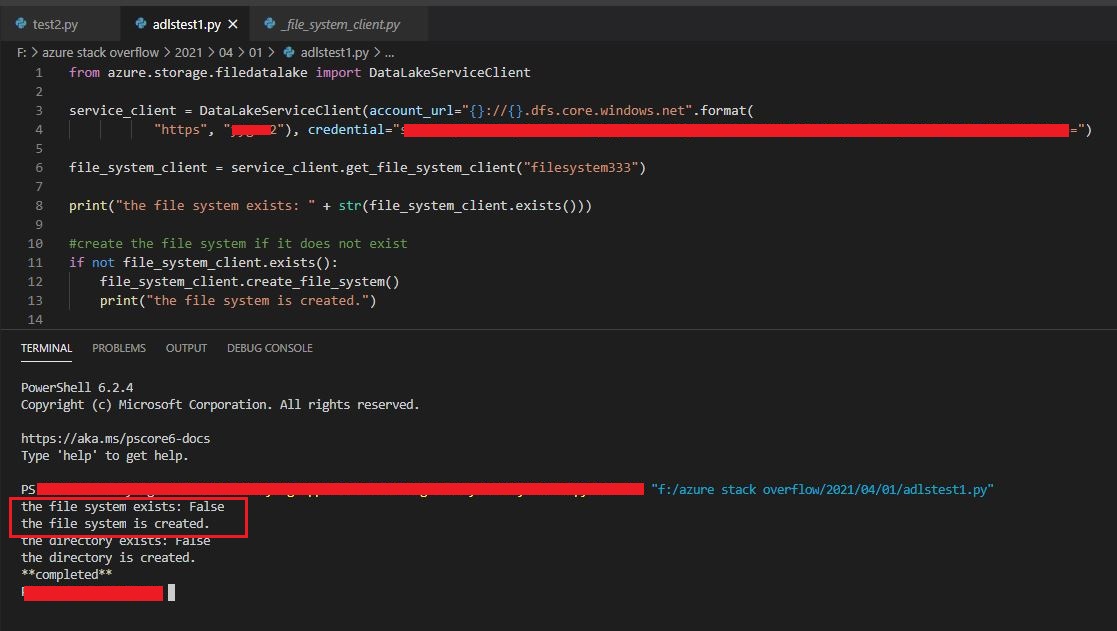
我已经在本地测试过,它可以成功地工作:
页面原文内容由Stack Overflow提供。腾讯云小微IT领域专用引擎提供翻译支持
原文链接:
https://stackoverflow.com/questions/66889092
复制相关文章
相似问题
腾讯云开发者

Copyright © 2013 - 2026 Tencent Cloud. All Rights Reserved. 腾讯云 版权所有
深圳市腾讯计算机系统有限公司 ICP备案/许可证号:粤B2-20090059  粤公网安备44030502008569号
腾讯云计算(北京)有限责任公司 京ICP证150476号 | 京ICP备11018762号