
在React中实现Quickblox视频会议时获取'DTLS警报‘
在React中实现Quickblox视频会议时获取'DTLS警报‘
提问于 2021-04-01 10:20:07
我正在我的React应用程序中实现Quickblox视频会议服务--但是我已经在我的react应用程序中实现了Quickblox,并且所有的Quickblox功能都很完美。在控制台中,我检查了函数的响应,它们也运行良好。每当系统试图将我的localMediaStream附加到流服务器时,它都会给出以下错误:
LOCAL WebRTC PeerConnection is down now (reason: DTLS alert) (userId: null)我认为这可能是SSL的一个问题,因为它部署在我的本地MacOS机器上,所以我将它部署在启用SSL的Live上,但错误仍然相同。下面是我使用的代码:
import React from 'react';
import {observer} from 'mobx-react';
import endcall from '../../../assets/images/endcall.svg';
import './styles.scss';
import adapter from 'webrtc-adapter';
const QBVideoConferencingClient = require('quickblox/quickblox-multiparty-video-conferencing-client-0.8.6.min.js');


@observer class VideoConferencing extends React.Component {

    componentDidMount() {
        const config = {
            server: "wss://-----.quickblox.com:8989", // Hiding on stackoverflow
            //debug: true, // optional
            //iceServers: [], // optional
        };
        //const QB = new QuickBlox();

        const client = new QBVideoConferencingClient(config);
        client
        .createSession()
        .then(() => {
            // session created
            const isRemote = false;
            const userId = null;
            client
            .attachVideoConferencingPlugin(isRemote, userId)
            .then((plugin) => {
                const eventHandler = console.log; // use your own event handler(s)
                Object.keys(plugin.events).forEach((key) =>
                    plugin.on(plugin.events[key], eventHandler)
                );

                plugin.addListener(plugin.events.CONSENT_DIALOG, this.consentDialog);
                plugin.addListener(plugin.events.MEDIA_STATE, this.mediaState);
                plugin.addListener(plugin.events.WEBRTC_STATE, this.webrtcState);
                plugin.addListener(plugin.events.SLOW_LINK, this.slowLink);
                plugin.addListener(plugin.events.ICE_STATE, this.iceState);
                plugin.addListener(plugin.events.DETACHED, this.detached);
                plugin.addListener(plugin.events.CLEANUP, this.cleanup);

                const joinParams = {
                    roomId: "room_12311",
                    userId: parseInt(this.props.match.params.id),
                    // display: "Tarun Narula",
                    // onlyAudio: false,
                    // role: "publisher",
                    // video: "fhdres",
                };

                client
                .join(joinParams)
                .then(() => {
                    // joined successfully

                    client
                    .listOnlineParticipants('room_123')
                    .then((participants) => {
                        // handle as necessary
                        console.log('Participants List');
                        console.log(participants);
                    })
                    .catch((error) => {
                        // handle error
                    });

                    client.on(client.events.PARTICIPANT_JOINED, (userId, userDisplayName) => {
                        //alert('Participant Joined ' + userId + ' -- '+userDisplayName);
                    });

                    client.on(client.events.PARTICIPANT_LEFT, (userId, userDisplayName) => {
                        //alert('Participant Left ' + userId + ' -- '+userDisplayName);
                    });

                    client.on(client.events.LOCAL_STREAM, (stream) => {
                        const localVideo = document.querySelector("video#curUserVidElem");
                        QBVideoConferencingClient.attachMediaStream(localVideo, stream);
                    });

                    client.on(client.events.REMOTE_STREAM, (stream, userId) => {
                        const remoteVideo = document.querySelector("video#frontVideoElem");
                        QBVideoConferencingClient.attachMediaStream(remoteVideo, stream);
                    });

                    client.on(client.events.SESSION_DESTROYED, () => {
                        //alert('Session Destroyed');
                    });

                    client.on(client.events.ERROR, (error) => {
                        // handle error
                        console.log('error');
                        console.log(error);
                        console.log('error');
                    });
                })
                .catch((error) => {
                    // handle error
                });

            })
            .catch((error) => {
                // some error occurred
            });
        })
        .catch((error) => {
            // some error occurred
        });
    }

    consentDialog(on) {
        console.log('consentDialog event start');
        console.log(on);
        console.log('consentDialog event end');
    }

    mediaState(media, receiving) {
        console.log('mediaState event start');
        console.log(media);
        console.log(receiving);
        console.log('mediaState event end');
    }

    webrtcState(on, reason) {
        console.log('webrtcState event start');
        console.log(on);
        console.log(reason);
        console.log('webrtcState event end');
    }

    slowLink(uplink, lost) {
        console.log('slowLink event start');
        console.log(uplink);
        console.log(lost);
        console.log('slowLink event end');
    }

    iceState(state) {
        console.log('iceState event start');
        console.log(state);
        console.log('iceState event end');
    }

    detached() {
        console.log('detached event start');
        console.log('detached event end');
    }

    cleanup() {
        console.log('cleanup event start');
        console.log('cleanup event end');
    }


    render() {
        return (
            <div className="VideoConferencingPage">
                <div className="UpperSection">
                    <video id="frontVideoElem"></video>
                    <video id="curUserVidElem"></video>
                </div>
                <div className="ActionBtns">
                    <div className="StatusText">
                        <p>Status</p>
                    </div>
                    <div className="centerSec">
                        <button className={`MuteCallBtn`}>
                            <span className="icon icon-microphone"></span>
                        </button>
                        <button className="EndCallBtn">
                            <img src={endcall} />
                        </button>
                        <button className={`ToggleScreenCallBtn`}>
                            <span className="icon icon-camrecorder"></span>
                        </button>
                    </div>
                </div>
            </div>
        );
    }
}

export default VideoConferencing;
日志:
true
index.js:111 consentDialog event start
index.js:112 true
index.js:113 consentDialog event end
index.js:60 Participants List
index.js:61 [{…}]
quickblox-multiparty-video-conferencing-client-0.8.6.min.js:161 false
index.js:111 consentDialog event start
index.js:112 false
index.js:113 consentDialog event end
quickblox-multiparty-video-conferencing-client-0.8.6.min.js:161 checking
index.js:138 iceState event start
index.js:139 checking
index.js:140 iceState event end
quickblox-multiparty-video-conferencing-client-0.8.6.min.js:161 connected
index.js:138 iceState event start
index.js:139 connected
index.js:140 iceState event end
quickblox-multiparty-video-conferencing-client-0.8.6.min.js:161 false "DTLS alert"
index.js:124 webrtcState event start
index.js:125 false
index.js:126 **DTLS alert**
index.js:127 webrtcState event end
index.js:149 cleanup event start
index.js:150 cleanup event end
截图:
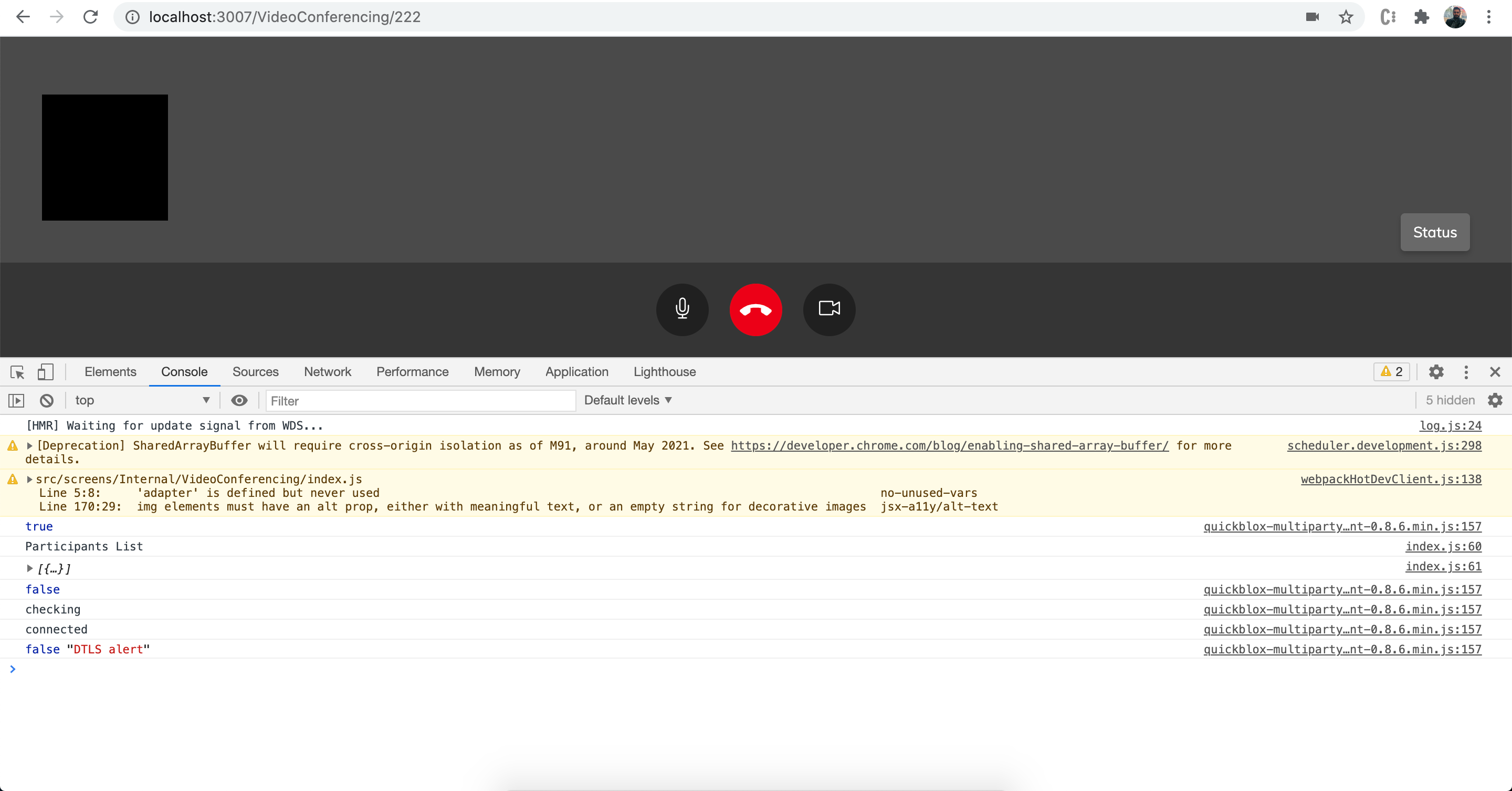
为解决以下问题而采取的步骤:
- 验证了禁用了本地
- 的防火墙,任何
- 块都没有阻塞摄像头空间,
- 在启用SSL的情况下将最终构建上传到Live,但仍然存在
错误
研究了很多小时,却找不到任何关于这件事的线索。任何帮助都将不胜感激。
提前谢谢。
回答 1
Stack Overflow用户
发布于 2022-02-10 10:25:43
这个问题很可能与测试服务器问题有关,因为它对我来说很好。
据我所知,它们无法保证测试服务器连接的稳定性(这是我们团队使用专用服务器的主要原因)。
页面原文内容由Stack Overflow提供。腾讯云小微IT领域专用引擎提供翻译支持
原文链接:
https://stackoverflow.com/questions/66902711
复制相关文章
相似问题
腾讯云开发者

Copyright © 2013 - 2026 Tencent Cloud. All Rights Reserved. 腾讯云 版权所有
深圳市腾讯计算机系统有限公司 ICP备案/许可证号:粤B2-20090059  粤公网安备44030502008569号
腾讯云计算(北京)有限责任公司 京ICP证150476号 | 京ICP备11018762号