
如何在圆周边缘放置图标
如何在圆周边缘放置图标
提问于 2021-04-03 10:37:32
我想把图标放在他们的父母(圆圈)的边缘,如下所示:
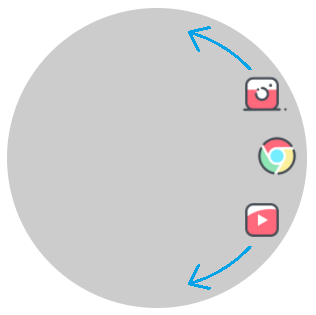
我尝试了一些方法,但在默认情况下,绝对子代放在父母的起始位置,如下所示:
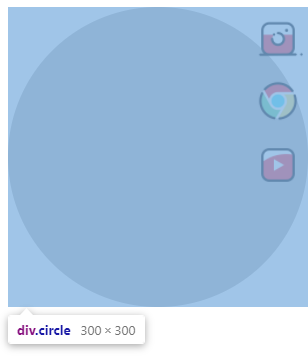
甚至父母都有一个圆形状(border-radius: 50%;)
我不想对每个孩子使用margin或position,因为它们的数量是动态的。
有没有办法把孩子放在父母的边缘?
.circle {
  position: relative;
  width: 300px;
  height: 300px;
  background: rgba(0, 0, 0, 0.2);
  display: flex;
  align-items: center;
  border-radius: 50%;
}

.menu {
  list-style-type: none;
  display: flex;
  flex-direction: column;
  justify-content: center;
  padding: 0;
  margin: 0;
  position: absolute;
  right: 5px;
}

.menu li {
  margin: 5px 0;
}

.menu li a {
  display: block;
}

.menu li a img {
  width: 50px;
}<div class="circle">
<ul class="menu">
<li>
<a href="#instagram">
<img src="https://img.icons8.com/cotton/344/instagram-new.png" />
</a>
</li>
<li>
<a href="#chrome">
<img src="https://img.icons8.com/cotton/344/chrome.png" />
</a>
</li>
<li>
<a href="#youtube">
<img src="https://img.icons8.com/cotton/344/youtube.png" />
</a>
</li>
</ul>
</div>
回答 1
Stack Overflow用户
回答已采纳
发布于 2021-04-03 11:17:42
考虑使用转换。你把所有的项目放在中心,然后旋转/翻译他们把他们放在边缘。我使用CSS变量来编写代码eaiser,但这不是强制性的
.circle {
  width: 300px;
  height: 300px;
  background: rgba(0, 0, 0, 0.2);
  display: flex;
  border-radius: 50%;
}

.menu {
  list-style-type: none;
  padding: 0;
  display:grid; /* use grid */
  margin:auto; /* center the menu with all the items */
}

.menu li {
  --d:120px; /* distance from the center */
  grid-area:1/1; /* all of them at the same position (they overlap) */
  /* we rotate then translate to the edge then rotate again using the opposite rotation */
  transform:rotate(var(--r)) translateX(var(--d)) rotate(calc(-1*var(--r)));
}

/* adjust the angle for each icon */
.menu li:nth-child(1) { --r:  0deg}
.menu li:nth-child(2) { --r: 40deg}
.menu li:nth-child(3) { --r:-40deg}

.menu li a {
  display: block;
}
.menu li a img {
  width: 50px;
}<div class="circle">
<ul class="menu">
<li>
<a href="#instagram">
<img src="https://img.icons8.com/cotton/344/instagram-new.png" />
</a>
</li>
<li>
<a href="#chrome">
<img src="https://img.icons8.com/cotton/344/chrome.png" />
</a>
</li>
<li>
<a href="#youtube">
<img src="https://img.icons8.com/cotton/344/youtube.png" />
</a>
</li>
</ul>
</div>
另一种使用形状的方法--外部:
.circle {
  width: 300px;
  height: 300px;
  background: rgba(0, 0, 0, 0.2);
  display: inline-flex;
  border-radius: 50%;
}

.menu {
  list-style-type: none;
  padding: 0;
  margin:0 0 0 auto;
  width:50%;
  text-align:right;
  word-spacing: 150px;
  line-height:0;
}
.menu::before {
  content:"";
  float:right;
  height:100%;
  width: 100%;
  shape-outside:radial-gradient(100% 50% at left,transparent 98%,#fff)
}

.menu li {
  display:inline-block;
}

.menu li a {
  display: block;
}
.menu li a img {
  width: 50px;
}<div class="circle">
<ul class="menu">
<li>
<a href="#instagram">
<img src="https://img.icons8.com/cotton/344/instagram-new.png" />
</a>
</li>
<li>
<a href="#chrome">
<img src="https://img.icons8.com/cotton/344/chrome.png" />
</a>
</li>
<li>
<a href="#youtube">
<img src="https://img.icons8.com/cotton/344/youtube.png" />
</a>
</li>
</ul>
</div>
<div class="circle">
<ul class="menu">
<li>
<a href="#instagram">
<img src="https://img.icons8.com/cotton/344/instagram-new.png" />
</a>
</li>
<li>
<a href="#chrome">
<img src="https://img.icons8.com/cotton/344/chrome.png" />
</a>
</li>
<li>
<a href="#youtube">
<img src="https://img.icons8.com/cotton/344/youtube.png" />
</a>
</li>
<li>
<a href="#instagram">
<img src="https://img.icons8.com/cotton/344/instagram-new.png" />
</a>
</li>
</ul>
</div>
如果元素的数量有限,您可以优化第一个元素,如下所示:
.circle {
  width: 300px;
  height: 300px;
  background: rgba(0, 0, 0, 0.2);
  display: inline-flex;
  border-radius: 50%;
}

.menu {
  --d:120px; /* distance from the center */
  --i:30deg; /* the increment */
  list-style-type: none;
  padding: 0;
  display:grid; /* use grid */
  margin:auto; /* center the menu with all the items */
}

.menu li {
  grid-area:1/1; /* all of them at the same position (they overlap) */
  /* we rotate then translate to the edge then rotate again using the opposite rotation */
  transform:rotate(var(--r)) translateX(var(--d)) rotate(calc(-1*var(--r)));
}

/* adjust the angle for each icon */
.menu li:nth-child(1) { --r: calc( 0*var(--i))}
.menu li:nth-child(2) { --r: calc( 1*var(--i))}
.menu li:nth-child(3) { --r: calc(-1*var(--i))}
.menu li:nth-child(4) { --r: calc( 2*var(--i))}
.menu li:nth-child(5) { --r: calc(-2*var(--i))}
.menu li:nth-child(6) { --r: calc( 3*var(--i))}
.menu li:nth-child(7) { --r: calc(-3*var(--i))}
.menu li:nth-child(8) { --r: calc( 4*var(--i))}
.menu li:nth-child(9) { --r: calc(-4*var(--i))}
.menu li:nth-child(10){ --r: calc( 5*var(--i))}
.menu li:nth-child(11){ --r: calc(-5*var(--i))}
.menu li:nth-child(12){ --r: calc(-6*var(--i))}

.menu li a {
  display: block;
}
.menu li a img {
  width: 50px;
}<div class="circle">
<ul class="menu" style="--i:50deg">
<li>
<a href="#instagram">
<img src="https://img.icons8.com/cotton/344/instagram-new.png" />
</a>
</li>
<li>
<a href="#chrome">
<img src="https://img.icons8.com/cotton/344/chrome.png" />
</a>
</li>
<li>
<a href="#youtube">
<img src="https://img.icons8.com/cotton/344/youtube.png" />
</a>
</li>
</ul>
</div>
<div class="circle">
<ul class="menu" style="--i:20deg;--d:130px">
<li>
<a href="#instagram">
<img src="https://img.icons8.com/cotton/344/instagram-new.png" />
</a>
</li>
<li>
<a href="#chrome">
<img src="https://img.icons8.com/cotton/344/chrome.png" />
</a>
</li>
<li>
<a href="#youtube">
<img src="https://img.icons8.com/cotton/344/youtube.png" />
</a>
</li>
<li>
<a href="#instagram">
<img src="https://img.icons8.com/cotton/344/instagram-new.png" />
</a>
</li>
<li>
<a href="#chrome">
<img src="https://img.icons8.com/cotton/344/chrome.png" />
</a>
</li>
<li>
<a href="#youtube">
<img src="https://img.icons8.com/cotton/344/youtube.png" />
</a>
</li>
</ul>
</div>
<div class="circle">
<ul class="menu" style="--d:100px">
<li>
<a href="#instagram">
<img src="https://img.icons8.com/cotton/344/instagram-new.png" />
</a>
</li>
<li>
<a href="#chrome">
<img src="https://img.icons8.com/cotton/344/chrome.png" />
</a>
</li>
<li>
<a href="#youtube">
<img src="https://img.icons8.com/cotton/344/youtube.png" />
</a>
</li>
<li>
<a href="#instagram">
<img src="https://img.icons8.com/cotton/344/instagram-new.png" />
</a>
</li>
<li>
<a href="#chrome">
<img src="https://img.icons8.com/cotton/344/chrome.png" />
</a>
</li>
<li>
<a href="#youtube">
<img src="https://img.icons8.com/cotton/344/youtube.png" />
</a>
</li> <li>
<a href="#instagram">
<img src="https://img.icons8.com/cotton/344/instagram-new.png" />
</a>
</li>
<li>
<a href="#chrome">
<img src="https://img.icons8.com/cotton/344/chrome.png" />
</a>
</li>
<li>
<a href="#youtube">
<img src="https://img.icons8.com/cotton/344/youtube.png" />
</a>
</li>
<li>
<a href="#chrome">
<img src="https://img.icons8.com/cotton/344/chrome.png" />
</a>
</li>
<li>
<a href="#youtube">
<img src="https://img.icons8.com/cotton/344/youtube.png" />
</a>
</li>
<li>
<a href="#chrome">
<img src="https://img.icons8.com/cotton/344/chrome.png" />
</a>
</li>
</ul>
</div>
上面覆盖了多达12个图标,您可以轻松地扩展到代码以涵盖更多。然后你要做的就是调整变量i和d
另一种配置:
.circle {
  width: 300px;
  height: 300px;
  background: rgba(0, 0, 0, 0.2);
  display: inline-flex;
  border-radius: 50%;
}

.menu {
  --d:120px; /* distance from the center */
  --i:30deg; /* the increment */
  list-style-type: none;
  padding: 0;
  display:grid; /* use grid */
  margin:auto; /* center the menu with all the items */
}

.menu li {
  grid-area:1/1; /* all of them at the same position (they overlap) */
  /* we rotate then translate to the edge then rotate again using the opposite rotation */
  transform:rotate(var(--r)) translateX(var(--d)) rotate(calc(-1*var(--r)));
}

/* adjust the angle for each icon */
.menu li:nth-child(1) { --r: calc( 0*var(--i))}
.menu li:nth-child(2) { --r: calc( 1*var(--i))}
.menu li:nth-child(3) { --r: calc( 2*var(--i))}
.menu li:nth-child(4) { --r: calc( 3*var(--i))}
.menu li:nth-child(5) { --r: calc( 4*var(--i))}
.menu li:nth-child(6) { --r: calc( 5*var(--i))}
.menu li:nth-child(7) { --r: calc( 6*var(--i))}
.menu li:nth-child(8) { --r: calc( 7*var(--i))}
.menu li:nth-child(9) { --r: calc( 8*var(--i))}
.menu li:nth-child(10){ --r: calc( 9*var(--i))}
.menu li:nth-child(11){ --r: calc(10*var(--i))}
.menu li:nth-child(12){ --r: calc(11*var(--i))}

.menu li a {
  display: block;
}
.menu li a img {
  width: 50px;
}<div class="circle">
<ul class="menu" style="--i:50deg">
<li>
<a href="#instagram">
<img src="https://img.icons8.com/cotton/344/instagram-new.png" />
</a>
</li>
<li>
<a href="#chrome">
<img src="https://img.icons8.com/cotton/344/chrome.png" />
</a>
</li>
<li>
<a href="#youtube">
<img src="https://img.icons8.com/cotton/344/youtube.png" />
</a>
</li>
</ul>
</div>
<div class="circle">
<ul class="menu" style="--i:20deg;--d:130px">
<li>
<a href="#instagram">
<img src="https://img.icons8.com/cotton/344/instagram-new.png" />
</a>
</li>
<li>
<a href="#chrome">
<img src="https://img.icons8.com/cotton/344/chrome.png" />
</a>
</li>
<li>
<a href="#youtube">
<img src="https://img.icons8.com/cotton/344/youtube.png" />
</a>
</li>
<li>
<a href="#instagram">
<img src="https://img.icons8.com/cotton/344/instagram-new.png" />
</a>
</li>
<li>
<a href="#chrome">
<img src="https://img.icons8.com/cotton/344/chrome.png" />
</a>
</li>
<li>
<a href="#youtube">
<img src="https://img.icons8.com/cotton/344/youtube.png" />
</a>
</li>
</ul>
</div>
<div class="circle">
<ul class="menu" style="--d:100px">
<li>
<a href="#instagram">
<img src="https://img.icons8.com/cotton/344/instagram-new.png" />
</a>
</li>
<li>
<a href="#chrome">
<img src="https://img.icons8.com/cotton/344/chrome.png" />
</a>
</li>
<li>
<a href="#youtube">
<img src="https://img.icons8.com/cotton/344/youtube.png" />
</a>
</li>
<li>
<a href="#instagram">
<img src="https://img.icons8.com/cotton/344/instagram-new.png" />
</a>
</li>
<li>
<a href="#chrome">
<img src="https://img.icons8.com/cotton/344/chrome.png" />
</a>
</li>
<li>
<a href="#youtube">
<img src="https://img.icons8.com/cotton/344/youtube.png" />
</a>
</li> <li>
<a href="#instagram">
<img src="https://img.icons8.com/cotton/344/instagram-new.png" />
</a>
</li>
<li>
<a href="#chrome">
<img src="https://img.icons8.com/cotton/344/chrome.png" />
</a>
</li>
<li>
<a href="#youtube">
<img src="https://img.icons8.com/cotton/344/youtube.png" />
</a>
</li>
<li>
<a href="#chrome">
<img src="https://img.icons8.com/cotton/344/chrome.png" />
</a>
</li>
<li>
<a href="#youtube">
<img src="https://img.icons8.com/cotton/344/youtube.png" />
</a>
</li>
<li>
<a href="#chrome">
<img src="https://img.icons8.com/cotton/344/chrome.png" />
</a>
</li>
</ul>
</div>
通过调整nth-child逻辑,您可以控制元素的放置方式。
页面原文内容由Stack Overflow提供。腾讯云小微IT领域专用引擎提供翻译支持
原文链接:
https://stackoverflow.com/questions/66930181
复制相关文章
相似问题
腾讯云开发者

Copyright © 2013 - 2026 Tencent Cloud. All Rights Reserved. 腾讯云 版权所有
深圳市腾讯计算机系统有限公司 ICP备案/许可证号:粤B2-20090059  粤公网安备44030502008569号
腾讯云计算(北京)有限责任公司 京ICP证150476号 | 京ICP备11018762号