
用于检测视频中矩形形状(文本光标)的对象检测模型?
我目前正在做一些研究,以检测和定位一个文本光标(你知道,闪烁的矩形形状,当你在你的电脑上键入字符位置)从屏幕记录视频。为此,我使用自定义对象数据集对YOLOv4模型进行了培训(我从这里获得了一个参考),并计划实现跟踪移动光标的DeepSORT。
下面是用于培训YOLOv4的培训数据示例:
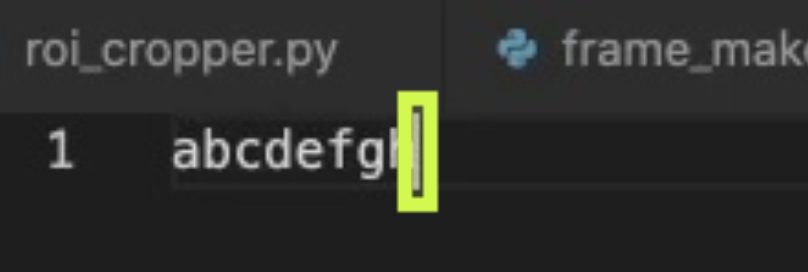
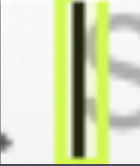
以下是我想要达到的目标:

您认为使用YOLOv4 + DeepSORT对此任务是否过分呢?我问这个问题是因为到目前为止,只有70%-80%的包含文本光标的视频帧可以被模型成功地检测到。如果它毕竟是过火的,那么您知道可以为这个任务实现的其他方法吗?
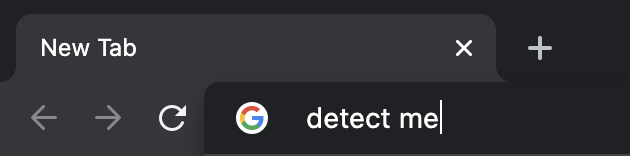
无论如何,我计划不仅从Visual代码窗口检测文本光标,还从浏览器(例如Google )和文本处理器(例如Microsoft )检测文本光标。就像这样:

我认为滑动窗口方法是一种替代方法,但据我所读,该方法可能消耗大量资源,执行速度更慢。我也在考虑来自OpenCV (像这样)的模板匹配,但我不认为它会比YOLOv4执行得更好和更快。
约束是关于性能速度(即在给定的时间内可以处理多少帧)和检测精度(即,我希望避免作为文本光标检测到的字母'l‘或'1’,因为这些字符在某些字体中是相似的)。但较高的精度,较慢的FPS是可以接受的,我认为。
我目前正在使用Python、Tensorflow和OpenCV。非常感谢!
回答 1
Stack Overflow用户
发布于 2021-04-04 17:31:15
如果光标是屏幕上唯一的移动对象,这将有效。以下是之前和之后的内容:
在此之前:

之后:

守则:
import cv2
import numpy as np

BOX_WIDTH = 10
BOX_HEIGHT = 20

def process_img(img):
    img_gray = cv2.cvtColor(img, cv2.COLOR_BGR2GRAY)
    kernel = np.ones((5, 5))
    img_canny = cv2.Canny(img_gray, 50, 50)
    return img_canny

def get_contour(img):
    contours, hierarchies = cv2.findContours(img, cv2.RETR_TREE, cv2.CHAIN_APPROX_NONE)
    if contours:
        return max(contours, key=cv2.contourArea)

def get_line_tip(cnt1, cnt2):
    x1, y1, w1, h1 = cv2.boundingRect(cnt1)

    if h1 > BOX_HEIGHT / 2:
        if np.any(cnt2):
            x2, y2, w2, h2 = cv2.boundingRect(cnt2)
            if x1 < x2:
                return x1, y1
        return x1 + w1, y1

def get_rect(x, y):
    half_width = BOX_WIDTH // 2
    lift_height = BOX_HEIGHT // 6
    return (x - half_width, y - lift_height), (x + half_width, y + BOX_HEIGHT - lift_height)

cap = cv2.VideoCapture("screen_record.mkv")
success, img_past = cap.read()

cnt_past = np.array([])
line_tip_past = 0, 0

while True:
    success, img_live = cap.read()

    if not success:
        break

    img_live_processed = process_img(img_live)
    img_past_processed = process_img(img_past)

    img_diff = cv2.bitwise_xor(img_live_processed, img_past_processed)
    cnt = get_contour(img_diff)

    line_tip = get_line_tip(cnt, cnt_past)

    if line_tip:
        cnt_past = cnt
        line_tip_past = line_tip
    else:
        line_tip = line_tip_past

    rect = get_rect(*line_tip)
    img_past = img_live.copy()
    cv2.rectangle(img_live, *rect, (0, 0, 255), 2)

    cv2.imshow("Cursor", img_live)
    if cv2.waitKey(1) & 0xFF == ord("q"):
        break

cv2.destroyAllWindows()
把它拆开:
- 导入必要的库:
import cv2
import numpy as np- 根据光标的大小定义跟踪框的大小:
BOX_WIDTH = 10
BOX_HEIGHT = 20- 定义一个函数将帧处理为边缘:
def process_img(img):
    img_gray = cv2.cvtColor(img, cv2.COLOR_BGR2GRAY)
    kernel = np.ones((5, 5))
    img_canny = cv2.Canny(img_gray, 50, 50)
return img_canny- 定义一个函数来检索具有图像中最大区域的等高线(光标不需要很大才能工作,如果需要的话,它可以很小):
def get_contour(img):
    contours, hierarchies = cv2.findContours(img, cv2.RETR_TREE, cv2.CHAIN_APPROX_NONE)
    if contours:
return max(contours, key=cv2.contourArea)- 定义一个将接受2个等高线的函数,一个是光标的轮廓+当前帧的一些文本,另一个是等高线+光标轮廓的一些杂乱文本+之前帧中的一些文本。通过这两个等高线,我们可以识别光标是向左移动还是向右移动:
def get_line_tip(cnt1, cnt2):
    x1, y1, w1, h1 = cv2.boundingRect(cnt1)

    if h1 > BOX_HEIGHT / 2:
        if np.any(cnt2):
            x2, y2, w2, h2 = cv2.boundingRect(cnt2)
            if x1 < x2:
                return x1, y1
return x1 + w1, y1- 定义将接受光标提示点的函数,并根据前面定义的
BOX_WIDTH和BOX_HEIGHT常量返回一个框:
def get_rect(x, y):
    half_width = BOX_WIDTH // 2
    lift_height = BOX_HEIGHT // 6
return (x - half_width, y - lift_height), (x + half_width, y + BOX_HEIGHT - lift_height)- 为视频定义一个捕获设备,并从视频开始时删除一个帧,并将其存储在一个变量中,该变量将用作每个帧之前的帧。还为过去的等高线和过去的线段定义临时值:
cap = cv2.VideoCapture("screen_record.mkv")
success, img_past = cap.read()

cnt_past = np.array([])
line_tip_past = 0, 0- 使用
while循环,并从视频中读取。在视频中处理该帧和该帧之前的帧:
while True:
    success, img_live = cap.read()
    if not success:
        break
    img_live_processed = process_img(img_live)
img_past_processed = process_img(img_past)- 对于经过处理的帧,我们可以使用
cv2.bitwise_xor方法来找出帧之间的差异,以获得屏幕上的移动位置。然后,我们可以使用定义的get_contour函数找到两个帧之间的运动轮廓:
    img_diff = cv2.bitwise_xor(img_live_processed, img_past_processed)
cnt = get_contour(img_diff)- 有了等高线,我们可以利用定义的
get_line_tip函数来找到光标的尖端。如果找到了提示,将其保存到line_tip_past变量中,以便用于下一次迭代,如果没有找到提示,则可以将以前保存的提示作为当前提示保存:
    line_tip = get_line_tip(cnt, cnt_past)

    if line_tip:
        cnt_past = cnt
        line_tip_past = line_tip
    else:
line_tip = line_tip_past- 现在,我们使用光标提示和前面定义的
get_rect函数定义一个矩形,并将其绘制到当前框架上。但在绘制它之前,我们将框架保存为下一次迭代的当前框架之前的框架:
    rect = get_rect(*line_tip)
    img_past = img_live.copy()
cv2.rectangle(img_live, *rect, (0, 0, 255), 2)- 最后,我们展示了这个框架:
    cv2.imshow("Cursor", img_live)
    if cv2.waitKey(1) & 0xFF == ord("q"):
        break

cv2.destroyAllWindows()https://stackoverflow.com/questions/66929833
复制相似问题
腾讯云开发者

Copyright © 2013 - 2026 Tencent Cloud. All Rights Reserved. 腾讯云 版权所有
深圳市腾讯计算机系统有限公司 ICP备案/许可证号:粤B2-20090059  粤公网安备44030502008569号
腾讯云计算(北京)有限责任公司 京ICP证150476号 | 京ICP备11018762号