
将复选框定位在容器的右侧并垂直对齐。
将复选框定位在容器的右侧并垂直对齐。
提问于 2021-04-05 20:11:46
我希望复选框的位置与下面的图像相同:
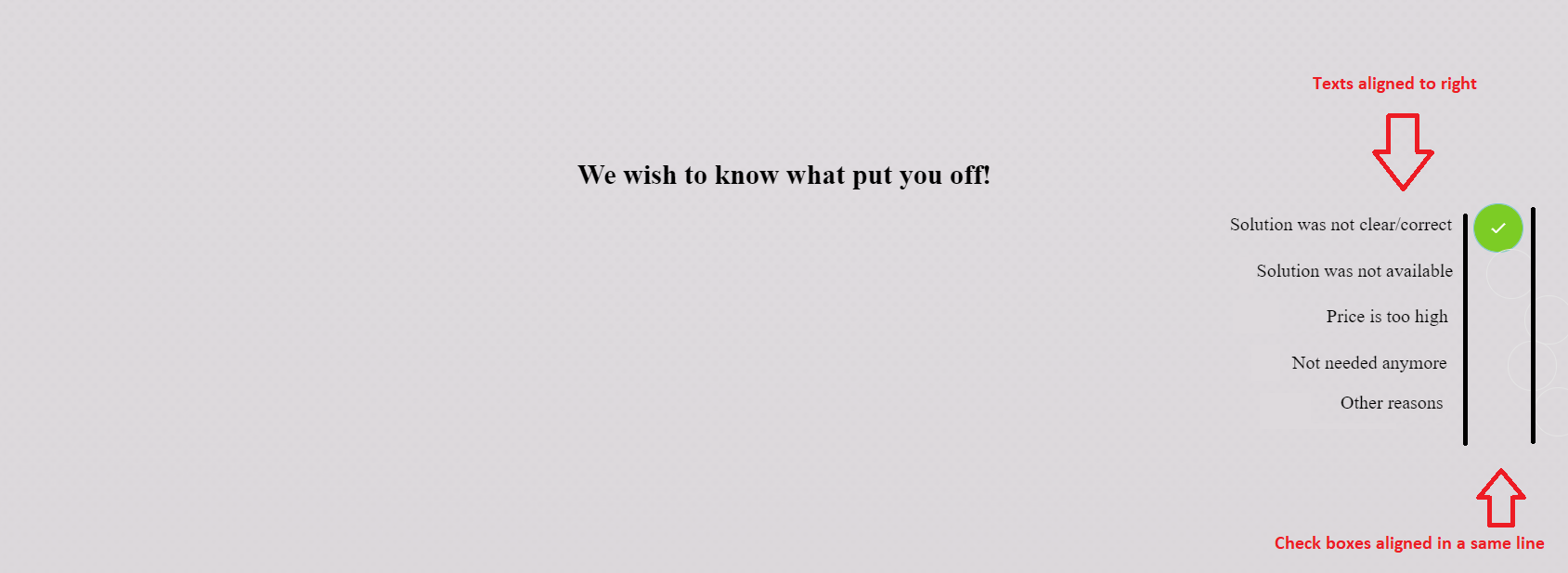
请注意,复选框应放置在相同的垂直对齐。
.feedback {
background: rgb(242 237 241 / 90%);
position: absolute;
width: 90%;
height: 60%;
left: 5%;
top: 23%;
display: flex;
justify-content: center;
align-items: stretch;
box-shadow: 0px 2px 4px 4px #000000;
}
.feedback__form {
margin: auto;
padding: 20px;
}
.feedback__form h1 {
font-weight: 700;
margin-bottom: 15px;
}
button:active, :focus {
outline: none !important;
}
.btn {
background-position: center;
border: 0;
border-radius: 3px;
cursor: pointer;
font-family: "Inter", san-serif;
font-weight: 500;
min-width: 120px;
padding: 12px 10px;
margin-bottom: 5px;
white-space: nowrap;
transition: all 0.5s;
}
.btn--primary {
background-color: #7BC4CA;
color: #FFF;
box-shadow: 0px 3px 6px 0px rgba(123, 196, 202, 0.7);
}
.btn--primary:hover {
background: #70bfc6 radial-gradient(circle, transparent 1%, #70bfc6 1%) center/15000%;
}
.btn--primary:active {
background-color: #8dccd1;
background-size: 100%;
transition: background 0s;
}
.btn--secondary {
background-color: #E4E4E4;
color: #000;
box-shadow: 0px 3px 6px 0px rgba(228, 228, 228, 0.7);
}
.btn--secondary:hover {
background: gainsboro radial-gradient(circle, transparent 1%, gainsboro 1%) center/15000%;
}
.btn--secondary:active {
background-color: #f1f1f1;
background-size: 100%;
transition: background 0s;
}
.burmanRadio {
margin-bottom: 10px;
}
.burmanRadio__input {
display: none;
}
.burmanRadio__input:checked ~ .burmanRadio__label::after {
opacity: 1;
transform: scale(1);
}
.burmanRadio__label {
cursor: pointer;
line-height: 30px;
position: relative;
margin-right: 35px;
}
.burmanRadio__label::before, .burmanRadio__label::after {
border-radius: 50%;
position: absolute;
top: -1.5px;
right: -35px;
transition: all 0.3s ease-out;
z-index: 2;
}
.burmanRadio__label::before {
content: "";
border: 1.5px solid #E4E4E4;
width: 40px;
height: 40px;
}
.burmanRadio__label::after {
content: "";
background: #7ccc25;
border: 1.5px solid #7BC4CA;
color: #FFF;
font-family: "Material-Design-Iconic-Font";
display: flex;
justify-content: center;
align-items: center;
opacity: 0;
width: 40px;
height: 40px;
transform: scale(0);
}
.burmanRadio__label:hover::before {
border-color: #7BC4CA;
} <main class="feedback">
<article class="feedback__form">
<h1 class="feedback__question">We wish to know what put you off!</h1>
<div class="burmanRadio">
<input type="radio" class="burmanRadio__input" id="radio-1" name="burmanRadio" checked>
<label for="radio-1" class="burmanRadio__label">Solution was not clear/correct</label>
</div>
<div class="burmanRadio">
<input type="radio" class="burmanRadio__input" id="radio-2" name="burmanRadio">
<label for="radio-2" class="burmanRadio__label">Solution was not available</label>
</div>
<div class="burmanRadio">
<input type="radio" class="burmanRadio__input" id="radio-3" name="burmanRadio">
<label for="radio-3" class="burmanRadio__label">Price is too high</label>
</div>
<div class="burmanRadio">
<input type="radio" class="burmanRadio__input" id="radio-4" name="burmanRadio">
<label for="radio-4" class="burmanRadio__label">Not needed anymore</label>
</div>
<div class="burmanRadio">
<input type="radio" class="burmanRadio__input" id="radio-5" name="burmanRadio">
<label for="radio-5" class="burmanRadio__label">Other reasons</label>
</div>
</article>
</main>
回答 1
Stack Overflow用户
回答已采纳
发布于 2021-04-05 20:33:59
将.burmanRadio__label更改为具有显示inline-block而不是默认的inline,使其具有固定的250px宽度,并将text-align设置为right调整top、right、width和height属性,以适应布局,您就完成了。另外,删除height: 60%并使用min-height: 60%,在大多数情况下会更好。
.feedback {
background: rgb(242 237 241 / 90%);
position: absolute;
width: 90%;
min-height: 60%;
left: 5%;
top: 23%;
display: flex;
justify-content: center;
align-items: stretch;
box-shadow: 0px 2px 4px 4px #000000;
}
.feedback__form {
margin: auto;
padding: 20px;
}
.feedback__form h1 {
font-weight: 700;
margin-bottom: 15px;
}
.burmanRadio {
margin-bottom: 10px;
}
.burmanRadio__input {
display: none;
}
.burmanRadio__input:checked~.burmanRadio__label::after {
opacity: 1;
transform: scale(1);
}
.burmanRadio__label {
cursor: pointer;
line-height: 30px;
position: relative;
text-align: right;
margin-right: 35px;
display: inline-block;
width: 250px;
}
.burmanRadio__label::before,
.burmanRadio__label::after {
border-radius: 50%;
position: absolute;
top: 0px;
right: -45px;
transition: all 0.3s ease-out;
z-index: 2;
}
.burmanRadio__label::before {
content: "";
border: 1.5px solid #E4E4E4;
width: 30px;
height: 30px;
}
.burmanRadio__label::after {
content: "";
background: #7ccc25;
border: 1.5px solid #7BC4CA;
color: #FFF;
font-family: "Material-Design-Iconic-Font";
display: flex;
justify-content: center;
align-items: center;
opacity: 0;
width: 30px;
height: 30px;
transform: scale(0);
}
.burmanRadio__label:hover::before {
border-color: #7BC4CA;
}<main class="feedback">
<article class="feedback__form">
<h1 class="feedback__question">We wish to know what put you off!</h1>
<div class="burmanRadio">
<input type="radio" class="burmanRadio__input" id="radio-1" name="burmanRadio" checked>
<label for="radio-1" class="burmanRadio__label">Solution was not clear/correct</label>
</div>
<div class="burmanRadio">
<input type="radio" class="burmanRadio__input" id="radio-2" name="burmanRadio">
<label for="radio-2" class="burmanRadio__label">Solution was not available</label>
</div>
<div class="burmanRadio">
<input type="radio" class="burmanRadio__input" id="radio-3" name="burmanRadio">
<label for="radio-3" class="burmanRadio__label">Price is too high</label>
</div>
<div class="burmanRadio">
<input type="radio" class="burmanRadio__input" id="radio-4" name="burmanRadio">
<label for="radio-4" class="burmanRadio__label">Not needed anymore</label>
</div>
<div class="burmanRadio">
<input type="radio" class="burmanRadio__input" id="radio-5" name="burmanRadio">
<label for="radio-5" class="burmanRadio__label">Other reasons</label>
</div>
</article>
</main>
使用柔性箱和网格会更好。
编辑:如果您需要将所有选项对齐,就像在图像上一样,那么您可以将其包装成一个div,并正确地对齐它。
.feedback {
background: rgb(242 237 241 / 90%);
position: absolute;
width: 90%;
min-height: 60%;
left: 5%;
top: 23%;
display: flex;
justify-content: center;
align-items: stretch;
box-shadow: 0px 2px 4px 4px #000000;
}
.feedback__form {
padding: 20px;
width: 100%;
text-align: center;
}
.feedback__form h1 {
font-weight: 700;
margin-bottom: 15px;
}
button:active,
:focus {
outline: none !important;
}
.btn {
background-position: center;
border: 0;
border-radius: 3px;
cursor: pointer;
font-family: "Inter", san-serif;
font-weight: 500;
min-width: 120px;
padding: 12px 10px;
margin-bottom: 5px;
white-space: nowrap;
transition: all 0.5s;
}
.options {
text-align: right;
}
.burmanRadio {
margin-bottom: 10px;
}
.burmanRadio__input {
display: none;
}
.burmanRadio__input:checked~.burmanRadio__label::after {
opacity: 1;
transform: scale(1);
}
.burmanRadio__label {
cursor: pointer;
line-height: 30px;
position: relative;
text-align: right;
margin-right: 35px;
display: inline-block;
width: 250px;
}
.burmanRadio__label::before,
.burmanRadio__label::after {
border-radius: 50%;
position: absolute;
top: 0px;
right: -45px;
transition: all 0.3s ease-out;
z-index: 2;
}
.burmanRadio__label::before {
content: "";
border: 1.5px solid #E4E4E4;
width: 30px;
height: 30px;
}
.burmanRadio__label::after {
content: "";
background: #7ccc25;
border: 1.5px solid #7BC4CA;
color: #FFF;
font-family: "Material-Design-Iconic-Font";
display: flex;
justify-content: center;
align-items: center;
opacity: 0;
width: 30px;
height: 30px;
transform: scale(0);
}
.burmanRadio__label:hover::before {
border-color: #7BC4CA;
}<main class="feedback">
<article class="feedback__form">
<h1 class="feedback__question">We wish to know what put you off!</h1>
<div class="options">
<div class="burmanRadio">
<input type="radio" class="burmanRadio__input" id="radio-1" name="burmanRadio" checked>
<label for="radio-1" class="burmanRadio__label">Solution was not clear/correct</label>
</div>
<div class="burmanRadio">
<input type="radio" class="burmanRadio__input" id="radio-2" name="burmanRadio">
<label for="radio-2" class="burmanRadio__label">Solution was not available</label>
</div>
<div class="burmanRadio">
<input type="radio" class="burmanRadio__input" id="radio-3" name="burmanRadio">
<label for="radio-3" class="burmanRadio__label">Price is too high</label>
</div>
<div class="burmanRadio">
<input type="radio" class="burmanRadio__input" id="radio-4" name="burmanRadio">
<label for="radio-4" class="burmanRadio__label">Not needed anymore</label>
</div>
<div class="burmanRadio">
<input type="radio" class="burmanRadio__input" id="radio-5" name="burmanRadio">
<label for="radio-5" class="burmanRadio__label">Other reasons</label>
</div>
</div>
</article>
</main>
在下一次请求代码之前,自己尝试一下。
页面原文内容由Stack Overflow提供。腾讯云小微IT领域专用引擎提供翻译支持
原文链接:
https://stackoverflow.com/questions/66959196
复制相关文章
相似问题
腾讯云开发者

Copyright © 2013 - 2026 Tencent Cloud. All Rights Reserved. 腾讯云 版权所有
深圳市腾讯计算机系统有限公司 ICP备案/许可证号:粤B2-20090059  粤公网安备44030502008569号
腾讯云计算(北京)有限责任公司 京ICP证150476号 | 京ICP备11018762号