
我的Android 11应用程序在用户将其放到后台时停止运行,除非手机与电源相连。
我写了一个前台服务,以确保我的应用程序可以继续运行时,把背景。该应用程序需要在后台运行,因为它的定时器过去后,它的声音和振动,以提醒用户。然而,当按下power或Home按钮时,应用程序的计时器在15分钟后停止运行,除非手机接通电源。当我测试这个的时候手机已经完全充电了。
顺便说一句,我还把这个应用程序设置为没有经过优化的电池寿命后,在不同的网站上,这将确保应用程序将继续运行。从我所读到的每一件事来看,我做的一切都是正确的,但我仍然无法让它发挥作用。我在Pixel 2上运行Android 11。我知道Google限制了Android后期版本的前台处理,但将应用程序设置为不优化电池寿命应该可以解决这个问题,不是吗?为了安全起见,当应用程序启动时,它要求用户批准后台操作:
     PowerManager pm = (PowerManager)getSystemService(POWER_SERVICE);
     if (!pm.isIgnoringBatteryOptimizations(APPLICATION_ID)) {
         // Ask user to allow app to not optimize battery life. This will keep
         // the app running when the user puts it in the background by pressing
         // the Power or Home button.
         Intent intent = new Intent();
         intent.setAction(Settings.ACTION_REQUEST_IGNORE_BATTERY_OPTIMIZATIONS);
         intent.setData(Uri.parse("package:" + APPLICATION_ID));
         startActivity(intent);
     }
因此,用户在运行该应用程序时,在为电池进行优化时,会看到以下内容:
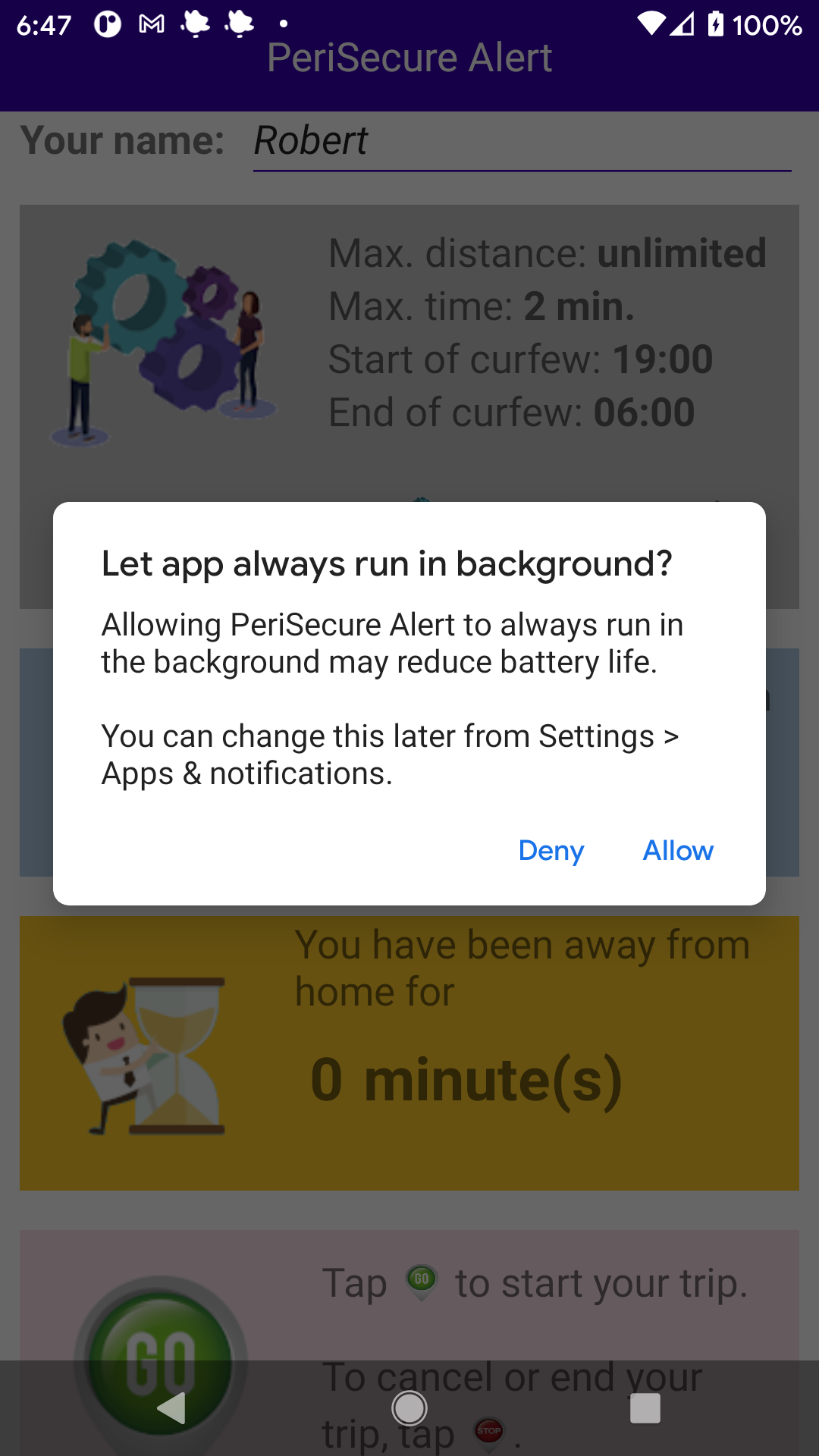
我开始前台服务的步骤如下:
    private void startForegroundMonitoring() {
    broadcastIntent = new Intent(context, BroadcastService.class);
    broadcastIntent.putExtra(ALLOWEDTIME, allowed_time);
    broadcastIntent.putExtra(BEEP, beep.isChecked());
    broadcastIntent.putExtra(VIBRATE, vibrate.isChecked());
    broadcastIntent.putExtra(NOTIFY, notify_monitor.isChecked());
    broadcastIntent.putExtra(CURFEW, curfew_config.isChecked());
    broadcastIntent.putExtra(CURFEWSTARTTIME, curfew_start_time);
    broadcastIntent.putExtra(CURFEWENDTIME, curfew_end_time);
    startService(broadcastIntent);
}
更新:下面是一些演示问题的代码:
主要活动:
package com.testapp.showbug;

import androidx.appcompat.app.AppCompatActivity;
import android.content.Intent;
import android.net.Uri;
import android.os.Bundle;
import android.os.PowerManager;
import android.provider.Settings;

import static com.testapp.showbug.BuildConfig.APPLICATION_ID;

public class MainActivity extends AppCompatActivity {

    private Context context;

    private Intent broadcastIntent;

    @Override
    protected void onCreate(Bundle savedInstanceState) {
        super.onCreate(savedInstanceState);
        setContentView(R.layout.activity_main);

        context = getApplicationContext();

        PowerManager pm = (PowerManager)getSystemService(POWER_SERVICE);
        if (!pm.isIgnoringBatteryOptimizations(APPLICATION_ID)) {
            // Ask user to allow app to not optimize battery life. This will keep
            // the app running when the user puts it in the background by pressing
            // the Power or Home button.
            Intent intent = new Intent();

            intent.setAction(
            Settings.
                ACTION_REQUEST_IGNORE_BATTERY_OPTIMIZATIONS);
            intent.setData(Uri.parse("package:" +
                APPLICATION_ID));
            startActivity(intent);
        }

    broadcastIntent = new Intent(context,
      BroadcastService.class);
    startService(broadcastIntent);
    }
    public void onDestroy() {
        super.onDestroy();

        stopService(broadcastIntent);
    }
}
BroadcastService:
import android.app.NotificationChannel;
import android.app.NotificationManager;
import android.app.PendingIntent;
import android.app.Service;
import android.content.Intent;
import android.os.Build;
import android.os.CountDownTimer;
import android.os.IBinder;
import android.widget.Toast;

import androidx.core.app.NotificationCompat;
import androidx.core.app.NotificationManagerCompat;

import static android.content.pm.ServiceInfo.
  FOREGROUND_SERVICE_TYPE_LOCATION;

public class BroadcastService extends Service {
    private static final int ONE_MINUTE = 60000;

    private int allowed_time = 30, tickCounter;

    private CountDownTimer countDown;

    private NotificationManagerCompat notificationManager;

    private NotificationCompat.Builder notification;

    @Override
    public void onCreate() {
        super.onCreate();

        // Clear all notifications sent earlier.
        notificationManager =
          NotificationManagerCompat.from(this);
        notificationManager.cancelAll();

        createNotificationChannel();
    }

    @Override
    public void onDestroy() {
        super.onDestroy();
    }

    @Override
    public int onStartCommand(Intent intent, int flags,
        int startId) {
        if (intent == null) return START_STICKY;

        Intent notificationIntent = new Intent(this,
          BroadcastService.class);
        PendingIntent pendingIntent =
            PendingIntent.getActivity(this, 0,
            notificationIntent, 0);

        if (Build.VERSION.SDK_INT >= Build.VERSION_CODES.O) {
            notification = new
              NotificationCompat.Builder(this,
              getString(
                R.string.default_notification_channel_id))
              .setContentTitle(
                getText(R.string.notification_title))
              .setContentText(
                  getText(R.string.notification_message))
              .setStyle(new NotificationCompat.BigTextStyle()
              .bigText(
                  getText(R.string.notification_message)))
              .setContentIntent(PendingIntent.getActivity(
                  this, 0, new Intent(), 0))
              .setSmallIcon(R.mipmap.ic_launcher_round)
              .setLocalOnly(true)
              .setContentIntent(pendingIntent);
        } else {
            notification = new
                NotificationCompat.Builder(this,
                  getString(
                    R.string.default_notification_channel_id))

            .setContentTitle(
                getText(R.string.notification_title))
            .setContentText(
                getText(R.string.notification_message))
            .setStyle(new NotificationCompat.BigTextStyle()
            .bigText(
                getText(R.string.notification_message)))
            .setContentIntent(PendingIntent.getActivity(
                this, 0, new Intent(), 0))
            .setSmallIcon(R.mipmap.ic_launcher_round)
            .setContentIntent(pendingIntent);
        }

    startForeground(FOREGROUND_SERVICE_TYPE_LOCATION, notification.build());

    tickCounter = -1;
    // Start countdown timer for allowed time.
    countDown = new CountDownTimer(allowed_time * ONE_MINUTE, ONE_MINUTE) {
        @Override
        public void onTick(long millisUntilFinished) {
            tickCounter++;
            Toast.makeText(getApplicationContext(), "tickCounter = " + tickCounter, Toast.LENGTH_LONG).show();
        }

        @Override
        public void onFinish() {
            Toast.makeText(getApplicationContext(), "tickCounter = " + allowed_time, Toast.LENGTH_LONG).show();
        }
    }.start();
    return START_STICKY;
}

private void createNotificationChannel() {
    if (Build.VERSION.SDK_INT >= Build.VERSION_CODES.O) {
        CharSequence name = getString(R.string.channel_name);
       String description = getString(R.string.channel_description);
       int importance = NotificationManager.IMPORTANCE_DEFAULT;
       NotificationChannel channel = new NotificationChannel(getString(R.string.default_notification_channel_id), name, importance);
       channel.setDescription(description);

       notificationManager.createNotificationChannel(channel);
       }
    }

    @Override
    public IBinder onBind(Intent arg0) {
        return null;
    }
}
上面的代码启动一个前台服务,然后启动一个CountDownTimer,它每分钟增加一个滴答数,并打印结果。30分钟后,它会显示出30个滴答数。相反,它会提前停止,通常在15-16秒之后。
下面是如何运行代码:
- 启动活动,断开设备与电源的连接(这很重要,显然需要一个真正的设备),并点击设备上的power按钮。
- 等待28分钟。
- 将应用程序放回前台等待下一个滴答。
- 注意到,下一个滴答显示小于28。
G 216
谢谢你在这方面的帮助。在我看来,它就像Android中的一个bug,看起来不太可能。我看不出还有什么别的原因。顺便说一下,我在Pixel 2和三星Tab A上测试了这段代码,它们都运行Android 11 (我拥有的唯一设备),所以我不知道这个bug是发生在早期版本的Android上还是在不同的设备上。
回答 1
Stack Overflow用户
发布于 2021-04-15 17:26:08
我终于用警钟解决了这个问题。Wakelocks确保在按下Power按钮后CPU继续运行。我所要做的就是在BroadcastService.java中添加以下代码:
在onCreate()中:
    PowerManager pm = (PowerManager)getSystemService(POWER_SERVICE);
    wakeLock = pm.newWakeLock(PowerManager.PARTIAL_WAKE_LOCK, "PeriSecure:MyWakeLock");
在onStartCommand()中:
wakeLock.acquire(allowed_time * ONE_MINUTE);在onDestroy()中:
wakeLock.release();就这样!后台服务按现在的方式运行。
https://stackoverflow.com/questions/67062114
复制相似问题
腾讯云开发者

Copyright © 2013 - 2026 Tencent Cloud. All Rights Reserved. 腾讯云 版权所有
深圳市腾讯计算机系统有限公司 ICP备案/许可证号:粤B2-20090059  粤公网安备44030502008569号
腾讯云计算(北京)有限责任公司 京ICP证150476号 | 京ICP备11018762号