
删除ListBox of ListBox中的高亮显示
删除ListBox of ListBox中的高亮显示
提问于 2021-04-22 16:32:44
我有以下代码,无法删除突出显示:
    <ListBox
      Name="OuterListBox"
      HorizontalAlignment="Center"
      VerticalAlignment="Center"
      AlternationCount="2"
      Background="White"
      BorderThickness="0"
      ItemsSource="{Binding Board}">
      <ListBox.ItemContainerStyle>
        <Style BasedOn="{StaticResource {x:Type ListBoxItem}}" TargetType="{x:Type ListBoxItem}">
          <Style.Resources>
            <AlternationConverter x:Key="AlternationPaddingConverter">
              <Thickness Right="25" />
              <Thickness Left="25" />
            </AlternationConverter>
          </Style.Resources>
          <Setter Property="Padding" Value="{Binding (ItemsControl.AlternationIndex), RelativeSource={RelativeSource Self}, Converter={StaticResource AlternationPaddingConverter}}" />
        </Style>
      </ListBox.ItemContainerStyle>
      <ListBox.ItemTemplate>
        <DataTemplate>
          <Grid>
            <ListBox
              Name="InnerListBox"
              Background="Transparent"
              BorderThickness="0"
              ItemContainerStyle="{StaticResource ChangeListBoxItemHighlight}"
              ItemsSource="{Binding}">
              <ListBox.ItemsPanel>
                <ItemsPanelTemplate>
                  <VirtualizingStackPanel Orientation="Horizontal" />
                </ItemsPanelTemplate>
              </ListBox.ItemsPanel>
              <ListBox.ItemTemplate>
                <DataTemplate>
                  <Ellipse
                    Margin="2"
                    Width="{Binding Size}"
                    Height="{Binding Size}"
                    Cursor="Hand"
                    Fill="{Binding Background}" />
                </DataTemplate>
              </ListBox.ItemTemplate>
            </ListBox>
          </Grid>
        </DataTemplate>
      </ListBox.ItemTemplate>
    </ListBox>
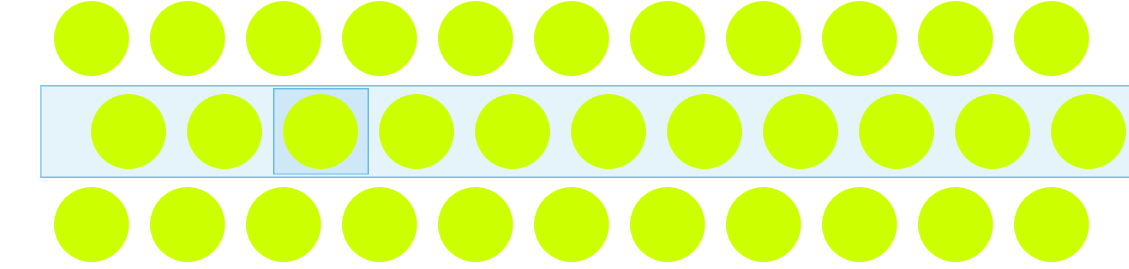
我试图在Property="Template"和value <ControlTemplate TargetType="{x:Type ListBoxItem}">中使用setter,但是行的交替消失了。
如何删除高光,但仍保留交替行?
回答 1
Stack Overflow用户
回答已采纳
发布于 2021-04-23 07:09:36
控件模板定义控件的可视外观、控件的状态和所需的部件。为了改变像鼠标一样的状态的表示或聚焦,你必须修改控制模板。然而,这并不容易,因为控制模板很复杂,很难从头开始构建。对于不同的控件,始终可以参考文档。
- ListBox样式和模板 > ListBoxItem (部件和状态)
正如您所看到的,有很多需要考虑的地方,所以您最好使用复制默认样式和控件模板并使它们适应您的需要。我已经根据你的问题提取并修改了它们。本质上,这意味着移除所有焦点和鼠标触发器,并添加替换填充。
<Style x:Key="ListBoxItemStyle" TargetType="{x:Type ListBoxItem}">
   <Style.Resources>
      <AlternationConverter x:Key="AlternationPaddingConverter">
         <Thickness Right="25" />
         <Thickness Left="25" />
      </AlternationConverter>
   </Style.Resources>
   <Setter Property="Padding" Value="{Binding (ItemsControl.AlternationIndex), RelativeSource={RelativeSource Self}, Converter={StaticResource AlternationPaddingConverter}}" />
   <Setter Property="SnapsToDevicePixels" Value="True"/>
   <Setter Property="HorizontalContentAlignment" Value="{Binding HorizontalContentAlignment, RelativeSource={RelativeSource AncestorType={x:Type ItemsControl}}}"/>
   <Setter Property="VerticalContentAlignment" Value="{Binding VerticalContentAlignment, RelativeSource={RelativeSource AncestorType={x:Type ItemsControl}}}"/>
   <Setter Property="Background" Value="Transparent"/>
   <Setter Property="BorderBrush" Value="Transparent"/>
   <Setter Property="BorderThickness" Value="1"/>
   <Setter Property="Template">
      <Setter.Value>
         <ControlTemplate TargetType="{x:Type ListBoxItem}">
            <Border x:Name="Bd" Background="{TemplateBinding Background}" BorderThickness="{TemplateBinding BorderThickness}" BorderBrush="{TemplateBinding BorderBrush}" Padding="{TemplateBinding Padding}" SnapsToDevicePixels="true">
               <ContentPresenter HorizontalAlignment="{TemplateBinding HorizontalContentAlignment}" SnapsToDevicePixels="{TemplateBinding SnapsToDevicePixels}" VerticalAlignment="{TemplateBinding VerticalContentAlignment}"/>
            </Border>
            <ControlTemplate.Triggers>
               <Trigger Property="IsEnabled" Value="False">
                  <Setter Property="TextElement.Foreground" TargetName="Bd" Value="{DynamicResource {x:Static SystemColors.GrayTextBrushKey}}"/>
               </Trigger>
            </ControlTemplate.Triggers>
         </ControlTemplate>
      </Setter.Value>
   </Setter>
</Style>然后,您可以在您的ListBox中引用这个样式,或者如果您愿意,可以内联它。
<ListBox
   Name="OuterListBox"
   HorizontalAlignment="Center"
   VerticalAlignment="Center"
   AlternationCount="2"
   Background="White"
   BorderThickness="0"
   ItemsSource="{Binding Board}"
   ItemContainerStyle="{StaticResource ListBoxItemStyle}">
   <ListBox.ItemTemplate>
      <DataTemplate>
         <Grid>
            <ListBox
               Name="InnerListBox"
               Background="Transparent"
               BorderThickness="0"
               ItemContainerStyle="{StaticResource ChangeListBoxItemHighlight}"
               ItemsSource="{Binding}">
               <ListBox.ItemsPanel>
                  <ItemsPanelTemplate>
                     <VirtualizingStackPanel Orientation="Horizontal" />
                  </ItemsPanelTemplate>
               </ListBox.ItemsPanel>
               <ListBox.ItemTemplate>
                  <DataTemplate>
                     <Ellipse
                        Margin="2"
                        Width="{Binding Size}"
                        Height="{Binding Size}"
                        Cursor="Hand"
                        Fill="{Binding Background}" />
                  </DataTemplate>
               </ListBox.ItemTemplate>
            </ListBox>
         </Grid>
      </DataTemplate>
   </ListBox.ItemTemplate>
</ListBox>页面原文内容由Stack Overflow提供。腾讯云小微IT领域专用引擎提供翻译支持
原文链接:
https://stackoverflow.com/questions/67217339
复制相关文章
相似问题
腾讯云开发者

Copyright © 2013 - 2026 Tencent Cloud. All Rights Reserved. 腾讯云 版权所有
深圳市腾讯计算机系统有限公司 ICP备案/许可证号:粤B2-20090059  粤公网安备44030502008569号
腾讯云计算(北京)有限责任公司 京ICP证150476号 | 京ICP备11018762号