
上次更新arm64-v8a后,M1 Mac上出现的仿真器
昨天模拟器工作得很好。系统图像为arm64-v8a。我不太记得工作系统映像的发布名,但是,昨天我接受了ARM 64系统映像的更新,发布名为"S“。
我可以从我的AVD管理器启动模拟器,当我按下“Run”按钮时,模拟器也会启动,但是,如果我检查“亚行设备”,或者单击“故障排除设备连接”,则该应用程序不会加载到模拟器上,并且模拟器将显示为脱机状态。
“模拟器-5554-设备目前处于脱机状态”
我尝试过在StackOverflow上找到的大多数建议,例如:
- adb杀死服务器,adb启动服务器
- 拆卸并重新创建AVD装置
- 使缓存失效/重新启动
- 在模拟器中启用USB调试
- 从AVD管理器中删除数据并进行冷引导 我使用的是Android 4.1.3 构建#AI-201.8743.12.41.7199119,建于2021年3月10日运行时版本: 1.8.0_242-release-1644-b3-6915495 x86_64 VM: OpenJDK 64位服务器VM由JetBrains s.r.o macOS 10.16 GC: ParNew,ConcurrentMarkSweep内存:1981 M核:8注册表: ide.new.welcome.screen.force=true,external.system.auto.import.disabled=true非捆绑插件: org.jetbrains.kotlin
AVD:
Name: Pixel_4_API_S
CPU/ABI: Google Play ARM (arm64-v8a)
Path: ~/.android/avd/Pixel_4_API_S.avd
Target: google_apis_playstore [Google Play] (API level S)
Skin: pixel_4
SD Card: 512M
fastboot.chosenSnapshotFile:
runtime.network.speed: full
hw.accelerometer: yes
hw.device.name: pixel_4
hw.lcd.width: 1080
image.androidVersion.codename: S
hw.initialOrientation: Portrait
image.androidVersion.api: 29
tag.id: google_apis_playstore
hw.mainKeys: no
hw.camera.front: emulated
avd.ini.displayname: Pixel 4 API S
hw.gpu.mode: auto
hw.ramSize: 1536
PlayStore.enabled: true
fastboot.forceColdBoot: no
hw.cpu.ncore: 4
hw.keyboard: yes
hw.sensors.proximity: yes
hw.dPad: no
hw.lcd.height: 2280
vm.heapSize: 256
skin.dynamic: yes
hw.device.manufacturer: Google
hw.gps: yes
hw.audioInput: yes
image.sysdir.1: system-images/android-S/google_apis_playstore/arm64-v8a/
showDeviceFrame: yes
hw.camera.back: virtualscene
AvdId: Pixel_4_API_S
hw.lcd.density: 440
hw.arc: false
hw.device.hash2: MD5:6b5943207fe196d842659d2e43022e20
fastboot.forceChosenSnapshotBoot: no
fastboot.forceFastBoot: yes
hw.trackBall: no
hw.battery: yes
hw.sdCard: yes
tag.display: Google Play
runtime.network.latency: none
disk.dataPartition.size: 6442450944
hw.sensors.orientation: yes
avd.ini.encoding: UTF-8
hw.gpu.enabled: yes
你知道哪里出了问题吗?或如何处理这个问题?
回答 4
Stack Overflow用户
发布于 2021-04-26 05:24:28
用r02图像替换已下载的avd系统映像。r03为我打破了,但恢复到r02拯救了一天!
更新: r03、r04和r05似乎都不适用于m1
使用macOS上最新的android (4.1.3),您希望将解压缩的图像放入的目录可能类似于~/Library/Android/sdk/system-images/android-S。
例如,google映像的路径是~/Library/Android/sdk/system-images/android-S/google_apis_playstore/arm64-v8a
Stack Overflow用户
发布于 2021-07-16 20:30:49
AndrewPK的回答真的很有帮助。
如果您没有使用api级别S,您可以尝试这样做(我的api级别是"31")
1.从r02-darwin.zip下载
2.创建一个新文件夹,如下所示,解压缩下载的文件并将其放入其中

路径:/用户/$ user_name / Library / Android / sdk /system-映像/android/ google_apis_playstore / arm64-v8a
- 启动Android并单击configure> AVD管理器
- 单击.,选择任意设备,按Next按钮并确认API级别S已经添加。
- 将其添加到您的设备中,并验证它与VS代码一起工作。
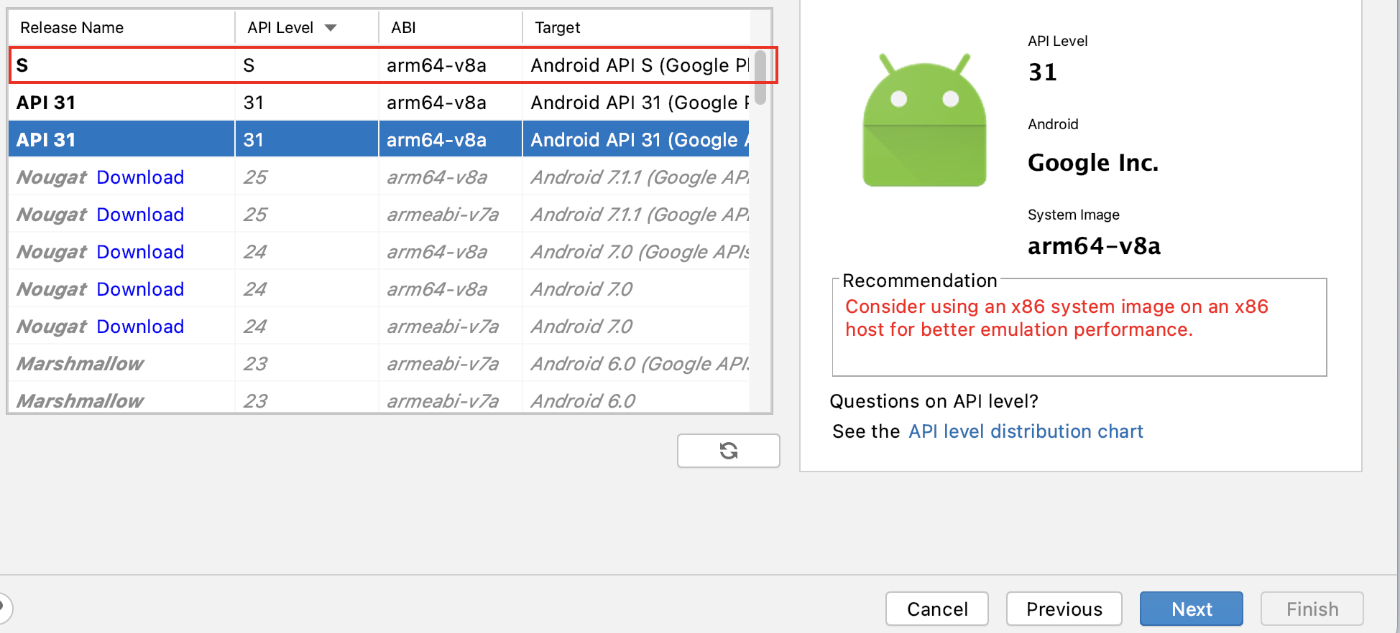
就这样,我花了3个小时在this>上<
Stack Overflow用户
发布于 2021-05-17 08:37:46
我遇到了一个类似的问题,不知道你是否把它修好了,但是我在寻找解决方案的时候碰到了这个帖子,上面的解决方案对我来说不管用。
我发现的一个解决方案是安装android-模拟器-m1-从google预览,启动它而不是从Android中启动模拟器。这几乎是恼人的问题,这是一个简单的问题,原来是要解决。
在12+花了几个小时尝试不同的解决方案之后,看到构建成功真的很不错。
https://stackoverflow.com/questions/67230200
复制相似问题
腾讯云开发者

Copyright © 2013 - 2026 Tencent Cloud. All Rights Reserved. 腾讯云 版权所有
深圳市腾讯计算机系统有限公司 ICP备案/许可证号:粤B2-20090059  粤公网安备44030502008569号
腾讯云计算(北京)有限责任公司 京ICP证150476号 | 京ICP备11018762号