
访问div外部的ngform时出错TS2339
我有一个角度项目,我使用ngb手风琴从ng-引导显示一些细节。我的手风琴有反应。我在每个手风琴里面都有表格。我有一个要求,当我想在手风琴面板上显示一个特定的图标时,取决于里面的表单是有效还是无效。就像在手风琴里面填写表单时,我想要显示一个引导滴答图标,如果它是错误的,那么我希望它显示一个十字标记图标。我尝试编写一个ngIf指令,检查表单对于包含图标的div是否有效。
下面是我尝试为一个手风琴实现上述功能的代码
HTML文件
<head>
</head>
<body>
<div>
<div *ngIf="form1.invalid">
<svg xmlns="http://www.w3.org/2000/svg" width="16" height="16" fill="currentColor" class="bi bi-x-circle" viewBox="0 0 16 16">
<path d="M8 15A7 7 0 1 1 8 1a7 7 0 0 1 0 14zm0 1A8 8 0 1 0 8 0a8 8 0 0 0 0 16z"/>
<path d="M4.646 4.646a.5.5 0 0 1 .708 0L8 7.293l2.646-2.647a.5.5 0 0 1 .708.708L8.707 8l2.647 2.646a.5.5 0 0 1-.708.708L8 8.707l-2.646 2.647a.5.5 0 0 1-.708-.708L7.293 8 4.646 5.354a.5.5 0 0 1 0-.708z"
style="color: red;"/>
</svg>
</div>
<div>
<ngb-accordion #acc="ngbAccordion">
<ngb-panel id="toggle-1" title="Primary Details" >
<ng-template ngbPanelContent>
<form #form1="ngForm" style="padding-left:20px;">
<div class="form-group">
<label for="name" class="control-label">First Name<sup style="color: red;font-size:medium;">*</sup></label>
<input type="text" ngModel name="FirstName" class="form-control" id="FirstName">
</div>
<div class="form-group">
<label for="name" class="control-label">Last Name<sup style="color: red;font-size:medium;">*</sup></label>
<input type="text" name="LastName" class="form-control" id="LastName">
</div>
<div class="form-group">
<label for="name" class="control-label">Organization<sup style="color: red;font-size:medium;">*</sup></label>
<input type="text" name="name" class="form-control" id="name">
</div>
</form>
</ng-template>
</ngb-panel>
</ngb-accordion>
</div>
</div>
<br>
<ngb-accordion #acc="ngbAccordion">
<ngb-panel id="toggle-2" title="Secondary Details">
<ng-template ngbPanelContent>
<form #form2="ngForm" style="padding-left:20px;">
<div class="form-group">
<label for="name" class="control-label">Address<sup style="color: red;font-size:medium;">*</sup></label>
<input type="text" name="Address" class="form-control" id="name">
</div>
<div class="form-group">
<label for="dropdown-test" class="control-label">City<sup style="color: red;font-size:medium;">*</sup></label>
<select class="form-control" name="dropdown-test">
<option>select an option</option>
<option>option2</option>
<option>option3</option>
<option>option4</option>
<option>option5</option>
</select>
</div>
</form>
</ng-template>
</ngb-panel>
</ngb-accordion>
<br>
<ngb-accordion #acc="ngbAccordion">
<ngb-panel id="toggle-3" title="More Details">
<ng-template ngbPanelContent>
<form #form3="ngForm" style="padding-left:20px;">
<div class="form-group">
<label for="name" class="control-label">Email<sup style="color: red;font-size:medium;">*</sup></label>
<input type="text" name="Email" class="form-control" id="name">
</div>
<div class="form-group">
<label for="name" class="control-label">Phone<sup style="color: red;font-size:medium;">*</sup></label>
<input type="number" name="Phone" class="form-control" id="name">
</div>
</form>
</ng-template>
</ngb-panel>
</ngb-accordion>
</body>CSS文件
    input[type="text"],
select.form-control{
  background: transparent;
  border: none;
  border-bottom: 1px solid #000000;
  -webkit-box-shadow: none;
  box-shadow: none;
  border-radius: 0;
}
input[type="number"],
select.form-control{
  background: transparent;
  border: none;
  border-bottom: 1px solid #000000;
  -webkit-box-shadow: none;
  box-shadow: none;
  border-radius: 0;
}
input[type="text"]:focus,
select.form-control:focus {
  -webkit-box-shadow: none;
  box-shadow: none;
  border-color:rgb(31, 14, 187);
}
input[type="number"]:focus,
select.form-control:focus {
  -webkit-box-shadow: none;
  box-shadow: none;
  border-color:darkred;
}在src/app/collapsedemo/collapsedemo.component.html:9:21 - <div *ngIf="form1.invalid"> TS2339: Property 'form1‘并不存在于'CollapsedemoComponent'.类型的的行中,它抛出一个错误。
请告诉我我做错了什么。当表单未填写时,我将包括没有ngIf指令的工作应用程序的图片。
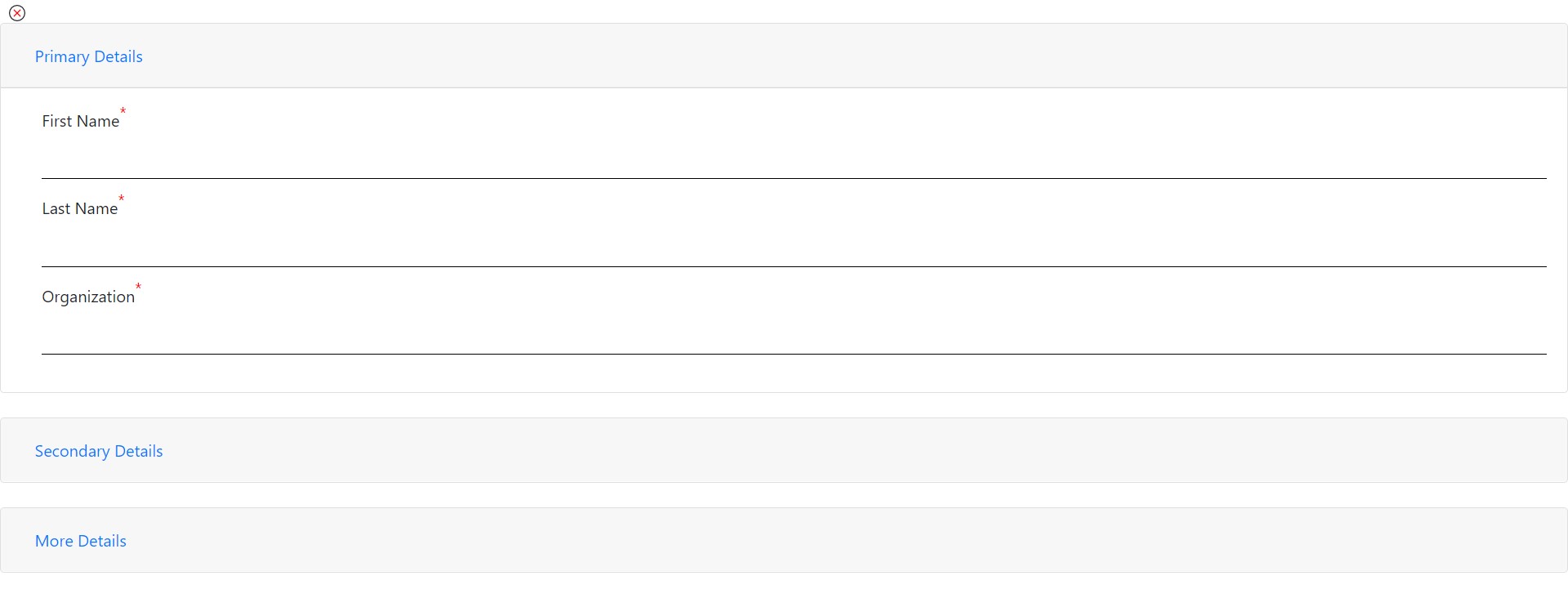
另外,如果有的话,请给我一个建议,我可以在标题的前面显示这些图标,就像在上面的图片中的“主要细节”标题之前,而不是在ngb面板上。最终的目标是在填写表格细节时显示绿色的滴答,在手风琴内部没有填充的时候显示一个十字标记。
回答 1
Stack Overflow用户
发布于 2021-04-27 20:48:40
该表单在此位置不可用,因为它位于嵌套结构中的更深的位置,而您位于嵌套结构之外。
您可以使用ViewChild指令和方法实现您想要的结果。我来教你怎么做。
步骤I
在TS-文件中获取表单的ViewChild。
@ViewChild('form1') myForm: NgForm | undefined;第二步
编写一个方法,您可以用它获取视图子视图的状态。
注意!,如果你不等的话,你会碰到ExpressionChangedAfterItHasBeenCheckedError的。这是因为表单的状态在开始时是undefined,当它获得true时,其余的HTML最终不会以角表示。所以我想了个办法来处理这个种族问题。
// shows whether the view is rendered entirely
private viewRendered = false;

// returns the current state of your form1
myFormIsInvalid(): boolean {

   // only return the actual state, when the view is rendered entirely
   if (this.viewRendered) {
       return !(this.myForm && this.myForm.valid);
   }

   return false;
}然后,我们需要在ngOnInit()中放置一个小的超时,以便在应该加载整个表单时释放您的方法。
ngOnInit(): void {
    // after 250ms set the method myFormIsValid() free to return the actual value
    setTimeout(() => {
        this.viewRendered = true;
    }, 250);
}
第三步
In your HTML: Use the method here to get the state of the form

<div *ngIf="myFormIsInvalid()">https://stackoverflow.com/questions/67290015
复制相似问题
腾讯云开发者

Copyright © 2013 - 2026 Tencent Cloud. All Rights Reserved. 腾讯云 版权所有
深圳市腾讯计算机系统有限公司 ICP备案/许可证号:粤B2-20090059  粤公网安备44030502008569号
腾讯云计算(北京)有限责任公司 京ICP证150476号 | 京ICP备11018762号