
按用户角色切换Gutenberg首选项
按用户角色切换Gutenberg首选项
提问于 2021-04-27 15:58:35
我正在寻找一种方法来隐藏一些页面设置面板在Gutenberg编辑器侧边栏基于用户角色。由于这些面板标题没有特定的类,所以我无法使用CSS来针对它们,所以我想知道是否有一种方法至少可以控制哪些面板在首选项中处于活动状态:
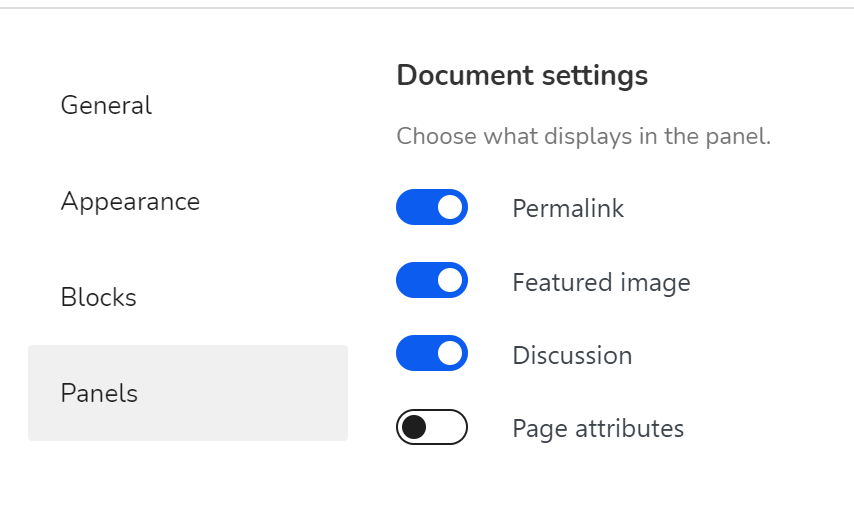
有没有人知道我是否可以根据用户角色有条件地预先设置这些切换点?
非常感谢。
回答 1
Stack Overflow用户
发布于 2022-03-28 07:20:07
我在WordPress 5.9上做了一些工作(没有在早期版本上进行测试)。
包含插件/主题的JS
add_action( 'enqueue_block_editor_assets', [ __CLASS__, 'so67286587EnqueueGutenbergEditorAssets' ] );

function so67286587EnqueueGutenbergEditorAssets() {
  wp_enqueue_script( 'so67286587-gutenberg', plugins_url( '/js/gutenberg.jsx.js', __FILE__ ), [ 'wp-edit-post' ] );
}
这是JS的特效。我只是检查是否一些功能是检查/未检查,并切换他们。
// force enabling those settings
['reducedUI', 'keepCaretInsideBlock', 'showBlockBreadcrumbs', 'focusMode', 'themeStyles'].forEach(mustBeEnabled => {
    if (!wp.data.select('core/edit-post').isFeatureActive(mustBeEnabled)) {
        wp.data.dispatch('core/edit-post').toggleFeature(mustBeEnabled);
    }
});

// force disabling those settings
['fullscreenMode', 'fixedToolbar', 'welcomeGuide', 'showIconLabels', 'mostUsedBlocks'].forEach(mustBeDisabled => {
    if (wp.data.select('core/edit-post').isFeatureActive(mustBeDisabled)) {
        wp.data.dispatch('core/edit-post').toggleFeature(mustBeDisabled);
    }
});这个JSX文件是用@wordpress/脚本编译的。
页面原文内容由Stack Overflow提供。腾讯云小微IT领域专用引擎提供翻译支持
原文链接:
https://stackoverflow.com/questions/67286587
复制相关文章
相似问题
腾讯云开发者

Copyright © 2013 - 2026 Tencent Cloud. All Rights Reserved. 腾讯云 版权所有
深圳市腾讯计算机系统有限公司 ICP备案/许可证号:粤B2-20090059  粤公网安备44030502008569号
腾讯云计算(北京)有限责任公司 京ICP证150476号 | 京ICP备11018762号