
如何使用反应-使用手势和useSpring在TypeScript?
如何使用反应-使用手势和useSpring在TypeScript?
提问于 2021-05-05 08:07:38
我正试图在react-use-gesture和react-spring中实现类似的TypeScript实现。在JavaScript中,我试图转换的示例是https://codesandbox.io/s/cards-fduch
我得到了这个空白卡片,但是当我查看HTML元素时,我可以看到卡片正在呈现。为什么他们看不见?
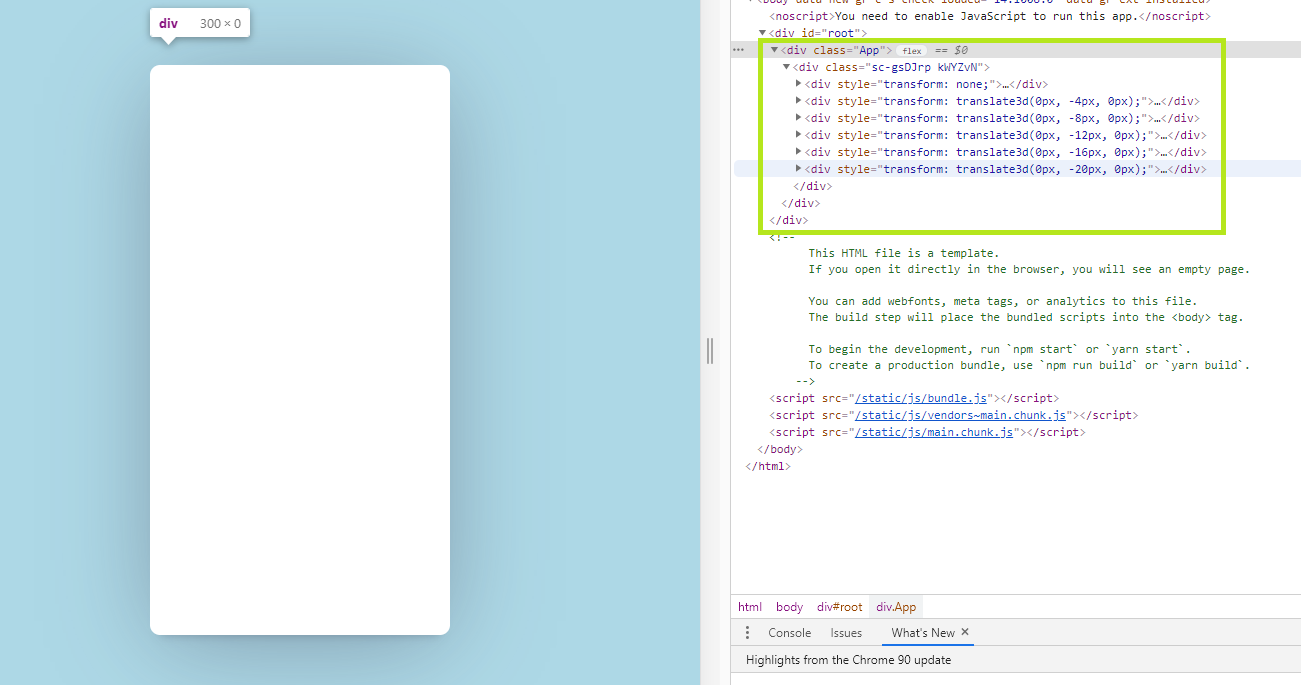
我在TypeScript的尝试在这里。
 const to = (i:number) => ({ x: 0, y: i * -4, scale: 1, rot: -10 + Math.random() * 20, delay: i * 100 })
      const from = (i:number) => ({ x: 0, rot: 0, scale: 1.5, y: -1000 })
    const Card:React.FC<Props> = ({ items1}) => {
      const items = [
        'https://upload.wikimedia.org/wikipedia/en/f/f5/RWS_Tarot_08_Strength.jpg',
        'https://upload.wikimedia.org/wikipedia/en/5/53/RWS_Tarot_16_Tower.jpg'

      ]


      const [trans, setTrans] = React.useState( "translateX(0px)");

      const [gone] = React.useState(() => new Set())
      const [props, set] = useSprings(items.length, (i:number) => ({ ...to(i), from: from(i) }))

      const bind = useDrag(({ args: [index], down, movement: [mx], direction: [xDir], velocity }) => {
          const trigger = velocity > 0.2
        const dir = xDir < 0 ? -1 : 1
        if (!down && trigger) gone.add(index) // If button/finger's up and trigger velocity is reached, we flag the card ready to fly out
        set((i) => {
          if (index !== i) return // We're only interested in changing spring-data for the current spring
          const isGone = gone.has(index)
          const x = isGone ? (200 + window.innerWidth) * dir : down ? mx : 0
          const rot = mx / 100 + (isGone ? dir * 10 * velocity : 0)
          const scale = down ? 1.1 : 1
          return { x, rot, scale, delay: undefined, config: { friction: 50, tension: down ? 800 : isGone ? 200 : 500 } }
        })
      });


      return <>{props.map(({ x, y }, i) => (

        <animated.div key={i} style={{ x, y }}>
          {/* This is the card itself, we're binding our gesture to it (and inject its index so we know which is which) */}
          <animated.div {...bind(i)} style={{ backgroundImage: `url(${items[i]})` }} />
        </animated.div>
      ))}</>


    };
export default Card;回答 1
Stack Overflow用户
回答已采纳
发布于 2022-03-02 11:27:37
此沙盒使用较新的@use-gesture/react并使用类型记录。
此外,到目前为止,维基百科的特定图片链接是不可用的。这也可能是你没有看到任何图像呈现的原因。
页面原文内容由Stack Overflow提供。腾讯云小微IT领域专用引擎提供翻译支持
原文链接:
https://stackoverflow.com/questions/67397411
复制相关文章
相似问题
腾讯云开发者

Copyright © 2013 - 2026 Tencent Cloud. All Rights Reserved. 腾讯云 版权所有
深圳市腾讯计算机系统有限公司 ICP备案/许可证号:粤B2-20090059  粤公网安备44030502008569号
腾讯云计算(北京)有限责任公司 京ICP证150476号 | 京ICP备11018762号