
生成CSS三维模型
生成CSS三维模型
提问于 2021-05-09 16:27:23
我试图用CSS3D转换(钢笔)从头开始创建一些笔记本电脑钢笔,我注意到这比我想象的要困难。下面是我正在处理的代码:
  transform: scaleX(1) scaleY(1) scaleZ(1)
    rotateX(48deg) rotateY(-35deg) rotateZ(37deg)
    translateX(360px) translateY(103px) translateZ(0px)
    skewX(0) skewY(0);
我还没有想出该怎么做,但我相信如果我们能在笔记本电脑图像的对应角上找到图像的角,那么它就会看起来很逼真。我说错了吗?
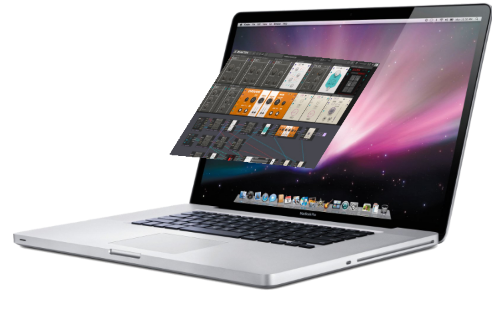
我认为这可以通过一个函数来完成,该函数接受5个输入(源图像的矩形比和目标(膝上型计算机)图像的四个角的坐标),并返回一个包含用于分层图像的有效CSS属性的对象。
你对如何做这件事有什么见解吗?
回答 1
Stack Overflow用户
回答已采纳
发布于 2021-05-09 17:20:07
这道数学题有一扇门:
它引出了这些很好的活生生的例子:
- https://franklinta.com/2014/09/08/computing-css-matrix3d-transforms/
- https://tympanus.net/codrops/2014/11/21/perspective-mockup-slideshow/
下面是从CoffeeScript移植到普通JavaScript的答案的文章中的笔:
// Original was CoffeeScript at https://codepen.io/fta/pen/ifnqH?editors=0010.
// This is ported back to plain JavaScript. It could be cleaned up!
{
  const $ = jQuery;

  function getTransform (from, to) {
    console.assert(from.length === to.length && to.length === 4);

    const A = []; // 8x8
    for (let i = 0; i < 4; i++) {
      A.push([from[i].x, from[i].y, 1, 0, 0, 0, -from[i].x * to[i].x, -from[i].y * to[i].x]);
      A.push([0, 0, 0, from[i].x, from[i].y, 1, -from[i].x * to[i].y, -from[i].y * to[i].y]);
    }

    const b = []; // 8x1
    for (let i = 0; i < 4; i++) {
      b.push(to[i].x);
      b.push(to[i].y);
    }

    // Solve A * h = b for h
    const h = numeric.solve(A, b);
    const H = [[h[0], h[1], 0, h[2]], [h[3], h[4], 0, h[5]], [0, 0, 1, 0], [h[6], h[7], 0, 1]];

// Sanity check that H actually maps `from` to `to`
    for (let i = 0; i < 4; i++) {
      const lhs = numeric.dot(H, [from[i].x, from[i].y, 0, 1]);
      const k_i = lhs[3];
      const rhs = numeric.dot(k_i, [to[i].x, to[i].y, 0, 1]);
      console.assert(numeric.norm2(numeric.sub(lhs, rhs)) < 1e-9, "Not equal:", lhs, rhs);
    }

    return H;
  };

   function applyTransform(element, originalPos, targetPos, callback) {
    // All offsets were calculated relative to the document
    // Make them relative to (0, 0) of the element instead
    const from = (function() {
      const results = [];
      for (let k = 0, len = originalPos.length; k < len; k++) {
        const p = originalPos[k];
        results.push({
          x: p[0] - originalPos[0][0],
          y: p[1] - originalPos[0][1]
        });
      }
      return results;
    })();

    const to = (function() {
      const results = [];
      for (let k = 0, len = targetPos.length; k < len; k++) {
        const p = targetPos[k];
        results.push({
          x: p[0] - originalPos[0][0],
          y: p[1] - originalPos[0][1]
        });
      }
      return results;
    })();

    // Solve for the transform
    const H = getTransform(from, to);

    // Apply the matrix3d as H transposed because matrix3d is column major order
    // Also need use toFixed because css doesn't allow scientific notation
    $(element).css({
      'transform': `matrix3d(${((function() {
        const results = [];
        for (let i = 0; i < 4; i++) {
          results.push((function() {
            const results1 = [];
            for (let j = 0; j < 4; j++) {
              results1.push(H[j][i].toFixed(20));
            }
            return results1;
          })());
        }
        return results;
      })()).join(',')})`,
      'transform-origin': '0 0'
    });

    return typeof callback === "function" ? callback(element, H) : void 0;
  };

  function makeTransformable(selector, callback) {
    return $(selector).each(function(i, element) {
      $(element).css('transform', '');

      // Add four dots to corners of `element` as control points
      const controlPoints = (function() {
        const ref = ['left top', 'left bottom', 'right top', 'right bottom'];
        const results = [];
        for (let k = 0, len = ref.length; k < len; k++) {
          const position = ref[k];
          results.push($('<div>').css({
            border: '10px solid black',
            borderRadius: '10px',
            cursor: 'move',
            position: 'absolute',
            zIndex: 100000
          }).appendTo('body').position({
            at: position,
            of: element,
            collision: 'none'
          }));
        }
        return results;
      })();

      // Record the original positions of the dots
      const originalPos = (function() {
        const results = [];
        for (let k = 0, len = controlPoints.length; k < len; k++) {
          const p = controlPoints[k];
          results.push([p.offset().left, p.offset().top]);
        }
        return results;
      })();

      // Transform `element` to match the new positions of the dots whenever dragged
      $(controlPoints).draggable({
        start: () => {
          return $(element).css('pointer-events', 'none'); // makes dragging around iframes easier
        },
        drag: () => {
          return applyTransform(element, originalPos, (function() {
            const results = [];
            for (let k = 0, len = controlPoints.length; k < len; k++) {
              const p = controlPoints[k];
              results.push([p.offset().left, p.offset().top]);
            }
            return results;
          })(), callback);
        },
        stop: () => {
          applyTransform(element, originalPos, (function() {
            const results = [];
            for (let k = 0, len = controlPoints.length; k < len; k++) {
              const p = controlPoints[k];
              results.push([p.offset().left, p.offset().top]);
            }
            return results;
          })(), callback);

          return $(element).css('pointer-events', 'auto');
        }
      });

      return element;
    });
  };

  makeTransformable('.box', function(element, H) {
    console.log($(element).css('transform'));
    return $(element).html($('<table>').append($('<tr>').html($('<td>').text('matrix3d('))).append((function() {
      const results = [];
      for (let i = 0; i < 4; i++) {
        results.push($('<tr>').append((function() {
          const results1 = [];
          for (let j = 0; j < 4; j++) {
            results1.push($('<td>').text(H[j][i] + ((i === j && j === 3) ? '' : ',')));
          }
          return results1;
        })()));
      }
      return results;
    })()).append($('<tr>').html($('<td>').text(')'))));
  });

}.box {
margin: 20px;
padding: 10px;
height: 150px;
width: 500px;
border: 1px solid black;
}<div class="box">
Drag the points to transform the box!
</div>
<script src="https://cdnjs.cloudflare.com/ajax/libs/jquery/2.1.3/jquery.min.js"></script>
<script src="https://ajax.googleapis.com/ajax/libs/jqueryui/1.11.2/jquery-ui.min.js"></script>
<script src="https://cdnjs.cloudflare.com/ajax/libs/numeric/1.2.6/numeric.min.js"></script>
<script src="https://cdnjs.cloudflare.com/ajax/libs/jqueryui-touch-punch/0.2.3/jquery.ui.touch-punch.min.js"></script>
页面原文内容由Stack Overflow提供。腾讯云小微IT领域专用引擎提供翻译支持
原文链接:
https://stackoverflow.com/questions/67459990
复制相关文章
相似问题
腾讯云开发者

Copyright © 2013 - 2026 Tencent Cloud. All Rights Reserved. 腾讯云 版权所有
深圳市腾讯计算机系统有限公司 ICP备案/许可证号:粤B2-20090059  粤公网安备44030502008569号
腾讯云计算(北京)有限责任公司 京ICP证150476号 | 京ICP备11018762号