
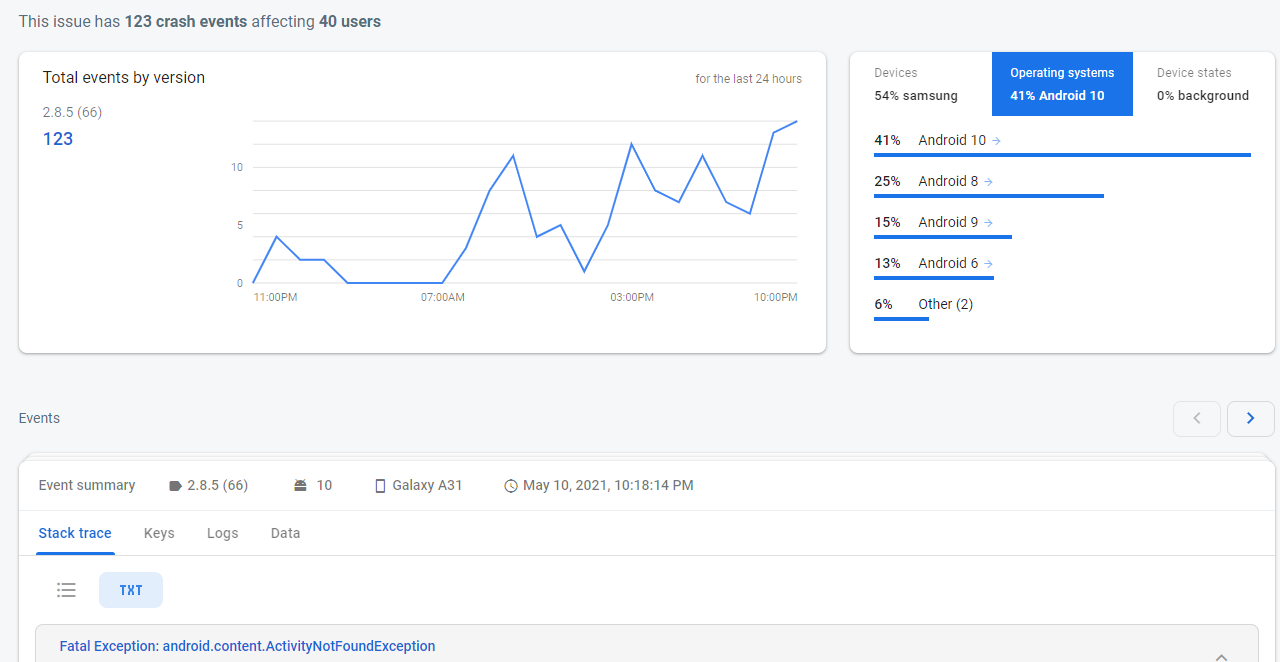
致命例外: android.content.ActivityNotFoundException:没有发现处理意图的活动
在打开url时,我在某些设备上得到了跟踪错误。我的设备上没有任何错误,但是很多设备都是错误的。
Fatal Exception: android.content.ActivityNotFoundException: No Activity found to handle Intent { act=android.intent.action.VIEW dat=https://google.com/... }
   at android.app.Instrumentation.checkStartActivityResult(Instrumentation.java:2076)
   at android.app.Instrumentation.execStartActivity(Instrumentation.java:1720)
   at android.app.Activity.startActivityForResult(Activity.java:5258)
   at androidx.activity.ComponentActivity.startActivityForResult(ComponentActivity.java:574)
   at android.app.Activity.startActivityForResult(Activity.java:5203)
   at androidx.activity.ComponentActivity.startActivityForResult(ComponentActivity.java:560)
   at android.app.Activity.startActivity(Activity.java:5587)
   at android.app.Activity.startActivity(Activity.java:5555)
发生错误的代码是非常直接的.
Uri uri = Uri.parse("https://google.com");

try {
     CustomTabsIntent.Builder builder = new CustomTabsIntent.Builder();
     builder.setShowTitle(true);
     CustomTabsIntent customTabsIntent = builder.build();
     Intent browserIntent = new Intent(Intent.ACTION_VIEW, Uri.parse("http://"));

     ResolveInfo resolveInfo = getPackageManager().resolveActivity(browserIntent, PackageManager.MATCH_DEFAULT_ONLY);
     if (resolveInfo != null && resolveInfo.activityInfo.packageName.length() > 0) {
         customTabsIntent.intent.setPackage(resolveInfo.activityInfo.packageName);
     }

     customTabsIntent.launchUrl(this, uri);
} catch (ActivityNotFoundException e) {
          // Do nothing
}在某些设备(不是旧设备,主要是最新设备)中,异常被触发,但怎么可能呢?这意味着设备有0浏览器?如果是这样,我的问题是如何打开url,甚至用户禁用所有浏览器?提前谢谢。
注意:在升级到实时版本的自定义选项卡之前,我使用了下面的代码来打开url,但是我总是得到ActivityNotFoundException。
Intent browserIntent = new Intent(Intent.ACTION_VIEW, uri);
startActivity(browserIntent);
它是最简单的代码,打开任何url,但不使用try/catch会导致崩溃。使用常规方式或自定义选项卡并不重要,它总是会导致ActivityNotFoundException。我在找一种解决办法,不管发生什么事,都能打开网址。我不确定这是否可能。
Note2: MinApi是Android5.0(棒棒糖)
回答 2
Stack Overflow用户
发布于 2021-06-14 22:39:27
我创建了一种基于@andreban的答案的方法。我相信它会打开url %99.99次。
public static void openURL(Context mContext, Uri uri) {
    CustomTabsIntent.Builder builder = new CustomTabsIntent.Builder();
    builder.setShowTitle(true);
    CustomTabsIntent customTabsIntent = builder.build();
    Intent browserIntent = new Intent()
            .setAction(Intent.ACTION_VIEW)
            .addCategory(Intent.CATEGORY_BROWSABLE)
            .setType("text/plain")
            .setData(Uri.fromParts("http", "", null));

    List<ResolveInfo> possibleBrowsers;
    if (android.os.Build.VERSION.SDK_INT >= android.os.Build.VERSION_CODES.M) {
        possibleBrowsers = mContext.getPackageManager().queryIntentActivities(browserIntent, PackageManager.MATCH_DEFAULT_ONLY);
        if (possibleBrowsers.size() == 0) {
            possibleBrowsers = mContext.getPackageManager().queryIntentActivities(browserIntent, PackageManager.MATCH_ALL);
        }
    } else {
        possibleBrowsers = mContext.getPackageManager().queryIntentActivities(browserIntent, PackageManager.MATCH_DEFAULT_ONLY);
    }

    if (possibleBrowsers.size() > 0) {
        customTabsIntent.intent.setPackage(possibleBrowsers.get(0).activityInfo.packageName);
        customTabsIntent.launchUrl(mContext, uri);
    } else {
        Intent browserIntent2 = new Intent(Intent.ACTION_VIEW, uri);
        mContext.startActivity(browserIntent2);
    }
}Stack Overflow用户
发布于 2021-05-11 11:27:58
关于这一问题的几点说明:
将非浏览器应用程序检测为浏览器
他们查询浏览器可以检测到非浏览器应用程序,这将导致启动自定义选项卡时的ActivityNotFoundException。有关示例,请参见本期。
在查询可以处理浏览器意图的包时,我建议使用以下内容:
Intent browserIntent = new Intent()
        .setAction(Intent.ACTION_VIEW)
        .addCategory(Intent.CATEGORY_BROWSABLE)
.setData(Uri.fromParts("http", "", null));这也是Android框架本身检测浏览器的方式。
以下不应该是一个问题,因为自定义选项卡仍然可以工作,但PackageManager.MATCH_DEFAULT_ONLY的行为在Android上发生了变化,并且只返回默认浏览器--我不确定如果没有设置默认浏览器会发生什么,但这可能意味着返回的列表将为空。这意味着当未设置默认浏览器时,用户将获得消歧对话框。在Android和更高版本中,如果希望获得所有浏览器,还可能需要使用PackageManager.MATCH_ALL来另外查询包管理器,避免消除歧义对话框。
查看android-browser-helper库中的android-browser-helper,以检测自定义选项卡和受信任的Web活动。
为Android 11做准备
Android11引入了包装能见度,应用程序现在必须声明它们正在查询哪些包。如果应用程序没有实现此操作,则在查询包管理时返回的列表将为空,即使安装了浏览器。
if (Build.VERSION.SDK_INT >= Build.VERSION_CODES.M) {
    possibleProviders.addAll(pm.queryIntentActivities(queryBrowsersIntent,
                    PackageManager.MATCH_ALL));
}同样,这不应该导致ActivityNotFoundException,因为它只会导致自定义选项卡在没有包集的情况下启动。
禁用浏览器
注意:在升级到实时版本中的自定义选项卡之前,我使用了下面的代码来打开url,但是我总是得到ActivityNotFoundException: browserIntent =新意图(Intent.ACTION_VIEW,uri);startActivity(browserIntent);
用户可以禁用所有浏览器应用程序,但我不认为这是常见的。
另一件需要注意的事情是,Android电视和Android设备没有安装浏览器。如果您的应用程序是针对这些设备,您将无法打开这些URL。但这只是一个问题,如果你的应用是针对这些平台。
https://stackoverflow.com/questions/67476856
复制相似问题
腾讯云开发者

Copyright © 2013 - 2026 Tencent Cloud. All Rights Reserved. 腾讯云 版权所有
深圳市腾讯计算机系统有限公司 ICP备案/许可证号:粤B2-20090059  粤公网安备44030502008569号
腾讯云计算(北京)有限责任公司 京ICP证150476号 | 京ICP备11018762号