
非office 365上滤波函数的选择
使用宏或公式,是否有方法实现以下公式Office 365的结果?
=FILTER(B:B,A:A = "x")
如果同一行上的Column B的值为x,则可以从Column A获取所有的值。
我的电脑有办公室365,但我正在工作的只有Office Pro Plus 2019。当我需要这个功能时,我不得不使用我的电脑,我对它感到厌倦,也许它也可以在Office 2019上用一个公式或宏来完成?
回答 4
Stack Overflow用户
发布于 2021-05-10 16:49:23
使用:
=IFERROR(INDEX($B$1:$B$100,AGGREGATE(15,7,ROW($A$1:$A$100)/($A$1:$A$100="x"),ROW($ZZ1))),"")注意设置范围的使用,而不是全列。这是故意的,这是一个数组公式,它将做大量的计算,每一个单元格,它被放置。将范围限制在数据集中将加快速度。
将其放入输出的第一个单元格中,然后向下复制,直到空白被返回。
Stack Overflow用户
发布于 2021-05-10 21:43:23
我有一些业余时间,我最近对用户定义的函数感兴趣,所以我决定自己制作我想象中的功能。我在开场白的时候说它不好,而且太长了,但是它很有效!
Function JOINIF(ByRef IfRange As Range, ByVal Criteria As String, Optional JoinRange As Range, Optional Delimeter As String = ",") As String
    'IfRange is the range that will be evaluated by the Criteria

    'Criteria is a logical test that can be applied to a cell value.
    'Examples of Criteria: "=Steve", ">100", "<>Toronto", "<=-1"

    'JoinRange is the range of values that will be concatenated if the corresponding -
    'IfRange cell meets the criteria. JoinRange can be left blank if the values to be -
    'concatenated are the IfRange values.

    'Delimeter is the string that will seperate the concatenated values.
    'Default delimeter is a comma.

    Dim IfArr() As Variant, JoinArr() As Variant, OutputArr() As String
    Dim IfArrDim As Integer, JoinArrDim As Integer
    Dim JCount As Long, LoopEnd(1 To 2) As Long
    Dim MeetsCriteria As Boolean, Expression As String
    Dim i As Long, j As Long

'PARSING THE CRITERIA
    Dim Regex As Object
    Set Regex = CreateObject("VBScript.RegExp")
    Regex.Pattern = "[=<>]+"
    'Looking for comparison operators
    Dim Matches As Object
    Set Matches = Regex.Execute(Criteria)
    If Matches.Count = 0 Then
        'If no operators found, assume default "Equal to"
        If Not IsNumeric(Criteria) Then
            'Add quotation marks to allow string comparisons
            Criteria = "=""" & Criteria & """"
        End If
    Else
        If Not IsNumeric(Replace(Criteria, Matches(0), "")) Then
            Criteria = Matches(0) & """" & Replace(Criteria, Matches(0), "") & """"
        End If
        'Add quotation marks to allow string comparisons
    End If

    'Trim IfRange to UsedRange
    Set IfRange = Intersect(IfRange, IfRange.Parent.UsedRange)

    'Default option for optional JoinRange input
    If JoinRange Is Nothing Then
        Set JoinRange = IfRange
    Else
        Set JoinRange = Intersect(JoinRange, JoinRange.Parent.UsedRange)
    End If

'DIMENSIONS
    'Filling the arrays
    If IfRange.Cells.Count > 1 Then
        IfArr = IfRange.Value
        IfArrDim = Dimensions(IfArr)
    Else
        ReDim IfArr(1 To 1)
        IfArr(1) = IfRange.Value
        IfArrDim = 1
    End If
    If JoinRange.Cells.Count > 1 Then
        JoinArr = JoinRange.Value
        JoinArrDim = Dimensions(JoinArr)
    Else
        ReDim JoinArr(1 To 1)
        JoinArr(1) = JoinRange.Value
        JoinArrDim = 1
    End If

    'Initialize the Output array to the smaller of the two input arrays.
    ReDim OutputArr(IIf(IfRange.Cells.Count < JoinRange.Cells.Count, IfRange.Cells.Count - 1, JoinRange.Cells.Count - 1))

'DEFINING THE LOOP PARAMETERS
    'Loop ends on the smaller of the two arrays
    If UBound(IfArr) > UBound(JoinArr) Then
        LoopEnd(1) = UBound(JoinArr)
    Else
        LoopEnd(1) = UBound(IfArr)
    End If
    If IfArrDim = 2 Or JoinArrDim = 2 Then
        If Not (IfArrDim = 2 And JoinArrDim = 2) Then
            'mismatched dimensions
            LoopEnd(2) = 1
        ElseIf UBound(IfArr, 2) > UBound(JoinArr, 2) Then
            LoopEnd(2) = UBound(JoinArr, 2)
        Else
            LoopEnd(2) = UBound(IfArr, 2)
        End If
    End If

'START LOOP
    If IfArrDim = 1 Then
        For i = 1 To LoopEnd(1)
            If IsNumeric(IfArr(i)) And IfArr(i) <> "" Then
                Expression = IfArr(i) & Criteria
            Else
                'Add quotation marks to allow string comparisons
                Expression = """" & IfArr(i) & """" & Criteria
            End If

            MeetsCriteria = Application.Evaluate(Expression)

            If MeetsCriteria Then
                If JoinArrDim = 1 Then
                    OutputArr(JCount) = CStr(JoinArr(i))
                Else
                    OutputArr(JCount) = CStr(JoinArr(i, 1))
                End If
                JCount = JCount + 1
            End If
        Next i
    Else
        For i = 1 To LoopEnd(1)
            For j = 1 To LoopEnd(2)
                If IsNumeric(IfArr(i, j)) And IfArr(i, j) <> "" Then
                    Expression = IfArr(i, j) & Criteria
                Else
                    'Add quotation marks to allow string comparisons
                    Expression = """" & IfArr(i, j) & """" & Criteria
                End If

                MeetsCriteria = Application.Evaluate(Expression)

                If MeetsCriteria Then
                    If JoinArrDim = 1 Then
                        OutputArr(JCount) = CStr(JoinArr(i))
                    Else
                        OutputArr(JCount) = CStr(JoinArr(i, j))
                    End If
                    JCount = JCount + 1
                End If
            Next j
        Next i
    End If

'END LOOP
    ReDim Preserve OutputArr(JCount + 1 * (JCount > 0))
    JOINIF = Join(OutputArr, Delimeter)
End Function
Private Function Dimensions(var As Variant) As Long
    'Credit goes to the great Chip Pearson, chip@cpearson.com, www.cpearson.com
    On Error GoTo Err
    Dim i As Long, tmp As Long
    While True
        i = i + 1
        tmp = UBound(var, i)
    Wend
Err:
    Dimensions = i - 1
End Function
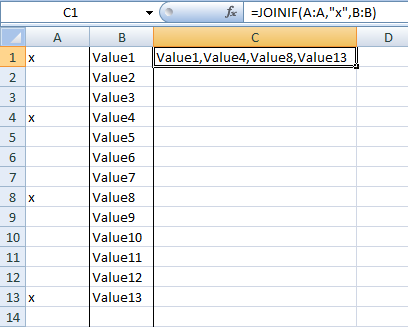
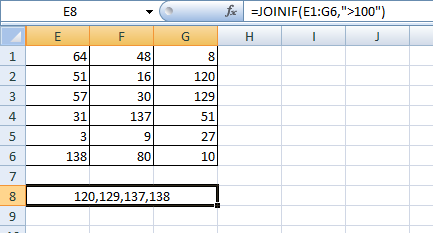
在使用中的例子:
分离IfRange和JoinRange
IfRange作为JoinRange
Stack Overflow用户
发布于 2021-05-12 17:23:54
您可以尝试下面的udf (例如调用:FILTER2(A1:A100,B1:B100)),它由以下复杂的步骤组成:
- a)将通用条件(
=If(A1:A100="x",Row(A1:A100),"?")计算为表格式Excel公式,并将所有有效的行号分配给数组x(用"?“标记其余行号)。(字符串), - b)过滤掉所有“?元素
- c))将
x应用于受益于该 - 的数据列
Public Function Filter2(rng1 As Range, rng2 As Variant, Optional ByVal FilterID As String = "x")
    Dim a As String: a = rng1.Address(False, False, External:=True)
    'a) get all valid row numbers (rng1)
    Dim myformula As String: myformula = "if(" & a & "=""" & FilterID & """,row(" & a & "),""?"")"
    Dim x: x = Application.Transpose(Evaluate(myformula))
    'b) filter out invalid "?" elements
    x = VBA.Filter(x, "?", False)
    'c) apply x upon data column (rng2)
    If UBound(x) > -1 Then Filter2 = Application.Index(rng2, Application.Transpose(x), 1)
End Function
在2019/MS 365版本之前调用函数的Note需要输入数组公式(Ctrl+Shift+Enter)。
函数假定一个列(范围)参数。
编辑将于2022-06-08发表评论
整个示例基于从第一行开始的实际行号 (OP范围指A:A、B:B。如果希望允许范围从任何行开始,则需要通过减去可能的偏移量(行号+1-第一行)来修改myFormula定义)。
    Dim myFormula As String
myFormula = "if(" & a & "=""" & FilterID & """,row(" & a & ")+1 -" & rng1.Row & ",""?"")"https://stackoverflow.com/questions/67474397
复制相似问题
腾讯云开发者

Copyright © 2013 - 2026 Tencent Cloud. All Rights Reserved. 腾讯云 版权所有
深圳市腾讯计算机系统有限公司 ICP备案/许可证号:粤B2-20090059  粤公网安备44030502008569号
腾讯云计算(北京)有限责任公司 京ICP证150476号 | 京ICP备11018762号