
解析JSON以以角形式显示数据
所以我把我的数据存储在数据库中,我用角度提取数据,得到数据,问题是当我试图显示数据时,我得到的是下面的错误。我只需要用ngFor*在html中显示这个问题,我对任何引导都是非常有用的。
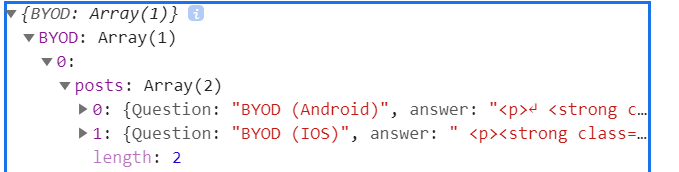
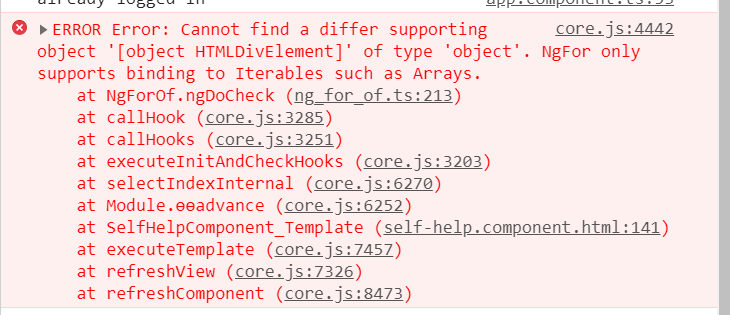
  this.selfHelpService.getFgSelfHelpByName("BYOD").subscribe(data => {
    //  console.log(data);
      const BYOD = JSON.parse(data["data"]);
    //  console.log(BYOD );
});<div class="cards" *ngFor="let BYOD of BYOD">
<div class="read-1">
{{BYOD.posts.question}}
</div>
</div>

回答 3
Stack Overflow用户
发布于 2021-05-10 15:05:36
由于您正在获取数据,因此可以执行以下操作:
// If this is your response:
{"BYOD":[ ` { "posts": [ {"Question":"BYOD (Android)","answer":"???"}, {"Question":"BYOD (IOS)","answer":"?????"} ] } ] };


this.selfHelpService.getFgSelfHelpByName("BYOD").subscribe(data => {
    try {
      const BYOD = JSON.parse(JSON.stringify(data["data"]));
    } catch(err) {
      console.log('Try catch error ==>', err);
    }

   // Declare a variable in the component.ts above constructor called byodPostsData

   // Assign the values to that variable
   this.byodPostsData = BYOD[0].posts;
});


// In your HTML now, simply loop through the this.byodPostsData;


<div class="cards" *ngFor="let eachPost of byodPostsData">
   <div class="read-1" *ngIf="eachPost && eachPost.question">
     {{ eachPost.question }}
   </div>
</div>Stack Overflow用户
发布于 2021-05-10 14:16:02
我不知道你想要循环什么,但是,如果你想在byod上循环,
<div class="cards" *ngFor="let byod of byod.BYOD[0].posts">
 <div class="read-1">
{{byod.Question}}
</div>
</div>
此外,在示例代码中,byod是函数中的本地作用域,您应该从中生成一个组件变量,使HTML能够访问它。
如果有什么不清楚的地方,可以随便问一下。
由于您对角是新的:这是如何决定如何访问响应:
0应该来自这样一个事实,即响应是一个JSON对象,其JSON键BYOD有一个数组作为值:因此BYOD表示您试图从BYOD访问数组的第一项,BYOD是另一个具有JSON键“post”的对象,“post”的值是要循环的数组。如果您将请求中的数据解析为一个名为byot的组件属性,那么它在html中应该是可访问的: byod.BYOD.posts --我希望我把它说得更清楚了。
这是一个堆栈闪电战!
https://stackblitz.com/edit/angular-ivy-jcxgfo?file=src/app/app.component.ts
Stack Overflow用户
发布于 2021-05-10 14:46:46
正如前面其他评论员所提到的:我不确定为什么要使用JSON.parse()。但是,如果您确实应该使用它,那么请尝试使用以下方法:
// Generally its considered good practice to use try-catch for JSON.parse() for data

try {
  const BYOD = JSON.parse(JSON.stringify(data["data"]));
} catch(err) {
  console.log('Try catch error ==>', err);
}https://stackoverflow.com/questions/67471993
复制相似问题
腾讯云开发者

Copyright © 2013 - 2026 Tencent Cloud. All Rights Reserved. 腾讯云 版权所有
深圳市腾讯计算机系统有限公司 ICP备案/许可证号:粤B2-20090059  粤公网安备44030502008569号
腾讯云计算(北京)有限责任公司 京ICP证150476号 | 京ICP备11018762号