
如何使用文件收集停靠日志?
如何使用文件收集停靠日志?
提问于 2021-05-10 13:55:20
我正试图从一个码头集装箱中收集这类日志:
[1620579277][642e7adc-74e1-4b89-a705-d271846f7ebc][channel1]
[afca2a976fa482f429fff4a38e2ea49f337a8af1b5dca0de90410ecc792fd5a4][usecase_cc][set] ex02 set

[1620579277][ac9f99b7-0126-45ed-8a74-6adc3a9d6bc5][channel1]
[afca2a976fa482f429fff4a38e2ea49f337a8af1b5dca0de90410ecc792fd5a4][usecase_cc][set][Transaction] Aval
=201 Bval =301 after performing the transaction

[1620579277][9211a9d4-3fe6-49db-b245-91ddd3a11cd3][channel1]
[afca2a976fa482f429fff4a38e2ea49f337a8af1b5dca0de90410ecc792fd5a4][usecase_cc][set][Transaction]
Transaction makes payment of X units from A to B

[1620579280][0391d2ce-06c1-481b-9140-e143067a9c2d][channel1]
[1f5752224da4481e1dc4d23dec0938fd65f6ae7b989aaa26daa6b2aeea370084][usecase_cc][get] Query Response:
{"Name":"a","Amount":"200"}
我以这种方式设置了filebeat.yml:
    filebeat.inputs:
- type: container
    paths:
      - '/var/lib/docker/containers/container-id/container-id.log'

processors:
- add_docker_metadata:
     host: "unix:///var/run/docker.sock"
- dissect:
     tokenizer: '{"log":"[%{time}][%{uuid}][%{channel}][%{id}][%{chaincode}][%{method}] %{specificinfo}\"\n%{}'
     field: "message"
     target_prefix: ""

output.elasticsearch:
  hosts: ["elasticsearch:9200"]
  username: "elastic"
  password: "changeme"
  indices:
      - index: "filebeat-%{[agent.version]}-%{+yyyy.MM.dd}"
logging.json: true
logging.metrics.enabled: false
虽然成功地部署了elasticsearch和kibana,但是当生成一个新日志时,我得到了这个错误:
{"error":{"root_cause":[{"type":"index_not_found_exception","reason":"no such index

[filebeat]","resource.type":"index_or_alias","resource.id":"filebeat","index_uuid":"_na_",
"index":"filebeat"}],"type":"index_not_found_exception","reason":"no such index

[filebeat]","resource.type":"index_or_alias","resource.id":"filebeat","index_uuid":"_na_",
"index":"filebeat"},"status":404}注意:i使用的是7.12.1版本,Kibana、Elastichsearch和Logstash部署在码头上。
回答 1
Stack Overflow用户
回答已采纳
发布于 2021-05-15 06:29:25
我已经用logstash作为替代方式,而不是文件传输。但是,错误的做法是,在filebeat配置文件中,错误地映射了从其中获取日志的路径。解决这个问题
- I创建了一个环境变量以指向正确的位置:

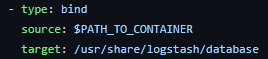
- I将环境变量作为坞卷的一部分传递:
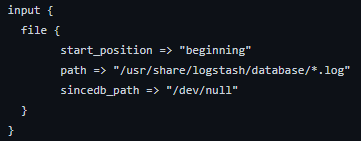
- 我已经将配置文件的路径指向容器内卷的路径:
页面原文内容由Stack Overflow提供。腾讯云小微IT领域专用引擎提供翻译支持
原文链接:
https://stackoverflow.com/questions/67471801
复制相关文章
相似问题
腾讯云开发者

Copyright © 2013 - 2026 Tencent Cloud. All Rights Reserved. 腾讯云 版权所有
深圳市腾讯计算机系统有限公司 ICP备案/许可证号:粤B2-20090059  粤公网安备44030502008569号
腾讯云计算(北京)有限责任公司 京ICP证150476号 | 京ICP备11018762号