
从火药库中获取随机对象
从火药库中获取随机对象
提问于 2021-05-10 10:15:00
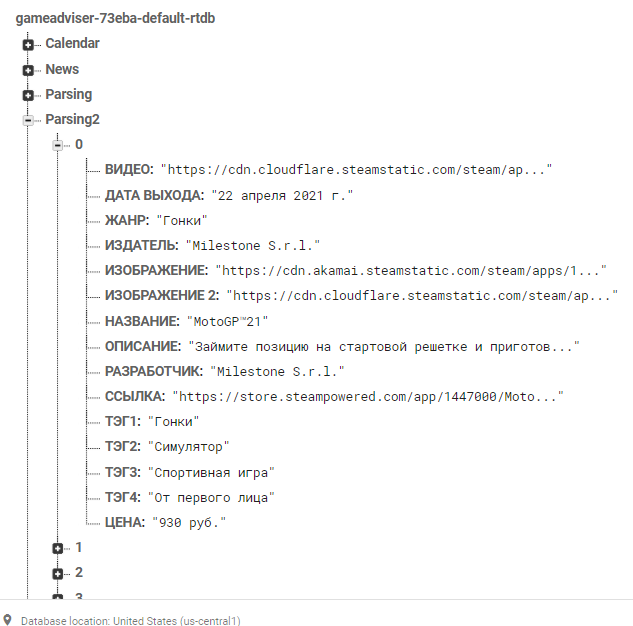
在Firebase我需要Parsing2,其中1-视频,2发行日期,3-类型,4-出版商,5-img,6-img2,7-标题,8-描述,9开发人员,10-url链接,11-14标签,15-价格。我需要在随机对象(0,n)中得到标题和img。
类描述要获取的
public class Random_game_texture {
String title;
String img;

public  Random_game_texture(String img, String title){
    this.title=title;
    this.img=img;
}

public void setTitle(String title) {
    this.title = title;
}

public void setImg(String img) {
    this.img = img;
}

public String getTitle() {
    return title;
}

public String getImg() {
    return img;
}}
随机博弈类,在需要实现从防火墙获取数据的情况下,做随机方法
  public class Random_game extends AppCompatActivity implements View.OnClickListener{

  Button random_btn, link_btn;
  TextView title;
  ImageView img;
  DatabaseReference myRef;
  ArrayList<Random_game_texture> gamesList;
  Random randomGenerator;


@Override
public void onCreate(Bundle savedInstanceState){
    super.onCreate(savedInstanceState);
    setContentView(R.layout.activity_random_game);

    ImageButton Home = (ImageButton) findViewById(R.id.home);
    Home.setOnClickListener(this);
    ImageButton Lupa = (ImageButton) findViewById(R.id.lupa);
    Lupa.setOnClickListener(this);
    ImageButton Calendar = (ImageButton) findViewById(R.id.calendar);
    Calendar.setOnClickListener(this);
    ImageButton Kubik = (ImageButton) findViewById(R.id.kubik);
    Kubik.setOnClickListener(this);
    ImageButton Profile = (ImageButton) findViewById(R.id.profile);
    Profile.setOnClickListener(this);

    random_btn=findViewById(R.id.random_game);
    link_btn=findViewById(R.id.link_page);

    title=findViewById(R.id.name_random);
    img=findViewById(R.id.img_random);

    myRef = FirebaseDatabase.getInstance().getReference();
    gamesList=new ArrayList<>();


    random_btn.setOnClickListener(new View.OnClickListener() {
        @Override
        public void onClick(View v) {


        }
    });

}


@Override
public void onClick(View v) {
    switch (v.getId()){
        case R.id.home:
            startActivity(new Intent(this, News.class));
            break;
        case R.id.lupa:
            startActivity(new Intent(this, Games.class));
            break;
        case R.id.calendar:
            startActivity(new Intent(this, Calendar.class));
            break;
        case R.id.kubik:
            startActivity(new Intent(this, Random_game.class));
            break;
        case R.id.profile:
            startActivity(new Intent(this, Profile.class));
            break;
    }
}}回答 1
Stack Overflow用户
回答已采纳
发布于 2021-05-10 11:29:49
您的节点是编号的,这样可以更容易地尝试使用我为您做的代码。在这里,我的代码说"max“和"min”放置您的第一个和最后一个节点。也不能从图像中复制和粘贴节点名称。希望它对你有用,如果不是我还是个初学者的话,很抱歉。
random_btn.setOnClickListener(new View.OnClickListener() {
    @Override
    public void onClick(View v) {
     readNodes();

    }
});//将该方法排除在onCreate()之外
private void readNodes() {

int range = ("max" - "min") + 1;
int random (int)(Math.random() * range) + "min";
String node = String.valueOf(random);


    DatabaseReference ref = myRef.child("Parsing2").child(node);

        ref.addValueEventListener(new ValueEventListener() {

            @Override
            public void onDataChange(@NonNull DataSnapshot dataSnapshot) {


                String title1 = dataSnapshot.child("title node name").getValue().toString();
                String img1 = dataSnapshot.child("img node name").getValue().toString();

                Random_game_texture randomObject = new Random_game_texture(img1, title1);

                title.setText(randomObject.getTitle());
                img.setText(randomObject.getImg());

            }

            @Override
            public void onCancelled(@NonNull DatabaseError error) {


            }


        });


}页面原文内容由Stack Overflow提供。腾讯云小微IT领域专用引擎提供翻译支持
原文链接:
https://stackoverflow.com/questions/67468645
复制相关文章
相似问题
腾讯云开发者

Copyright © 2013 - 2026 Tencent Cloud. All Rights Reserved. 腾讯云 版权所有
深圳市腾讯计算机系统有限公司 ICP备案/许可证号:粤B2-20090059  粤公网安备44030502008569号
腾讯云计算(北京)有限责任公司 京ICP证150476号 | 京ICP备11018762号