
Qml垂直Tabbar
Qml垂直Tabbar
提问于 2021-05-11 14:26:04
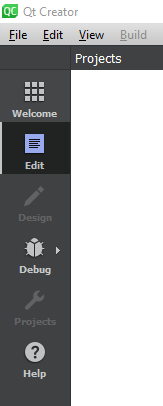
我想将垂直TabBar添加到我的应用程序中,其方式与Qt Creater在应用程序中所做的类似(如图所示)。我一直在探索如何简单地使TabBar垂直,但却没有找到正确的答案(认为垂直化是很常见的)。
问题:如何制作一个垂直选项卡来浏览我拥有的不同的qml文件?如果有更合适的选择,请建议。
回答 2
Stack Overflow用户
回答已采纳
发布于 2021-05-11 14:41:03
TabBar只是使用一个普通的ListView来显示一堆TabButtons。您可以通过覆盖contentItem属性并使ListView垂直化来自定义它,如下所示:
// VertTabBar.qml
TabBar {
    id: control

    contentItem: ListView {
        model: control.contentModel
        currentIndex: control.currentIndex

        spacing: control.spacing
        orientation: ListView.Vertical   // <<-- VERTICAL
        boundsBehavior: Flickable.StopAtBounds
        flickableDirection: Flickable.AutoFlickIfNeeded
        snapMode: ListView.SnapToItem

        highlightMoveDuration: 0
        highlightRangeMode: ListView.ApplyRange
        preferredHighlightBegin: 40
        preferredHighlightEnd: height - 40
    }
}Stack Overflow用户
发布于 2022-10-29 23:10:51
--使用融合主题.的完整示例
设置TabButton的宽度很重要,否则宽度除以项目数。
注意到有一条浅色分隔线,它来自于?
问题:第一项可以部分剪裁。
好吧,有很多东西在罩下的QML.
因此,我们不能真正使垂直.
import QtQuick
import QtQuick.Controls
import QtQuick.Layouts

import QtQuick.Templates as T
// import QtQuick.Controls.impl
// import QtQuick.Controls.Fusion
// import QtQuick.Controls.Fusion.impl

Page {
    id: root
    width: 1800
    height: 800

    Row {
        anchors.fill: parent

        TabBar {
            id: control
            width: 200
            height: parent.height

            contentItem: ListView {
                model: control.contentModel
                currentIndex: control.currentIndex

                spacing: control.spacing
                orientation: ListView.Vertical
                boundsBehavior: Flickable.StopAtBounds
                flickableDirection: Flickable.AutoFlickIfNeeded
                snapMode: ListView.SnapToItem

                highlightMoveDuration: 0
                highlightRangeMode: ListView.ApplyRange
                preferredHighlightBegin: 40
                preferredHighlightEnd: width - 40
            }

            Repeater {
                model: 50
                TabButton {
                    id: control2
                    width: control.width
                    text: "tab blabla blabla %1".arg(model.index)

                    contentItem: IconLabel {
                        spacing: control2.spacing
                        mirrored: control2.mirrored
                        display: control2.display

                        icon: control2.icon
                        text: control2.text
                        font: control2.font
                        color: control2.palette.buttonText
                    }

                    background: Rectangle {
                        y: control2.checked || control2.TabBar.position !== T.TabBar.Header ? 0 : 2
                        implicitHeight: 21
                        height: control2.height - (control2.checked ? 0 : 2)

                        border.color: Qt.lighter(Fusion.outline(control2.palette), 1.1)
                        border.width: 0

                        gradient: Gradient {
                            GradientStop {
                                position: 0
                                color: control2.checked ? Qt.lighter(Fusion.tabFrameColor(control2.palette), 1.04)
                                    : Qt.darker(Fusion.tabFrameColor(control2.palette), 1.08)
                            }
                            GradientStop {
                                position: control2.checked ? 0 : 0.85
                                color: control2.checked ? Qt.lighter(Fusion.tabFrameColor(control2.palette), 1.04)
                                    : Qt.darker(Fusion.tabFrameColor(control2.palette), 1.08)
                            }
                            GradientStop {
                                position: 1
                                color: control2.checked ? Fusion.tabFrameColor(control2.palette)
                                    : Qt.darker(Fusion.tabFrameColor(control2.palette), 1.16)
                            }
                        }
                    }
                }
            }
        }

        StackLayout {
            id: stack_layout
            width: parent.width - 200
            height: parent.height

            currentIndex: control.currentIndex

            Repeater {
                model: 50
                Item {
                    Label {
                        anchors.centerIn: parent
                        text: "tab %1".arg(model.index)
                        font.pixelSize: 50
                    }
                }
            }
        }
    }
}页面原文内容由Stack Overflow提供。腾讯云小微IT领域专用引擎提供翻译支持
原文链接:
https://stackoverflow.com/questions/67488758
复制相关文章
相似问题
腾讯云开发者

Copyright © 2013 - 2026 Tencent Cloud. All Rights Reserved. 腾讯云 版权所有
深圳市腾讯计算机系统有限公司 ICP备案/许可证号:粤B2-20090059  粤公网安备44030502008569号
腾讯云计算(北京)有限责任公司 京ICP证150476号 | 京ICP备11018762号