
在自定义域/URL公开Kong API网关
在自定义域/URL公开Kong API网关
提问于 2021-05-13 15:50:40
我已经在文档这里之后设置了Kong API网关。使用下面的curl命令,我可以确认Kong已经启动并通过本地主机进行响应。
curl -i http://localhost:8001/services

    HTTP/1.1 200 OK
    Date: Thu, 13 May 2021 15:39:32 GMT
    Content-Type: application/json; charset=utf-8
    Connection: keep-alive
    Access-Control-Allow-Origin: http://localhost:8002
    X-Kong-Admin-Request-ID: xeUkwshQPRXA5T9bPQmxsmPcspJCGU2L
    vary: Origin
    Access-Control-Allow-Credentials: true
    Content-Length: 23
    X-Kong-Admin-Latency: 5
    Server: kong/2.3.3.2-enterprise-edition
我的问题是,对于生产,如何配置Kong响应DNS/URL?
我已在AWS 53号干线上建立了DNS记录,以便将流量指向部署Kong的服务器的IP。有了一个独立的应用程序--一个用于exmaple的Node/Express应用程序,我会设置一个反向代理ie NGINX,将接收到的请求从URL发送到应用程序。然而,由于Kong是API网关,这是不合适的。
总结;
- 我想从客户端向网关发出API请求,地址是:http://my-gateway-url.com/service-name/route
- 此请求应由Kong处理,并由配置的服务处理。我如何配置空在http://my-gateway-url.com上收听?
回答 1
Stack Overflow用户
回答已采纳
发布于 2021-05-13 20:13:28
如果您希望基于主机进行路由,这是一个经典特征。
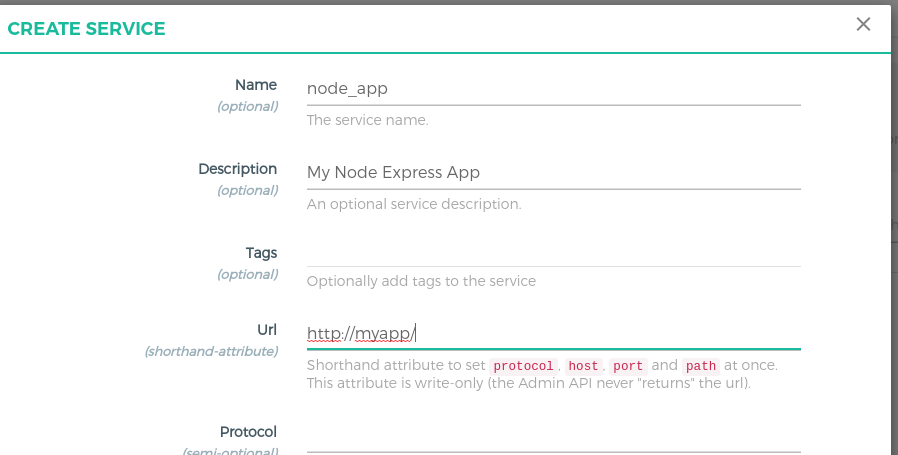
首先创建一个服务(您的节点应用程序):
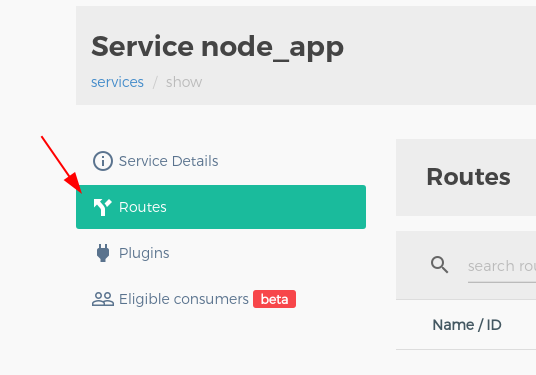
然后创建一条路线:
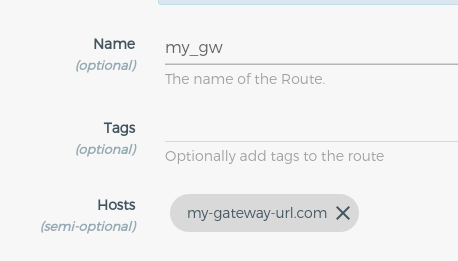
然后,您可以测试路由是否匹配。
curl -i --header 'kong-debug: 1' http://my-gateway-url.com:8000

HTTP/1.1 502 Bad Gateway
Date: Fri, 14 May 2021 08:11:54 GMT
Content-Type: text/plain; charset=utf-8
Connection: keep-alive
Kong-Route-Id: 9f5584d7-4ac5-4720-a90c-f809c47faf8d
Kong-Route-Name: my_gw
Kong-Service-Id: 77443f69-80f4-49ea-b910-77eebdeb9385
Kong-Service-Name: node_app
Server: kong/2.0.3
Content-Length: 58
与
curl -i --header 'kong-debug: 1' 0.0.0.0:8000
HTTP/1.1 404 Not Found
Date: Thu, 13 May 2021 20:11:23 GMT
Content-Type: application/json; charset=utf-8
Connection: keep-alive
Content-Length: 48

{"message":"no Route matched with those values"}
另一件要检查的事情是,您不能公开80或8000的端口,并检查路由是否在您的安全级别上打开(例如AWS上的安全组)。
页面原文内容由Stack Overflow提供。腾讯云小微IT领域专用引擎提供翻译支持
原文链接:
https://stackoverflow.com/questions/67522264
复制相关文章
相似问题
腾讯云开发者

Copyright © 2013 - 2026 Tencent Cloud. All Rights Reserved. 腾讯云 版权所有
深圳市腾讯计算机系统有限公司 ICP备案/许可证号:粤B2-20090059  粤公网安备44030502008569号
腾讯云计算(北京)有限责任公司 京ICP证150476号 | 京ICP备11018762号