
计算机视觉:改进兴趣区域分割
计算机视觉:改进兴趣区域分割
提问于 2021-05-14 23:14:31
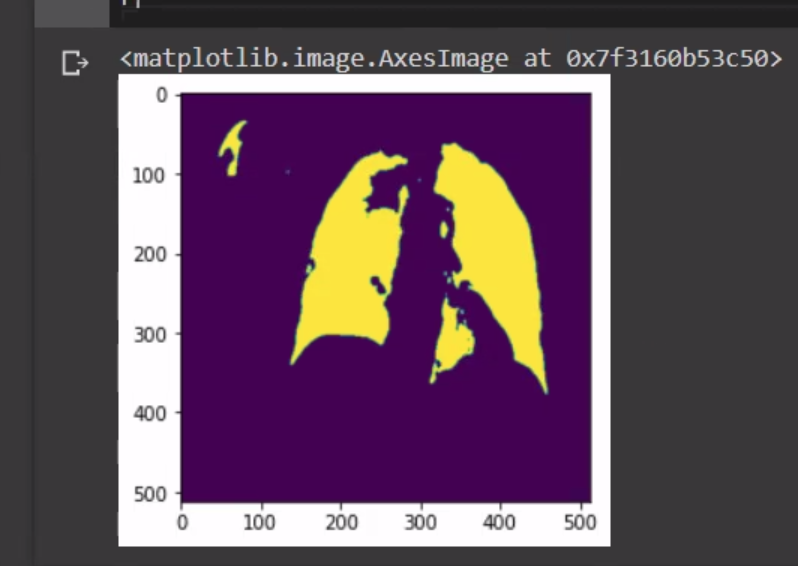
我在x射线上运行了一个unet模型,用于肺区域分割,这个模型看起来很好,但是我的数据集不太好看,我正在获得一些缺少部分的结果,如下所示:
我的问题是:是否有任何cv操作符,我可以预先准备,使它更平滑一点,以获得这样的东西:
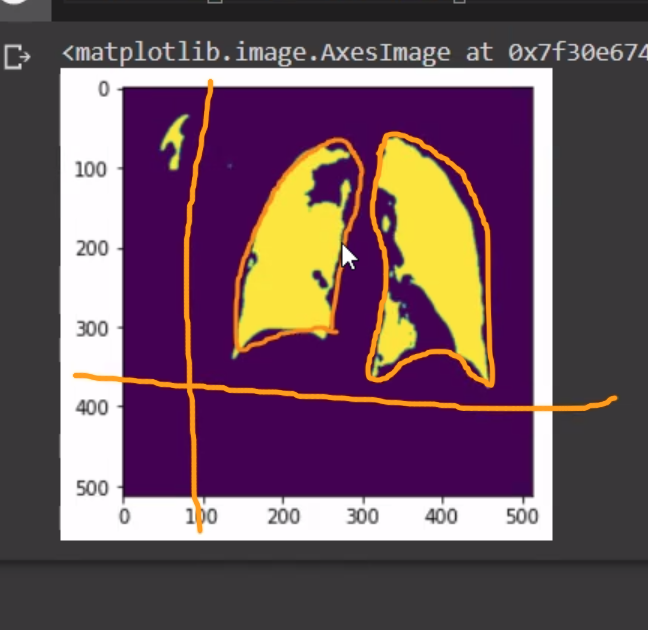
谢谢。
回答 1
Stack Overflow用户
回答已采纳
发布于 2021-05-14 23:42:19
您描述的内容可以通过morphology实现。形态学操作是一组影响图像整体形状的(逻辑)操作。它可以“扩展”或“缩小”形状区域,以及许多其他冷操作。
让我们用一个膨胀来扩展你的图像的形状:
# Imports
import cv2
import numpy as np

# Read image
imagePath = "D://opencvImages//"
inputImage = cv2.imread(imagePath+"lungs.png")

# Convert BGR back to grayscale:
grayInput = cv2.cvtColor(inputImage, cv2.COLOR_BGR2GRAY)

# Threshold via Otsu + bias adjustment:
threshValue, binaryImage = cv2.threshold(grayInput, 0, 255, cv2.THRESH_BINARY+cv2.THRESH_OTSU)
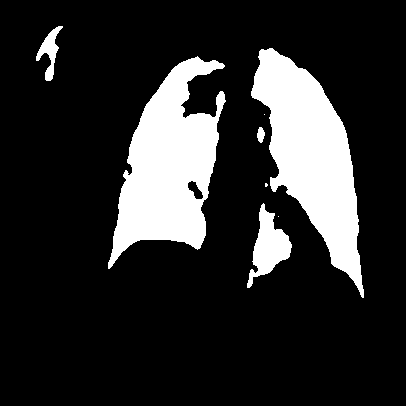
这个第一位将你上传的图像转换为二值图像,因为形态学操作只能在1通道图像(也是灰度图像)上执行,但是由于我们将应用基本的扩展,二值图像就足够了。这是上述片段的结果:
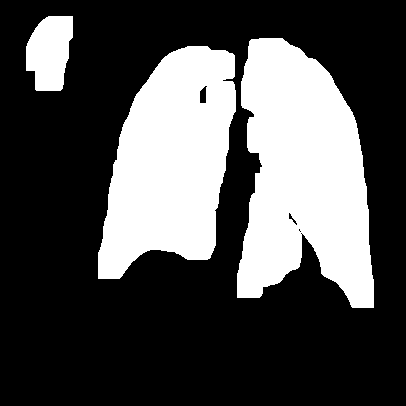
让我们应用dilation。可以连续应用该操作,因此可以指定多个iterations。既然您想要一个比较强的效果,那么让我们试试10 iterations。操作需要第二个操作数,名为"Structuring“(SE),它选择形状定义的子区域中的像素。SE有不同的类型,其中最常见的是3 x 3 rectangular SE。
# Set morph operation iterations:
opIterations = 10
# Set Structuring Element size:
structuringElementSize = (3, 3)
# Set Structuring element shape:
structuringElementShape = cv2.MORPH_RECT
# Get the Structuring Element:
structuringElement = cv2.getStructuringElement(structuringElementShape, structuringElementSize)

# Perform Dilate:
dilateImg = cv2.morphologyEx(binaryImage, cv2.MORPH_DILATE, structuringElement, None, None, opIterations, cv2.BORDER_REFLECT101)

# Show the image:
cv2.imshow("dilateImg", dilateImg)
cv2.waitKey(0)
其结果是:
页面原文内容由Stack Overflow提供。腾讯云小微IT领域专用引擎提供翻译支持
原文链接:
https://stackoverflow.com/questions/67541938
复制相关文章
相似问题
腾讯云开发者

Copyright © 2013 - 2026 Tencent Cloud. All Rights Reserved. 腾讯云 版权所有
深圳市腾讯计算机系统有限公司 ICP备案/许可证号:粤B2-20090059  粤公网安备44030502008569号
腾讯云计算(北京)有限责任公司 京ICP证150476号 | 京ICP备11018762号