
颤振:用子GestureDetector覆盖‘GestureDetector’滚动手势
颤振:用子GestureDetector覆盖‘GestureDetector’滚动手势
提问于 2021-05-17 11:17:10
在我的应用程序中,我使用"BottomNavigationBar“和"PageView”的组合进行导航。用户可以滑动到下一页,也可以使用导航条。
在我的一个页面上,我想使用一个手势检测器来处理平移手势,无论是垂直的还是水平的。
我找不到用嵌套的GestureDetector覆盖页面视图的手势检测的方法。这意味着只处理垂直的pan手势,因为水平手势被PageView占用。
如何在不完全禁用PageViews滚动物理功能的情况下,禁用/重写仅针对该页面或小部件的PageViews手势检测?
我已经创建了我的应用程序的简化版本来隔离这个问题,并在下面附上了这个问题的视频。
任何帮助都将不胜感激!
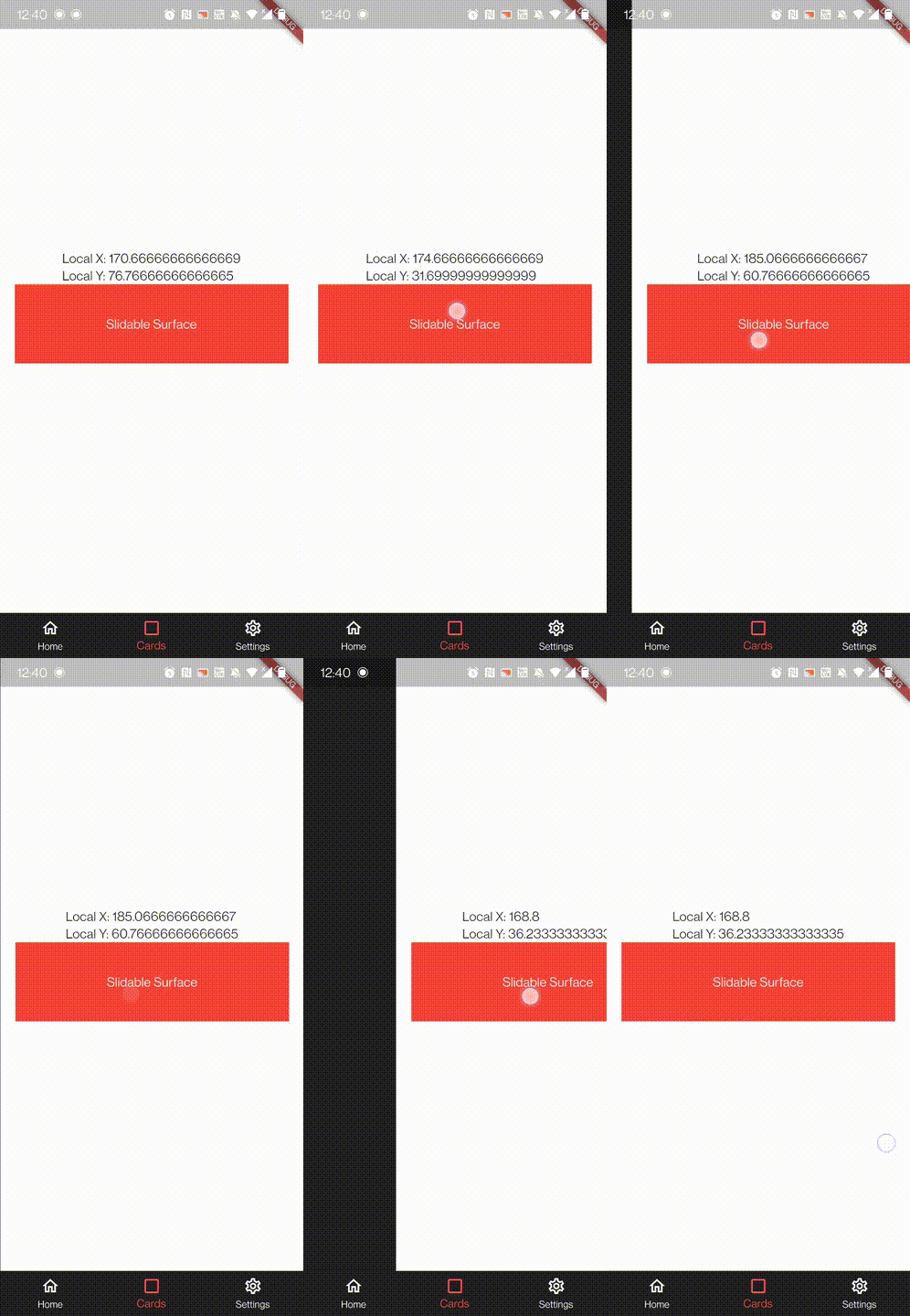
下面是我的main.dart中的代码:
import 'package:flutter/material.dart';

void main() {
  runApp(MyApp());
}

class MyApp extends StatelessWidget {
  @override
  Widget build(BuildContext context) {
    return MaterialApp(
      title: 'Flutter Demo',
      theme: ThemeData(
        primarySwatch: Colors.blue,
      ),
      home: GestureIssueExample(),
    );
  }
}

class GestureIssueExample extends StatefulWidget {
  GestureIssueExample({Key key}) : super(key: key);

  @override
  _GestureIssueExampleState createState() => _GestureIssueExampleState();
}

class _GestureIssueExampleState extends State<GestureIssueExample> {
  int _navigationIndex;
  double _xLocalValue;
  double _yLocalValue;
  PageController _pageController;
  @override
  Widget build(BuildContext context) {
    return Scaffold(
      appBar: null,
      bottomNavigationBar: _buildBottomNavigationBar(),
      backgroundColor: Colors.white,
      body: PageView(
        controller: _pageController,
        onPageChanged: _onNavigationPageChanged,
        children: [
          //Just a placeholder to represent a page to the left of the "swipe cards" widget
          _buildSamplePage("Home"),

          //Center child of 'PageView', contains a GestureDetector that handles Pan Gestures
          //Thanks to the page view however, only vertical pan gestures are detected, while both horizontal and vertical gestures
          //need to be handled...
          Container(
            width: MediaQuery.of(context).size.width,
            height: MediaQuery.of(context).size.height,
            child: Column(
              mainAxisAlignment: MainAxisAlignment.center,
              crossAxisAlignment: CrossAxisAlignment.center,
              children: [
                Text(
                    "Local X: ${_xLocalValue.toString()}\nLocal Y: ${_yLocalValue.toString()}"),
                GestureDetector(
                  onPanStart: (details) => setState(
                    () {
                      this._xLocalValue = details.localPosition.dx;
                      this._yLocalValue = details.localPosition.dy;
                    },
                  ),
                  onPanUpdate: (details) => setState(
                    () {
                      this._xLocalValue = details.localPosition.dx;
                      this._yLocalValue = details.localPosition.dy;
                    },
                  ),
                  child: Container(
                    width: MediaQuery.of(context).size.width * 0.9,
                    height: 100.0,
                    color: Colors.red,
                    alignment: Alignment.center,
                    child: Text("Slidable Surface",
                        style: TextStyle(color: Colors.white)),
                  ),
                ),
              ],
            ),
          ),

          //Just a placeholder to represent a page to the right of the "swipe cards" widget
          _buildSamplePage("Settings"),
        ],
      ),
    );
  }

  @override
  void initState() {
    super.initState();
    this._navigationIndex = 0;
    this._pageController = PageController(
      initialPage: _navigationIndex,
    );
  }

  Widget _buildSamplePage(String text) {
    // This simply returns a container that fills the page,
    // with a text widget in its center.

    return Container(
      width: MediaQuery.of(context).size.width,
      height: MediaQuery.of(context).size.height,
      color: Colors.grey[900],
      alignment: Alignment.center,
      child: Text(
        text,
        style: TextStyle(
            color: Colors.white, fontSize: 30.0, fontWeight: FontWeight.bold),
      ),
    );
  }

  Widget _buildBottomNavigationBar() {
    //Returns the bottom navigation bar for the scaffold
    return BottomNavigationBar(
      backgroundColor: Colors.grey[900],
      selectedItemColor: Colors.redAccent,
      unselectedItemColor: Colors.white,
      items: [
        BottomNavigationBarItem(icon: Icon(Icons.home_outlined), label: "Home"),
        BottomNavigationBarItem(
            icon: Icon(Icons.check_box_outline_blank), label: "Cards"),
        BottomNavigationBarItem(
            icon: Icon(Icons.settings_outlined), label: "Settings"),
      ],
      currentIndex: _navigationIndex,
      onTap: _onNavigationPageChanged,
    );
  }

  void _onNavigationPageChanged(int newIndex) {
    //Set the new navigation index for the nav bar
    setState(() => this._navigationIndex = newIndex);

    //Animate to the selected page
    _pageController.animateToPage(
      newIndex,
      curve: Curves.easeInOut,
      duration: Duration(microseconds: 100),
    );
  }
}回答 1
Stack Overflow用户
回答已采纳
发布于 2021-05-17 11:34:01
你能试试这样的东西吗?
将这一行添加到PageView中
PageView(
...
physics: _navigationIndex == 1 ? NeverScrollableScrollPhysics() : AlwaysScrollableScrollPhysics(),
...
)注意:数字1是因为带有GestureDetector的页面位于索引1上。
页面原文内容由Stack Overflow提供。腾讯云小微IT领域专用引擎提供翻译支持
原文链接:
https://stackoverflow.com/questions/67568625
复制相关文章
相似问题
腾讯云开发者

Copyright © 2013 - 2026 Tencent Cloud. All Rights Reserved. 腾讯云 版权所有
深圳市腾讯计算机系统有限公司 ICP备案/许可证号:粤B2-20090059  粤公网安备44030502008569号
腾讯云计算(北京)有限责任公司 京ICP证150476号 | 京ICP备11018762号