
怎么才能像这样踏入SBCL?
我对通用Lisp很陌生,我正在使用SBCL、Slime和Emacs来学习。
在阅读“通用Lisp:符号计算的绅士介绍”一书时,作者提到了STEP工具,它有助于调试并能够做到这一点:
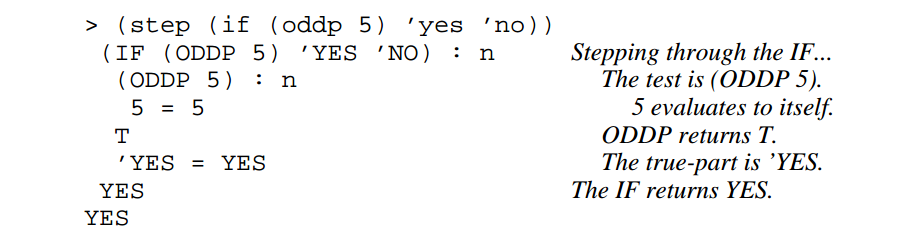
这并不是100%清楚的斜体文本是来自作者还是工具本身。可能只是作者的评论。
然而,即使我不考虑斜体,我是无法生成这样的描述性信息。
如果我使用只是SBCL的REPL,我得到:
* (step (if (oddp 5) 'yes 'no))
YES
如果我使用Emacs中的REPL和Slime,我得到:
CL-USER> (step (if (oddp 5) 'yes 'no))
YES
提交人说:
Common的每个实现都提供了自己版本的这个工具;只有名称已经标准化了。
如果我在Emacs/Slime中尝试使用相同的功能,我会得到更多的信息:
(defun my-abs (x)
  (cond ((> x 0) x)
    ((< x 0) (- x))
    (t 0)))
在REPL上使用上面的定义和下面的命令:
CL-USER> (step (my-abs 10))我得到:
Evaluating call:
  (MY-ABS 10)
With arguments:
  10
   [Condition of type STEP-FORM-CONDITION]

Restarts:
 0: [STEP-CONTINUE] Resume normal execution
 1: [STEP-OUT] Resume stepping after returning from this function
 2: [STEP-NEXT] Step over call
 3: [STEP-INTO] Step into call
 4: [RETRY] Retry SLIME REPL evaluation request.
 5: [*ABORT] Return to SLIME's top level.
 --more--

Backtrace:
  0: ((LAMBDA ()))
  1: (SB-INT:SIMPLE-EVAL-IN-LEXENV (LET ((SB-IMPL::*STEP-OUT* :MAYBE)) (UNWIND-PROTECT (SB-IMPL::WITH-STEPPING-ENABLED #))) #S(SB-KERNEL:LEXENV :FUNS NIL :VARS NIL :BLOCKS NIL :TAGS NIL :TYPE-RESTRICTIONS ..
  2: (SB-INT:SIMPLE-EVAL-IN-LEXENV (STEP (MY-ABS 10)) #<NULL-LEXENV>)
  3: (EVAL (STEP (MY-ABS 10)))
 --more--
不幸的是,这些选择似乎没有给我我想要的(这可能是一个错误的解释对我的一方)。
我希望看到这样的情况:
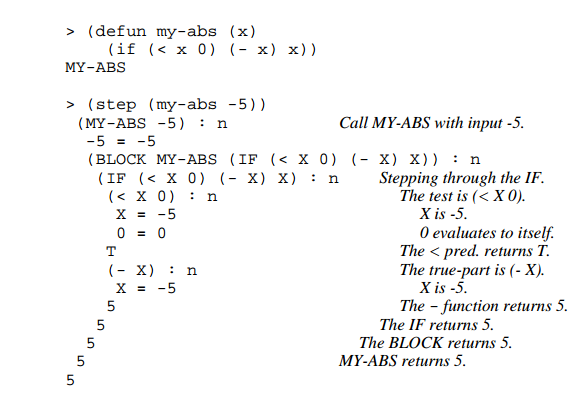
黏液似乎是一个彻底的工具。我可能漏掉了什么。
是否有一种方法可以使用SLIME或SBCL生成与该书描述的输出相同的输出?
回答 2
Stack Overflow用户
发布于 2021-05-19 08:20:11
看起来,作者使用的是LispWorks的步骤。
用LispWorks
下面是我的步骤会话,使用:s对当前表单及其所有子表单进行分步。
CL-USER 5 > (step (my-abs -5))
(MY-ABS -5) -> :s
   -5 -> :s
   -5
   (COND ((> X 0) X) ((< X 0) (- X)) (T 0)) <=> (IF (> X 0) (PROGN X) (IF (< X 0) (- X) (PROGN 0)))
   (IF (> X 0) (PROGN X) (IF (< X 0) (- X) (PROGN 0))) -> :s
      (> X 0) -> :s
         X -> :s
         -5
         0 -> :s
         0
      NIL
      (IF (< X 0) (- X) (PROGN 0)) -> :s
         (< X 0) -> :s
            X -> :s
            -5
            0 -> :s
            0
         T
         (- X) -> :s
            X -> :s
            -5
         5
      5
   5
5
5帮助在:?上
 :?

:s       Step this form and all of its subforms (optional +ve integer arg)
:st      Step this form without stepping its subforms
:si      Step this form without stepping its arguments if it is a function call
:su      Step up out of this form without stepping its subforms
:sr      Return a value to use for this form
:sq      Quit from the current stepper level
:bug-form <subject> &key <filename>
         Print out a bug report form, optionally to a file.
:get <variable> <command identifier>
         Get a previous command (found by its number or a symbol/subform within it) and put it in a variable.
:help    Produce this list.
:his &optional <n1> <n2>
         List the command history, optionally the last n1 or range n1 to n2.
:redo &optional <command identifier>
         Redo a previous command, found by its number or a symbol/subform within it.
:use <new> <old> &optional <command identifier>
         Do variant of a previous command, replacing old symbol/subform with new symbol/subform.
对于编译后的代码,它还有一个可视步骤,您可以按一个红色按钮来设置断点,查看中间变量的变化等等。
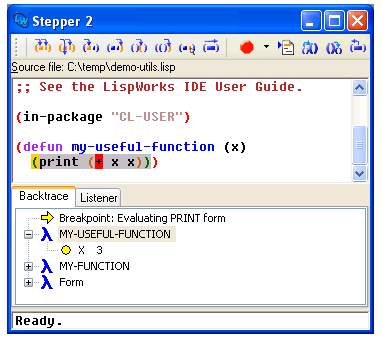
LispWorks是一个专有的实现和IDE,它有一个免费但有限的版本。我刚刚写了评议,应该合并到烹饪簿上。
跟踪和打印
你认识trace吗?印字,一个外部库,是类固醇的痕迹。它们类似于你所欣赏的输出。
(defun factorial (n)
  (if (plusp n)
    (* n (factorial (1- n)))
1))(trace factorial)
(factorial 2)
0: (FACTORIAL 3)
1: (FACTORIAL 2)
2: (FACTORIAL 1)
3: (FACTORIAL 0)
3: FACTORIAL returned 1
2: FACTORIAL returned 1
1: FACTORIAL returned 2
0: FACTORIAL returned 6
6
(untrace factorial)printv打印代码和返回的值。
(printv:printv
           (+ 2 3)
           *print-case*
           *package*
           'symbol
           (let* ((x 0) (y (1+ x)) (z (1+ y)))
             (values x y z)))
;;;   (+ 2 3) => 5
;;;   *PRINT-CASE* => :UPCASE
;;;   *PACKAGE* => #<PACKAGE "ISSR-TEST">
;;;   'SYMBOL => SYMBOL
;;;   (LET* ((X 0) (Y (1+ X)) (Z (1+ Y)))
        (VALUES X Y Z)) =>
           [ [X=0]  [Y=1]  [Z=2] ]
;;; => 0, 1, 2Stack Overflow用户
发布于 2021-05-19 06:07:20
正如上面有人建议的那样,SBCL在默认情况下确实优化了很多,默认情况下也进行了编译。下面是我为创建一个示例所做的工作:
- 我首先通过运行“建议的优化”来弥补“坏值”。
(declaim (optimize (debug 3) (space 0) (speed 0)))- 然后,我定义了一个函数,它不仅仅是一个
if条件,因为这类事情总是内联的,不幸的是(尽管您可能尝试过(declaim (notinline ...)),但我没有这样做。一种方法是创建一个调用另一个函数的函数,比如:
(defun foo () "hey!")

(defun bar () (foo))- 现在,当我运行
(step (bar))时,我看到了您在上面的问题中共享的调试器窗格,如果我现在选择选项#3,进入,我会得到相同的窗格,但现在像希望的那样将焦点集中在对foo的调用上。
祝好运!
一些参考资料:
- “单步”手册:http://www.sbcl.org/manual/#Single-Stepping
- “调试器策略控制”手册:http://www.sbcl.org/manual/#Debugger-Policy-Control
https://stackoverflow.com/questions/67591748
复制相似问题
腾讯云开发者

Copyright © 2013 - 2026 Tencent Cloud. All Rights Reserved. 腾讯云 版权所有
深圳市腾讯计算机系统有限公司 ICP备案/许可证号:粤B2-20090059  粤公网安备44030502008569号
腾讯云计算(北京)有限责任公司 京ICP证150476号 | 京ICP备11018762号