
码头ActiveMQ Artemis显示空屏幕
短版
当我在码头上运行ActiveMQ Artemis时,我看到这个基本上是空屏幕:
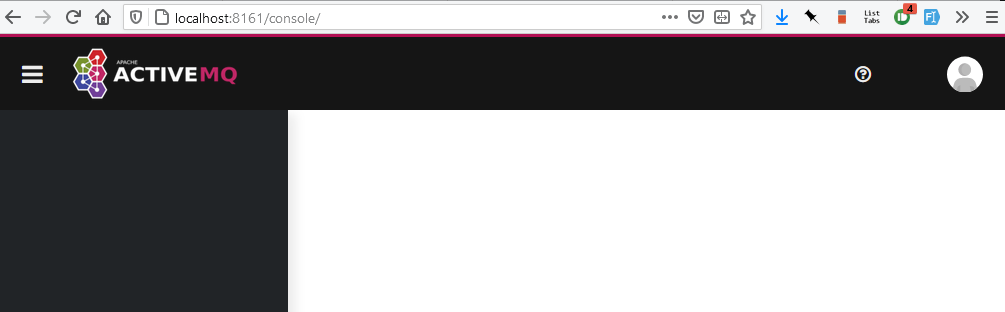
看起来不太对劲..。我以为会这样,就像我在使用zip文件时得到的一样:
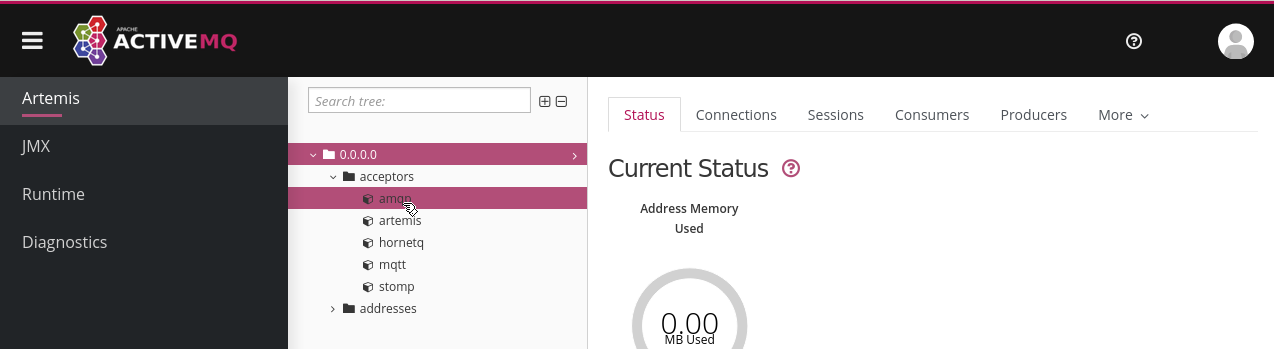
不管我使用的是坞文件还是压缩文件,不管我输入了什么用户名或密码,我都可以登录,这有点让人担心.
我做错了什么?
较长版本
我正在尝试一个"Hello“风格的ActiveMQ安装。听起来我应该使用ActiveMQ Artemis。我们将在Kubernetes上使用这个,所以我找到并跟踪了https://artemiscloud.io/。头版上有一个快速部署运行代理的基本容器映像。它建议:
docker run -e AMQ_USER=admin -e AMQ_PASSWORD=admin -p80:8161 --name artemis quay.io/artemiscloud/activemq-artemis-broker:dev.latest我将端口更改为-p8161:8161,并使用Docker运行它。访问http://localhost:8161/console/给我看了上面的第一张截图。
如果我从https://activemq.apache.org/components/artemis/download/下载并跟随https://activemq.apache.org/components/artemis/documentation/latest/using-server.html,我会得到第二个截图。
不管我是使用docker还是zip文件,输入什么用户名或密码都不重要,我只需登录即可。
全码头控制台日志
» docker run -e AMQ_USER=admin -e AMQ_PASSWORD=admin -p8161:8161 --name artemis quay.io/artemiscloud/activemq-artemis-broker:latest
Creating Broker with args --user XXXXX --password XXXXX --role admin --name broker --allow-anonymous --http-host 172.17.0.3 --host 172.17.0.3   --force
Creating ActiveMQ Artemis instance at: /home/jboss/broker

Auto tuning journal ...
done! Your system can make 1.44 writes per millisecond, your journal-buffer-timeout will be 696000

You can now start the broker by executing:

   "/home/jboss/broker/bin/artemis" run

Or you can run the broker in the background using:

   "/home/jboss/broker/bin/artemis-service" start

Running Broker
     _        _               _
    / \  ____| |_  ___ __  __(_) _____
   / _ \|  _ \ __|/ _ \  \/  | |/  __/
  / ___ \ | \/ |_/  __/ |\/| | |\___ \
 /_/   \_\|   \__\____|_|  |_|_|/___ /
 Apache ActiveMQ Artemis 2.17.0


2021-05-27 21:23:44,556 INFO  [org.apache.activemq.artemis.integration.bootstrap] AMQ101000: Starting ActiveMQ Artemis Server
2021-05-27 21:23:44,605 INFO  [org.apache.activemq.artemis.core.server] AMQ221000: live Message Broker is starting with configuration Broker Configuration (clustered=false,journalDirectory=data/journal,bindingsDirectory=data/bindings,largeMessagesDirectory=data/large-messages,pagingDirectory=data/paging)
2021-05-27 21:23:44,650 INFO  [org.apache.activemq.artemis.core.server] AMQ221012: Using AIO Journal
2021-05-27 21:23:44,694 INFO  [org.apache.activemq.artemis.core.server] AMQ221057: Global Max Size is being adjusted to 1/2 of the JVM max size (-Xmx). being defined as 1,073,741,824
2021-05-27 21:23:44,712 INFO  [org.apache.activemq.artemis.core.server] AMQ221043: Protocol module found: [artemis-server]. Adding protocol support for: CORE
2021-05-27 21:23:44,712 INFO  [org.apache.activemq.artemis.core.server] AMQ221043: Protocol module found: [artemis-amqp-protocol]. Adding protocol support for: AMQP
2021-05-27 21:23:44,713 INFO  [org.apache.activemq.artemis.core.server] AMQ221043: Protocol module found: [artemis-hornetq-protocol]. Adding protocol support for: HORNETQ
2021-05-27 21:23:44,713 INFO  [org.apache.activemq.artemis.core.server] AMQ221043: Protocol module found: [artemis-mqtt-protocol]. Adding protocol support for: MQTT
2021-05-27 21:23:44,713 INFO  [org.apache.activemq.artemis.core.server] AMQ221043: Protocol module found: [artemis-openwire-protocol]. Adding protocol support for: OPENWIRE
2021-05-27 21:23:44,714 INFO  [org.apache.activemq.artemis.core.server] AMQ221043: Protocol module found: [artemis-stomp-protocol]. Adding protocol support for: STOMP
2021-05-27 21:23:44,759 INFO  [org.apache.activemq.artemis.core.server] AMQ221034: Waiting indefinitely to obtain live lock
2021-05-27 21:23:44,760 INFO  [org.apache.activemq.artemis.core.server] AMQ221035: Live Server Obtained live lock
2021-05-27 21:23:44,832 INFO  [org.apache.activemq.artemis.core.server] AMQ221080: Deploying address DLQ supporting [ANYCAST]
2021-05-27 21:23:44,839 INFO  [org.apache.activemq.artemis.core.server] AMQ221003: Deploying ANYCAST queue DLQ on address DLQ
2021-05-27 21:23:44,880 INFO  [org.apache.activemq.artemis.core.server] AMQ221080: Deploying address ExpiryQueue supporting [ANYCAST]
2021-05-27 21:23:44,882 INFO  [org.apache.activemq.artemis.core.server] AMQ221003: Deploying ANYCAST queue ExpiryQueue on address ExpiryQueue
2021-05-27 21:23:45,148 INFO  [org.apache.activemq.artemis.core.server] AMQ221020: Started EPOLL Acceptor at 172.17.0.3:61616 for protocols [CORE,MQTT,AMQP,STOMP,HORNETQ,OPENWIRE]
2021-05-27 21:23:45,152 INFO  [org.apache.activemq.artemis.core.server] AMQ221020: Started EPOLL Acceptor at 172.17.0.3:5445 for protocols [HORNETQ,STOMP]
2021-05-27 21:23:45,155 INFO  [org.apache.activemq.artemis.core.server] AMQ221020: Started EPOLL Acceptor at 172.17.0.3:5672 for protocols [AMQP]
2021-05-27 21:23:45,158 INFO  [org.apache.activemq.artemis.core.server] AMQ221020: Started EPOLL Acceptor at 172.17.0.3:1883 for protocols [MQTT]
2021-05-27 21:23:45,162 INFO  [org.apache.activemq.artemis.core.server] AMQ221020: Started EPOLL Acceptor at 172.17.0.3:61613 for protocols [STOMP]
2021-05-27 21:23:45,167 INFO  [org.apache.activemq.artemis.core.server] AMQ221007: Server is now live
2021-05-27 21:23:45,168 INFO  [org.apache.activemq.artemis.core.server] AMQ221001: Apache ActiveMQ Artemis Message Broker version 2.17.0 [broker, nodeID=d1043ae4-bf31-11eb-8c49-0242ac110003]
2021-05-27 21:23:45,379 INFO  [org.apache.activemq.hawtio.branding.PluginContextListener] Initialized activemq-branding plugin
2021-05-27 21:23:45,413 INFO  [org.apache.activemq.hawtio.plugin.PluginContextListener] Initialized artemis-plugin plugin
2021-05-27 21:23:45,625 INFO  [io.hawt.HawtioContextListener] Initialising hawtio services
2021-05-27 21:23:45,636 INFO  [io.hawt.system.ConfigManager] Configuration will be discovered via system properties
2021-05-27 21:23:45,638 INFO  [io.hawt.jmx.JmxTreeWatcher] Welcome to Hawtio 2.11.0
2021-05-27 21:23:45,643 INFO  [io.hawt.web.auth.AuthenticationConfiguration] Starting hawtio authentication filter, JAAS realm: "activemq" authorized role(s): "admin" role principal classes: "org.apache.activemq.artemis.spi.core.security.jaas.RolePrincipal"
2021-05-27 21:23:45,656 INFO  [io.hawt.web.proxy.ProxyServlet] Proxy servlet is disabled
2021-05-27 21:23:45,660 INFO  [io.hawt.web.servlets.JolokiaConfiguredAgentServlet] Jolokia overridden property: [key=policyLocation, value=file:/home/jboss/broker/etc/jolokia-access.xml]
2021-05-27 21:23:45,727 INFO  [org.apache.activemq.artemis] AMQ241001: HTTP Server started at http://172.17.0.3:8161
2021-05-27 21:23:45,727 INFO  [org.apache.activemq.artemis] AMQ241002: Artemis Jolokia REST API available at http://172.17.0.3:8161/console/jolokia
2021-05-27 21:23:45,728 INFO  [org.apache.activemq.artemis] AMQ241004: Artemis Console available at http://172.17.0.3:8161/console
2021-05-27 21:23:54,289 INFO  [io.hawt.web.auth.LoginServlet] Hawtio login is using 1800 sec. HttpSession timeout
2021-05-27 21:23:54,968 INFO  [io.hawt.web.auth.keycloak.KeycloakServlet] Keycloak integration is disabled
2021-05-27 21:24:00,270 INFO [io.hawt.web.auth.LoginServlet] Logging in user: admin回答 1
Stack Overflow用户
发布于 2021-05-28 09:59:42
用于ArtemisCloud的ActiveMQ Artemis容器映像设计为在容器内运行,因此应该使用容器IP地址来访问控制台或其他资源。
可以使用命令docker inspect或通过读取容器日志获得容器IP地址,即:
[org.apache.activemq.artemis] AMQ241004: Artemis Console available at http://172.17.0.3:8161/consolehttps://stackoverflow.com/questions/67730226
复制相似问题
腾讯云开发者

Copyright © 2013 - 2026 Tencent Cloud. All Rights Reserved. 腾讯云 版权所有
深圳市腾讯计算机系统有限公司 ICP备案/许可证号:粤B2-20090059  粤公网安备44030502008569号
腾讯云计算(北京)有限责任公司 京ICP证150476号 | 京ICP备11018762号