
Shopee产品名称中的数据抓取没有分别显示它们的正确名称。
Shopee产品名称中的数据抓取没有分别显示它们的正确名称。
提问于 2021-06-01 16:18:07
因此,我试图使用Pycharm/Python和Selenium在Shopeee中刮取数据。以下是代码:
from selenium import webdriver
import time
import csv
from selenium.webdriver.common.keys import Keys
from selenium.webdriver.common.by import By
from selenium.webdriver.support.ui import WebDriverWait
from selenium import webdriver
PATH = "C:\Program Files (x86)\chromedriver.exe"
driver = webdriver.Chrome(PATH)

driver.get("https://shopee.ph/search?keyword=nacific&noCorrection=true&page=0&withDiscount=true")
time.sleep(2)

driver.execute_script("window.scrollTo(0, document.body.scrollHeight)")
time.sleep(3)

Categories = []
Categories.append(["NAME"])
driver.implicitly_wait(10)
products = driver.find_elements_by_xpath("//div[@class='row shopee-search-item-result__items']/div")

for product in products:
    name_p = product.find_element_by_xpath("//div[@class='yQmmFK _1POlWt _36CEnF']")

    rowData = [name_p]
    Categories.append(rowData)

with open('Shopee.csv', 'a', encoding='utf-8') as file:
    Import = csv.writer(file,lineterminator='\n')
    Import.writerows(Categories)
所以在我运行它之后.我“成功地”运行了它,但问题是:
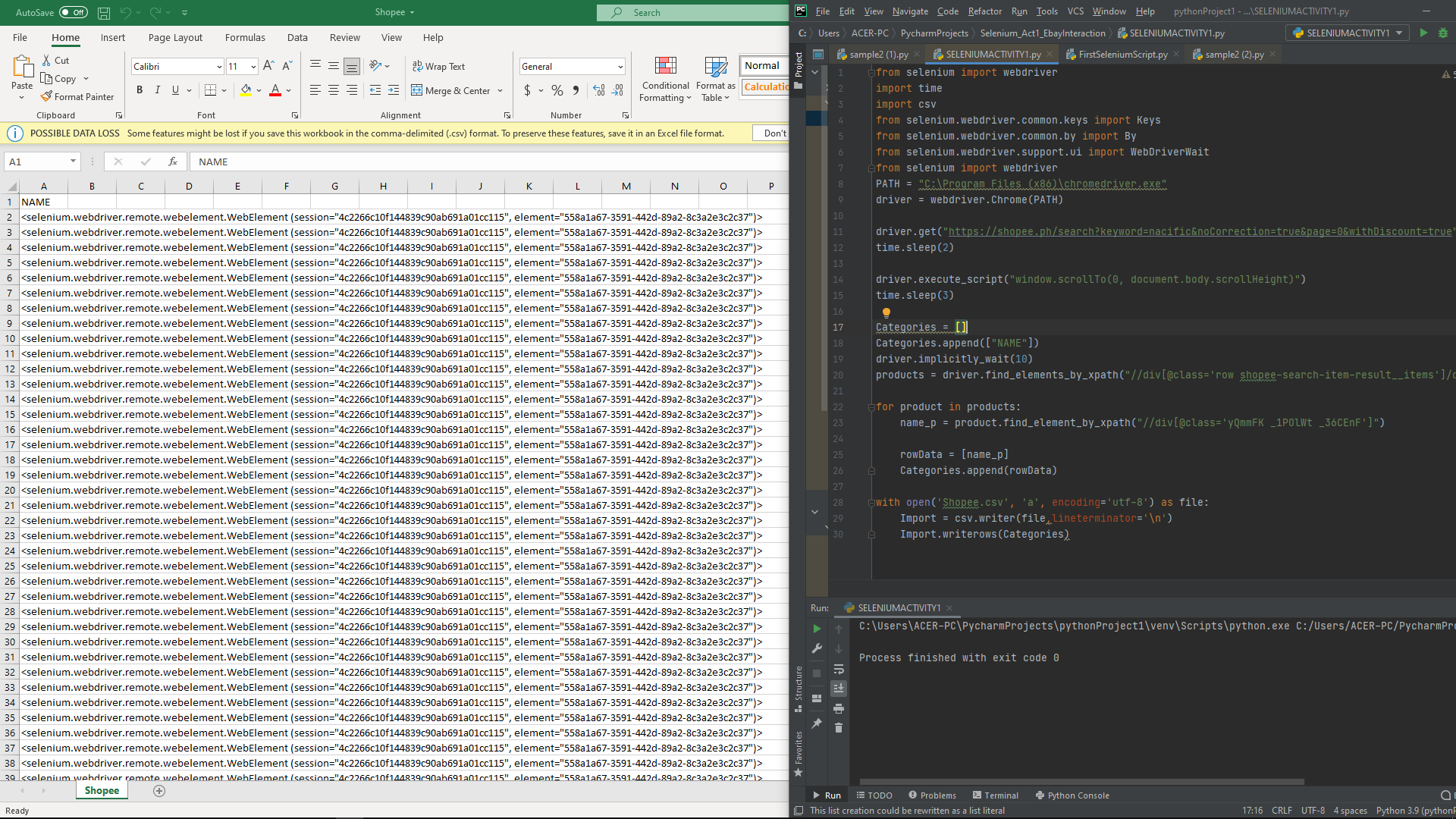
我没有显示产品的名称,而是显示了selenium.webdriver等等,我尝试通过不使用XPath并执行常规方式(find_element_by_class_name等)来更改到其他代码,但是它仍然会导致错误。我想知道它为什么不起作用?有人能帮我吗?
试图擦拭:Shopee.ph软件: Pycharm和Selenium网站
回答 1
Stack Overflow用户
发布于 2021-06-01 17:01:09
您可以使用.text从Selenium WebElements获取文本。
示例
product.find_element_by_xpath("//div[@class='yQmmFK _1POlWt _36CEnF']").text有很多方法来定位web元素。
element = driver.find_element_by_id("passwd-id")
element = driver.find_element_by_name("passwd")
element = driver.find_element_by_xpath("//input[@id='passwd-id']")
element = driver.find_element_by_css_selector("input#passwd-id")你可以在这里找到文件。https://selenium-python.readthedocs.io/navigating.html
我还修正了你的一些代码。这里
products = driver.find_elements_by_class_name('yQmmFK')

for product in products:
    name_p = product.text
    rowData = [name_p]
    Categories.append(rowData)
driver.close()页面原文内容由Stack Overflow提供。腾讯云小微IT领域专用引擎提供翻译支持
原文链接:
https://stackoverflow.com/questions/67792507
复制相关文章
相似问题
腾讯云开发者

Copyright © 2013 - 2026 Tencent Cloud. All Rights Reserved. 腾讯云 版权所有
深圳市腾讯计算机系统有限公司 ICP备案/许可证号:粤B2-20090059  粤公网安备44030502008569号
腾讯云计算(北京)有限责任公司 京ICP证150476号 | 京ICP备11018762号