
CardView cardElevation在CardView中绘制随机方格
CardView cardElevation在CardView中绘制随机方格
提问于 2021-06-03 02:40:49
一个简单的问题是,我使用CardView将提升添加到按钮中,但是当分配cardElevation时,CardView在自己的内部绘制一个框,我尝试切换海拔和其他属性,我可以通过增加cardElevation来最小化它的影响,但这不是一个解决方案。
以下是来自XML的CardView。
  <androidx.cardview.widget.CardView
            android:layout_width="38sp"
            android:layout_height="38sp"
            app:cardElevation="5sp"
            android:layout_gravity="end"
            android:layout_marginTop="60sp"
            android:layout_marginRight="12sp"
            android:layout_marginEnd="12sp"
app:cardBackgroundColor="#97FFFFFF"></androidx.cardview.widget.CardView>应用程序中的CardView。(右上角的框)
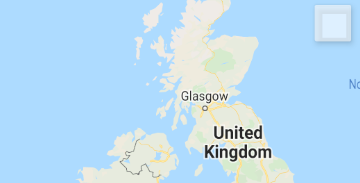
整个XML文件,最后一个CardView是图像上的那个。
<?xml version="1.0" encoding="utf-8"?>
<com.flipboard.bottomsheet.BottomSheetLayout
    android:id="@+id/bottomsheet"
    android:layout_width="match_parent"
    android:layout_height="match_parent"
    xmlns:android="http://schemas.android.com/apk/res/android"
    xmlns:app="http://schemas.android.com/apk/res-auto">

<fragment xmlns:android="http://schemas.android.com/apk/res/android"
    xmlns:tools="http://schemas.android.com/tools"
    android:id="@+id/map"
    android:name="com.google.android.gms.maps.SupportMapFragment"
    android:layout_width="match_parent"
    android:layout_height="match_parent"
    tools:context=".ui.map.MapFragment">

    <LinearLayout
        android:layout_height="match_parent"
        android:layout_width="match_parent"
        android:orientation="vertical">

    <androidx.cardview.widget.CardView
        android:layout_width="wrap_content"
        android:layout_height="wrap_content"
        app:cardElevation="20dp"
        android:layout_gravity="end"
        android:layout_marginTop="60dp"
        android:layout_marginRight="12dp"
        android:layout_marginEnd="12dp"
        app:cardBackgroundColor="#97FFFFFF">

      <ImageButton
          android:layout_width="38dp"
          android:layout_height="38dp"
          android:padding="1dp"
          android:src="@drawable/ic_baseline_refresh_24"
          android:background="#00FFFFFF"
          android:elevation="10dp"
          android:id="@+id/btn_reset_map"/>
    </androidx.cardview.widget.CardView>

        <androidx.cardview.widget.CardView
            android:layout_width="wrap_content"
            android:layout_height="wrap_content"
            app:cardElevation="20dp"
            android:layout_gravity="end"
            android:layout_marginTop="10dp"
            android:layout_marginRight="12dp"
            android:layout_marginEnd="12dp"
            app:cardBackgroundColor="#97FFFFFF">

            <ImageButton
                android:layout_width="38dp"
                android:layout_height="38dp"
                android:padding="1dp"
                android:src="@drawable/ic_baseline_layers_24"
                android:background="#00FFFFFF"
                android:elevation="10dp"
                android:id="@+id/btn_layer_map"/>
        </androidx.cardview.widget.CardView>

        <androidx.cardview.widget.CardView
            android:layout_width="38dp"
            android:layout_height="38dp"
            app:cardElevation="5dp"
            android:layout_gravity="end"
            android:layout_marginTop="40dp"
            android:layout_marginRight="12dp"
            android:layout_marginEnd="12dp"
            app:cardBackgroundColor="#97FFFFFF"></androidx.cardview.widget.CardView>

    </LinearLayout>
</fragment>

</com.flipboard.bottomsheet.BottomSheetLayout>回答 2
Stack Overflow用户
回答已采纳
发布于 2021-06-03 03:14:45
可以以编程方式将CardView背景色设置为与使用app:cardBackgroundColor设置的颜色相同的颜色。
CardView cardview = findViewById(R.id.cardview);
cardview.setBackgroundColor(ContextCompat.getColor(this, R.color.cardview_color));
并在colors.xml中创建此颜色
<color name="cardview_color">#97FFFFFF</color>并将此id添加到xml中:
  <androidx.cardview.widget.CardView
      android:id="@+id/cardview"
....注意:由于某些原因,android:background="#97FFFFFF"无法工作
Stack Overflow用户
发布于 2022-05-11 13:20:57
设置android:outlineProvider="none"为我解决了这个问题
页面原文内容由Stack Overflow提供。腾讯云小微IT领域专用引擎提供翻译支持
原文链接:
https://stackoverflow.com/questions/67814722
复制相关文章
相似问题
腾讯云开发者

Copyright © 2013 - 2026 Tencent Cloud. All Rights Reserved. 腾讯云 版权所有
深圳市腾讯计算机系统有限公司 ICP备案/许可证号:粤B2-20090059  粤公网安备44030502008569号
腾讯云计算(北京)有限责任公司 京ICP证150476号 | 京ICP备11018762号