
当前的SpringBoot OAuth2方法
我花了两天时间为一个SpringBoot OAuth2客户端学习各种教程。每个人看起来都有点不同。此外,由于没有找到给定的包,所以它们都没有工作。
https://www.baeldung.com/spring-webclient-oauth2
https://www.baeldung.com/spring-security-5-oauth2-login#setup
https://github.com/spring-projects/spring-security/wiki/OAuth-2.0-Migration-Guide ...
可能是我弄糊涂了。但是,这个月我确实需要一个关于如何在OAuth2中正确实现SpringBoot客户端的示例或文档。
我希望任何帮助链接或只是一个例子(与POM版本)来实现这一点。
提前感谢
格雷果
回答 2
Stack Overflow用户
发布于 2021-06-08 16:16:19
Stack Overflow用户
发布于 2021-06-08 07:56:33
你需要做四件简单的事情:
步骤1:创建Facebook应用程序ID
首先,您需要创建Facebook帐户,并创建一个用于OAuth身份验证的Facebook。
然后获取新Facebook应用程序的应用程序ID和应用程序秘密,用于项目配置。注意,要在localhost上进行测试,不需要指定重定向URI。
步骤2:添加Spring OAuth2客户端依赖项
<dependency>
    <groupId>org.springframework.boot</groupId>
    <artifactId>spring-boot-starter-security</artifactId>
</dependency>
<dependency>
    <groupId>org.springframework.boot</groupId>
    <artifactId>spring-boot-starter-web</artifactId>
</dependency>
<dependency>
    <groupId>org.springframework.cloud</groupId>
    <artifactId>spring-cloud-starter-oauth2</artifactId>
</dependency>步骤3:为Facebook配置Spring OAuth2属性
spring:
  application:
    name: spring-oauth2-security-example
security:
  oauth2:
    client:
      clientId: <client-id>
      clientSecret: <clientSecret>
      accessTokenUri: https://graph.facebook.com/oauth/access_token
      userAuthorizationUri: https://www.facebook.com/dialog/oauth
      tokenName: oauth_token
      authenticationScheme: query
      clientAuthenticationScheme: form
    resource:
      userInfoUri: https://graph.facebook.com/me
这是特定于Facebook的设置,您只需要提供clientID (或App )和clientSecret或应用程序密钥。当您创建应用程序时,可以在页面上找到这两种情况。
步骤4:更新主类
@SpringBootApplication
@RestController
@EnableOAuth2Sso
public class SpringOauth2SecurityExampleApplication {

    @GetMapping("/")
    public String welcome(Principal principal) {
        Map<String, Object> details = (Map<String, Object>)
                ((OAuth2Authentication) principal).getUserAuthentication().getDetails();
        String userName = (String) details.get("name");
        return "Hi " + userName + " Welcome to my application !!";
    }

    public static void main(String[] args) {
        SpringApplication.run(SpringOauth2SecurityExampleApplication.class, args);
    }

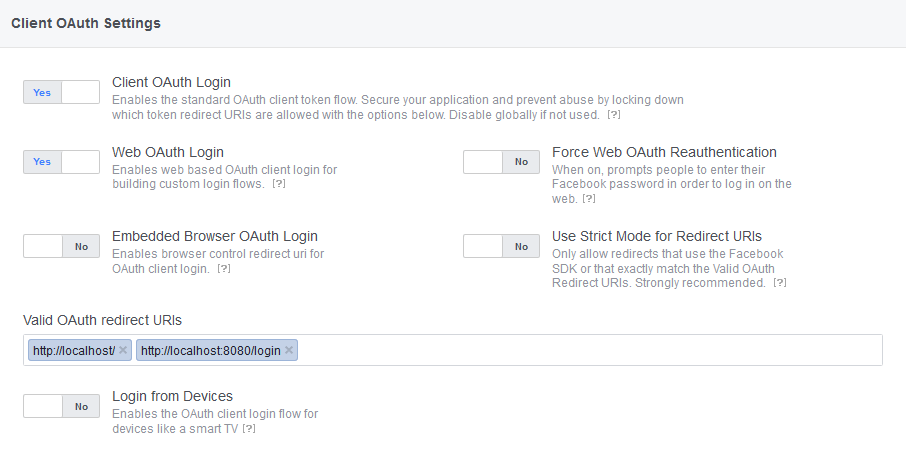
}注意:应该注意,您需要将用于身份验证的端点url添加到Facebook上的“有效oAuth重定向url”设置中。因为oAuth只对特定的地址起作用。在这个例子中,我们在本地运行这个,所以我要将localhost:8080和localhost:8080/login放在
步骤5:测试
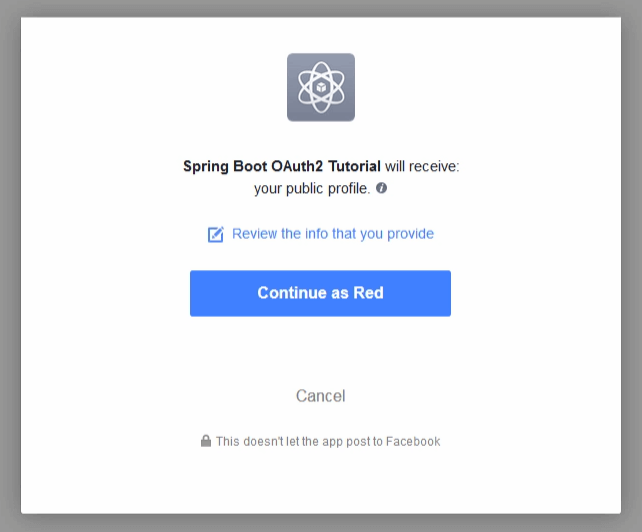
转到localhost:8080,它将自动重定向到OAuth,因为您的站点上的所有内容都受到访问限制,您必须先通过身份验证。
希望这能帮到你!
https://stackoverflow.com/questions/67875815
复制相似问题
腾讯云开发者

Copyright © 2013 - 2026 Tencent Cloud. All Rights Reserved. 腾讯云 版权所有
深圳市腾讯计算机系统有限公司 ICP备案/许可证号:粤B2-20090059  粤公网安备44030502008569号
腾讯云计算(北京)有限责任公司 京ICP证150476号 | 京ICP备11018762号