
遍历不连通图并创建标识符
遍历不连通图并创建标识符
提问于 2021-06-07 15:33:48
我正在尝试创建一个客户标识图,以跟踪跨设备的客户,登录或退出。
目前,我想做两件事:
- 对于每个断开连接的图,创建唯一生成的密钥与实体(adobe、铅、帐户、签出)之间的映射。
1. For example, the bottom graph will randomly pick one of the entities to be used as the unique key. If we pick adobe, we will create a new value "adobe:<adobe\_id>" and use that as the key to identify this disconnected graph. Perhaps we could traverse the entire disconnected graph and set the value "adobe:<adobe\_id>" as a property.- (很高兴)能够处理两个不同帐户可能使用相同ip_address的情况。例如,顶部图应该有两个唯一生成的键。
我对Gremlin相当陌生,但我了解图遍历的基本知识。不知道从哪里开始,所以任何见解都值得赞赏!
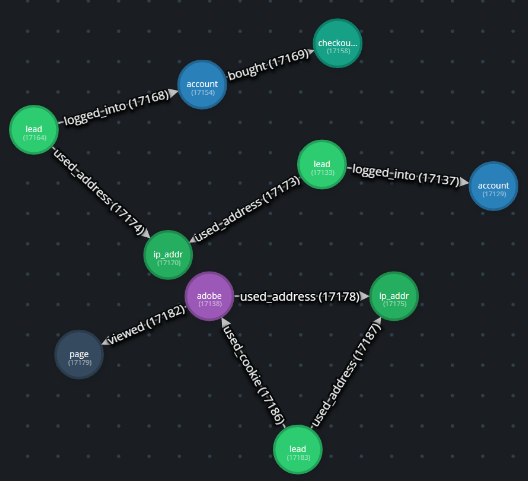
我在下面创建了一个简化的版本。Gremlify链接也将允许代码执行。
回答 1
Stack Overflow用户
回答已采纳
发布于 2021-06-24 10:45:54
听起来好像你在寻找某种形式的社区检测,或者只是试图识别图的分量。对于Gremlin,最好用图形计算机(OLAP)和步骤来完成。
gremlin> g.withComputer().
......1>   V().connectedComponent().
......2>         with(ConnectedComponent.propertyName, 'component').
......3>   elementMap().
......4>   order().by('component')
==>[id:0,label:account,component:0,account_id:1]
==>[id:2,label:lead,component:0,lead_id:1]
==>[id:6,label:account,component:0,account_id:3]
==>[id:8,label:checkout,checkout_id:1,component:0]
==>[id:10,label:lead,component:0,lead_id:2]
==>[id:12,label:ip_addr,component:0,ip_addr:1.1.1.1]
==>[id:16,label:page,page_id:1,component:14]
==>[id:18,label:lead,component:14,lead_id:4]
==>[id:4,label:adobe,component:14,adobe_id:1]
==>[id:14,label:ip_addr,component:14,ip_addr:3.3.3.3]
您可以使用Gremlin不使用Graph (OLTP)来查找连接的组件,但是除非您有一个非常小的图,否则它将无法执行。如果您有兴趣了解更多关于这方面的知识,那么有一个Gremlin食谱将更详细地介绍这个主题,并找到了这里。
页面原文内容由Stack Overflow提供。腾讯云小微IT领域专用引擎提供翻译支持
原文链接:
https://stackoverflow.com/questions/67874561
复制相关文章
相似问题
腾讯云开发者

Copyright © 2013 - 2026 Tencent Cloud. All Rights Reserved. 腾讯云 版权所有
深圳市腾讯计算机系统有限公司 ICP备案/许可证号:粤B2-20090059  粤公网安备44030502008569号
腾讯云计算(北京)有限责任公司 京ICP证150476号 | 京ICP备11018762号