
NV12到YUV444加速
我有一个代码可以将图像从nv12转换为yuv444
for h in range(self.img_shape[0]):
    # centralize yuv 444 data for inference framework
    for w in range(self.img_shape[1]):
        yuv444_res[h][w][0] = (nv12_y_data[h * self.img_shape[1] +w]).astype(np.int8)
        yuv444_res[h][w][1] = (nv12_u_data[int(h / 2) * int(self.img_shape[1] / 2) +int(w / 2)]).astype(np.int8)
        yuv444_res[h][w][2] = (nv12_v_data[int(h / 2) * int(self.img_shape[1] / 2) +int(w / 2)]).astype(np.int8)
因为for循环在python中非常慢,比numpy慢得多。我想知道这种转换是否可以在NumPy计算中完成。
06/15/2021更新:
我从这个页面外部链接中得到了这段代码,它的索引非常出色。
    yuv444 = np.empty([self.height, self.width, 3], dtype=np.uint8)
    yuv444[:, :, 0] = nv12_data[:self.width * self.height].reshape(
        self.height, self.width)
    u = nv12_data[self.width * self.height::2].reshape(
        self.height // 2, self.width // 2)
    yuv444[:, :, 1] = Image.fromarray(u).resize((self.width, self.height))
    v = nv12_data[self.width * self.height + 1::2].reshape(
        self.height // 2, self.width // 2)
    yuv444[:, :, 2] = Image.fromarray(v).resize((self.width, self.height))

    data[0] = yuv444.astype(np.int8)
如果使用PIL替换不推荐的大小大小,则代码100%匹配旧代码。
06/19/2021更新:
在仔细观察了一下Rotem给出的答案之后,我意识到他的方法更快。
    #nv12_data is reshaped to one dimension
    y = nv12_data[:self.width * self.height].reshape(
        self.height, self.width)
    shrunk_u = nv12_data[self.width * self.height::2].reshape(
        self.height // 2, self.width // 2)
    shrunk_v = nv12_data[self.width * self.height + 1::2].reshape(
        self.height // 2, self.width // 2)
    u = cv2.resize(shrunk_u, (self.width, self.height),
                   interpolation=cv2.INTER_NEAREST)
    v = cv2.resize(shrunk_v, (self.width, self.height),
                   interpolation=cv2.INTER_NEAREST)
    yuv444 = np.dstack((y, u, v))
此外,我做了一个时间比较,处理1000张图片。结果证明,cv整形更快,并保证了同样的结果。
cv time: 4.417593002319336, pil time: 5.39573216438293506/25/2021更新:
枕头调整大小在不同版本中有不同的默认重采样参数值。
5.1.0:
def resize(self, size, resample=NEAREST, box=None):8.1.0:
def resize(self, size, resample=BICUBIC, box=None, reducing_gap=None):具体说明所使用的重采样策略是个好主意。
回答 3
Stack Overflow用户
发布于 2021-06-12 13:36:22
您可以按照相反的顺序使用下面的帖子中描述的过程(没有RGB部分)。
说明:

首先,使用NV12 (命令行工具)创建一个NV12格式的合成示例图像。
样品图像用于测试。
使用子流程模块从Python执行:
import subprocess as sp
import shlex

sp.run(shlex.split('ffmpeg -y -f lavfi -i testsrc=size=192x108:rate=1:duration=1 -vcodec rawvideo -pix_fmt nv12 nv12.yuv'))
sp.run(shlex.split('ffmpeg -y -f rawvideo -video_size 192x162 -pixel_format gray -i nv12.yuv -pix_fmt gray nv12_gray.png'))读取示例映像,并从post中执行代码(用作引用):
import numpy as np
import cv2

nv12 = cv2.imread('nv12_gray.png', cv2.IMREAD_GRAYSCALE)
cols, rows = nv12.shape[1], nv12.shape[0]*2//3

# Reference implementation - using for-loops (the solution is in the part below):
################################################################################
nv12_y_data = nv12[0:rows, :].flatten()
nv12_u_data = nv12[rows:, 0::2].flatten()
nv12_v_data = nv12[rows:, 1::2].flatten()

yuv444_res = np.zeros((rows, cols, 3), np.uint8)

for h in range(rows):
    # centralize yuv 444 data for inference framework
    for w in range(cols):
        yuv444_res[h][w][0] = (nv12_y_data[h * cols + w]).astype(np.int8)
        yuv444_res[h][w][1] = (nv12_u_data[int(h / 2) * int(cols / 2) + int(w / 2)]).astype(np.int8)
        yuv444_res[h][w][2] = (nv12_v_data[int(h / 2) * int(cols / 2) + int(w / 2)]).astype(np.int8)

################################################################################我的建议的解决方案适用于以下阶段:
- 将U和V分成两个“半大小”矩阵
shrunk_u和shrunk_v。 - 使用
shrunk_u和shrunk_v将大小调整为完整的图像大小矩阵。 在我的代码示例中,我使用最近邻插值来获得与您的结果相同的结果。 为了获得更好的质量,建议用线性插值代替它。 - 使用
np.dstack将Y、U和V合并成YUV (3色通道)图像。
下面是完整的代码示例:
import numpy as np
import subprocess as sp
import shlex
import cv2

sp.run(shlex.split('ffmpeg -y -f lavfi -i testsrc=size=192x108:rate=1:duration=1 -vcodec rawvideo -pix_fmt nv12 nv12.yuv'))
sp.run(shlex.split('ffmpeg -y -f rawvideo -video_size 192x162 -pixel_format gray -i nv12.yuv -pix_fmt gray nv12_gray.png'))
#sp.run(shlex.split('ffmpeg -y -f rawvideo -video_size 192x108 -pixel_format nv12 -i nv12.yuv -vcodec rawvideo -pix_fmt yuv444p yuv444.yuv'))
#sp.run(shlex.split('ffmpeg -y -f rawvideo -video_size 192x324 -pixel_format gray -i yuv444.yuv -pix_fmt gray yuv444_gray.png'))
#sp.run(shlex.split('ffmpeg -y -f rawvideo -video_size 192x108 -pixel_format yuv444p -i yuv444.yuv -pix_fmt rgb24 rgb.png'))
#sp.run(shlex.split('ffmpeg -y -f rawvideo -video_size 192x108 -pixel_format gbrp -i yuv444.yuv -filter_complex "extractplanes=g+b+r[g][b][r],[r][g][b]mergeplanes=0x001020:gbrp[v]" -map "[v]" -vcodec rawvideo -pix_fmt rgb24 yuvyuv.yuv'))
#sp.run(shlex.split('ffmpeg -y -f rawvideo -video#_size 576x108 -pixel_format gray -i yuvyuv.yuv -pix_fmt gray yuvyuv_gray.png'))

nv12 = cv2.imread('nv12_gray.png', cv2.IMREAD_GRAYSCALE)
cols, rows = nv12.shape[1], nv12.shape[0]*2//3

nv12_y_data = nv12[0:rows, :].flatten()
nv12_u_data = nv12[rows:, 0::2].flatten()
nv12_v_data = nv12[rows:, 1::2].flatten()

yuv444_res = np.zeros((rows, cols, 3), np.uint8)

for h in range(rows):
    # centralize yuv 444 data for inference framework
    for w in range(cols):
        yuv444_res[h][w][0] = (nv12_y_data[h * cols + w]).astype(np.int8)
        yuv444_res[h][w][1] = (nv12_u_data[int(h / 2) * int(cols / 2) + int(w / 2)]).astype(np.int8)
        yuv444_res[h][w][2] = (nv12_v_data[int(h / 2) * int(cols / 2) + int(w / 2)]).astype(np.int8)

y = nv12[0:rows, :]
shrunk_u = nv12[rows:, 0::2].copy()
shrunk_v = nv12[rows:, 1::2].copy()

u = cv2.resize(shrunk_u, (cols, rows), interpolation=cv2.INTER_NEAREST)  # Resize U channel (use NEAREST interpolation - fastest, but lowest quality).
v = cv2.resize(shrunk_v, (cols, rows), interpolation=cv2.INTER_NEAREST)  # Resize V channel

yuv444 = np.dstack((y, u, v))

is_eqaul = np.all(yuv444 == yuv444_res)
print('is_eqaul = ' + str(is_eqaul))  # is_eqaul = True

# Convert to RGB for display
yvu = np.dstack((y, v, u))  # Use COLOR_YCrCb2BGR, because it's uses the corrected conversion coefficients.
rgb = cv2.cvtColor(yvu, cv2.COLOR_YCrCb2BGR)

# Show results:
cv2.imshow('nv12', nv12)
cv2.imshow('yuv444_res', yuv444_res)
cv2.imshow('yuv444', yuv444)
cv2.imshow('rgb', rgb)
cv2.waitKey()
cv2.destroyAllWindows()
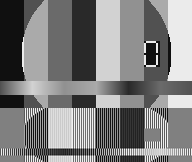
输入(NV12显示为灰度):
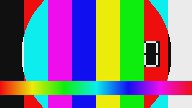
输出(转换为RGB后):
Stack Overflow用户
发布于 2021-06-10 06:15:39
似乎是花式索引(高级索引)的主要案例。
像这样的东西应该能起作用,虽然我没有在真实的图像上验证它。我在开始时添加了一个部分来重建图像,因为作为一个整体处理数组比分割成各个部分要容易得多。很可能,您可以重构它并避免从一开始就分割它。
# reconstruct image array
y = nv12_y_data.reshape(self.image_shape[0], self.image_shape[1])
u = nv12_u_data.reshape(self.image_shape[0], self.image_shape[1])
v = nv12_v_data.reshape(self.image_shape[0], self.image_shape[1])
img = np.stack((y,u,v), axis=-1)

# take every index twice until half the range
idx_h = np.repeat(np.arange(img.shape[0] // 2), 2)[:, None]
idx_w = np.repeat(np.arange(img.shape[1] // 2), 2)[None, :]

# convert
yuv444 = np.empty_like(img, dtype=np.uint8)
yuv444[..., 0] = img[..., 0]
yuv444[..., 1] = img[idx_h, idx_w, 1]
yuv444[..., 2] = img[idx_h, idx_w, 2]
如果这是您的关键路径,并且您希望获得更高的性能,您可以考虑首先处理图像通道,这在现代CPU(但不是GPU)上会更快。
Stack Overflow用户
发布于 2022-06-17 08:13:09
这个答案只是另一种方法,并不是完成任务最快的方法,但绝对应该很容易理解。我也检查了与yuvplayer应用程序生成的文件,以确认其工作正常。
#height mentioned is height of nv12 file and so is the case with width
def convert_nv12toyuv444(filename= 'input.nv12',height=2358,width=2040):

    nv12_data = np.fromfile(filename, dtype=np.uint8)
    imageSize = (height, width)
    npimg = nv12_data.reshape(imageSize)
    y_height = npimg.shape[0] * (2/3)
    y_wid = npimg.shape[1]
    y_height = int(y_height)
    y_wid = int(y_wid)
    y_data= npimg[:y_height,:y_wid]
    uv_data=npimg[y_height:,:y_wid]
    shrunkU= uv_data[:, 0 : :2]
    shrunkV= uv_data[:, 1 : :2]
    u = cv2.resize(shrunkU, (y_wid, y_height),
                   interpolation=cv2.INTER_NEAREST)
    v = cv2.resize(shrunkV, (y_wid, y_height),
                   interpolation=cv2.INTER_NEAREST)
yuv444 = np.dstack((y_data, u, v))https://stackoverflow.com/questions/67914430
复制相似问题
腾讯云开发者

Copyright © 2013 - 2026 Tencent Cloud. All Rights Reserved. 腾讯云 版权所有
深圳市腾讯计算机系统有限公司 ICP备案/许可证号:粤B2-20090059  粤公网安备44030502008569号
腾讯云计算(北京)有限责任公司 京ICP证150476号 | 京ICP备11018762号