
基于枕头的水印图像
基于枕头的水印图像
提问于 2021-06-14 06:14:07
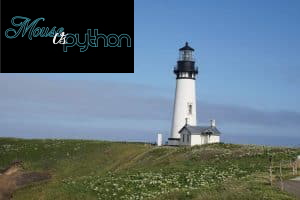
我试图水印一个图像,但我不能这样做,如果不粘贴水印的背景色。(见下文示例)
我尝试从下面的网站实现本教程。
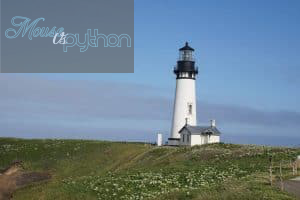
从下面的图像中可以看出,目前的结果显示了水印的黑色背景,这是不可取的。(所需结果见预期结果图像)
我使用Linux/Ubuntu 20.04和Python3.8
以下是内容:
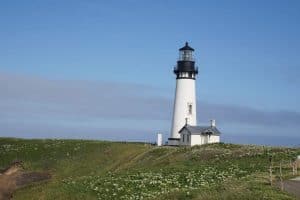
背景图像
水印图像

当前结果
预期结果
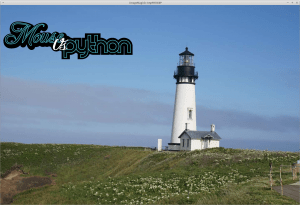
制作透明后的当前结果
下面是我使用的代码,与网站教程示例相同。
#adding transparency to watermark image(as suggested)
from PIL import Image, ImageFilter
img = Image.open('path_to_watermark').convert('RGBA')
img.putalpha(130)
img.save('path_to_watermark')


def watermark_with_transparency(input_image_path, output_image_path, watermark_image_path, position):
    base_image = Image.open(input_image_path).convert('RGBA')
    watermark = Image.open(watermark_image_path).convert('RGBA')
    width, height = base_image.size
    transparent = Image.new('RGBA', (width, height), (0,0,0,0))
    transparent.paste(base_image, (0,0))
    transparent.paste(watermark, position, mask=watermark)
    transparent.show()
    transparent.save(output_image_path)

if __name__ == '__main__':
    img = 'path_to_input_image /home/...'
    watermark_with_transparency(img, 'path_to_output', 'path_to_watermark', position=(0,0))
我做错什么了?谢谢你的帮助。
回答 2
Stack Overflow用户
发布于 2021-06-18 00:25:43
你在粘贴一个没有透明度的图像。作为一个PNG,并不意味着它包含透明度,而是一个alpha层,在这种情况下,每个像素等于255
没有必要用麻疯树使其透明,您只需要一个带有黑区透明的PNG文件。
Stack Overflow用户
发布于 2022-10-31 11:51:32
from PIL import Image

background = Image.open("test1.png")
foreground = Image.open("test2.png")

background.paste(foreground, (0, 0), foreground)
background.show().paste()的第一个参数是要粘贴的图像。第二,是坐标,而秘密酱油是第三个参数。它表示将用于粘贴图像的掩码。如果您以透明的方式传递图像,则使用alpha通道作为掩码。
检查一下文档。
页面原文内容由Stack Overflow提供。腾讯云小微IT领域专用引擎提供翻译支持
原文链接:
https://stackoverflow.com/questions/67965574
复制相关文章
相似问题
腾讯云开发者

Copyright © 2013 - 2026 Tencent Cloud. All Rights Reserved. 腾讯云 版权所有
深圳市腾讯计算机系统有限公司 ICP备案/许可证号:粤B2-20090059  粤公网安备44030502008569号
腾讯云计算(北京)有限责任公司 京ICP证150476号 | 京ICP备11018762号