
Google视频智能注释视频JSON与示例代码
Google视频智能注释视频JSON与示例代码
提问于 2021-06-20 20:10:29
Google视频智能提供了以下代码,用于解析带有对象跟踪的注释结果:
features = [videointelligence.Feature.OBJECT_TRACKING]
context = videointelligence.VideoContext(segments=None)
request = videointelligence.AnnotateVideoRequest(input_uri=gs_video_path, features=features, video_context=context, output_uri=output_uri)

operation = video_client.annotate_video(request)
result = operation.result(timeout=3600)
object_annotations = result.annotation_results[0].object_annotations

for object_annotation in object_annotations:
    print('Entity description: {}'.format(object_annotation.entity.description))
    print('Segment: {}s to {}s'.format(
        object_annotation.segment.start_time_offset.total_seconds(),
        object_annotation.segment.end_time_offset.total_seconds()))

    print('Confidence: {}'.format(object_annotation.confidence))

    # Here we print only the bounding box of the first frame_annotation in the segment
    frame_annotation = object_annotation.frames[0]
    box = frame_annotation.normalized_bounding_box
    timestamp = frame_annotation.time_offset.total_seconds()
    timestamp_end = object_annotation.segment.end_time_offset.total_seconds()

    print('Time offset of the first frame_annotation: {}s'.format(timestamp))
    print('Bounding box position:')
    print('\tleft  : {}'.format(box.left))
    print('\ttop   : {}'.format(box.top))
    print('\tright : {}'.format(box.right))
    print('\tbottom: {}'.format(box.bottom))
    print('\n')
但是,我想解析通过output_uri生成的json文件。json文件的格式如下:
{
  "annotation_results": [ {
    "input_uri": "/production.supereye.co.uk/video/54V5x8q0CRU/videofile.mp4",
    "segment": {
      "start_time_offset": {

      },
      "end_time_offset": {
        "seconds": 22,
        "nanos": 966666000
      }
    },
    "object_annotations": [ {
      "entity": {
        "entity_id": "/m/01yrx",
        "description": "cat",
        "language_code": "en-US"
      },
      "confidence": 0.91939145,
      "frames": [ {
        "normalized_bounding_box": {
          "left": 0.17845993,
          "top": 0.44048917,
          "right": 0.5315634,
          "bottom": 0.7752136
        },
        "time_offset": {

        }
      }, {
如何使用示例代码解析output_uri提供的JSON?这需要什么样的转换?
回答 2
Stack Overflow用户
回答已采纳
发布于 2021-06-21 09:22:26
使用来自output_uri的文件,您可以使用以下代码解析json。我在本地将该文件保存为response.json,并将使用此文件进行解析。
这与上面的代码类似,在上面的代码中,它在第一个frame_annotation上解析数据。但是这段代码缺少时间偏移的转换,因为用于转换的函数来自时间对象。
我注释了start_end_offset和end_time_offset,因为它有两个键,seconds和nano。这取决于您想使用哪一个,只需取消评论行,并相应调整。
import json

f = open('response.json', "r")
data = json.loads(f.read())

for results in data["annotation_results"]:
    for obj_ann in results["object_annotations"]:
        #start_time_offset = obj_ann["segment"]["start_time_offset"]["seconds"]
        #end_time_offset = obj_ann["segment"]["end_time_offset"]["seconds"]
        frame_annotation = obj_ann["frames"][0]
        entity = obj_ann["entity"]["description"]
        confidence = obj_ann["confidence"]
        box = frame_annotation["normalized_bounding_box"]
        time_offset = frame_annotation["time_offset"] #apparently this also has 2 keys. Look out for the other key which is `seconds`

        print('Entity description: {}'.format(entity))
        #print('Segment: {}s to {}s'.format(start_time_offset,end_time_offset))
        print('Confidence: {}'.format(confidence))

        #You can modify the code here if you encounter the `second` key
        if 'nanos' not in time_offset:
            print('No time offset in frame')
            print('Bounding box position:')
            print('\tleft  : {}'.format(str(box["left"])))
            print('\tleft  : {}'.format(str(box["top"])))
            print('\tleft  : {}'.format(str(box["right"])))
            print('\tleft  : {}'.format(str(box["bottom"])))
        else:
            print('Time offset of the first frame_annotation: {}'.format(time_offset["nanos"]))
            print('Bounding box position:')
            print('\tleft  : {}'.format(str(box["left"])))
            print('\tleft  : {}'.format(str(box["top"])))
            print('\tleft  : {}'.format(str(box["right"])))
print('\tleft : {}'.format(str(box["bottom"])))在测试中,我使用了gs://cloud-samples-data/video/cat.mp4并使用了它的响应:
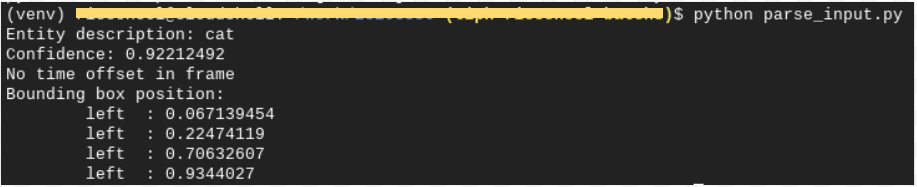
Stack Overflow用户
发布于 2021-06-22 18:45:45
使用dotmap包并为时间戳实现一个简单的total_seconds函数,与原始示例代码非常接近:
import json
import os
from dotmap import DotMap

def total_seconds(time_offset):
    if type(time_offset.seconds) is DotMap:
        seconds = 0
    else:
        seconds = time_offset.seconds

    if type(time_offset.nanos) is DotMap:
        nanos = 0
    else:
        nanos = time_offset.nanos

    return seconds/1.0 + (float)(nanos/1e9)

f = open("./visual.json")

jsonDict = json.load(f)
result = DotMap(jsonDict)

print(result)

object_annotations = result.annotation_results[0].object_annotations


for object_annotation in object_annotations:
    print('Entity description: {}'.format(object_annotation.entity.description))
    frame_annotation = object_annotation.frames[0]
    box = frame_annotation.normalized_bounding_box
    timestamp = total_seconds(frame_annotation.time_offset)
    timestamp_end = total_seconds(object_annotation.segment.end_time_offset)
    print("Timestamps : {0} - {1}".format(timestamp, timestamp_end))

    print('Bounding box position:')
    print('\tleft  : {}'.format(box.left))
    print('\ttop   : {}'.format(box.top))
    print('\tright : {}'.format(box.right))
    print('\tbottom: {}'.format(box.bottom))
print('\n')页面原文内容由Stack Overflow提供。腾讯云小微IT领域专用引擎提供翻译支持
原文链接:
https://stackoverflow.com/questions/68059670
复制相关文章
相似问题
腾讯云开发者

Copyright © 2013 - 2026 Tencent Cloud. All Rights Reserved. 腾讯云 版权所有
深圳市腾讯计算机系统有限公司 ICP备案/许可证号:粤B2-20090059  粤公网安备44030502008569号
腾讯云计算(北京)有限责任公司 京ICP证150476号 | 京ICP备11018762号