
如何平滑淡出切换文本使用按钮点击?
如何平滑淡出切换文本使用按钮点击?
提问于 2021-06-22 16:59:24
我有以下密码-
<!DOCTYPE html>
<html>
<head>
<script src="https://ajax.googleapis.com/ajax/libs/jquery/3.5.1/jquery.min.js"></script>
<script>
function toggleText(){
    if ($("#txt-1").css("display") != "none") {
        $("#txt-1").css("display", "none");
        $("#txt-2").css("display", "block");
        $("#txt-3").css("display", "none");
    } else if ($("#txt-2").css("display") != "none") {
        $("#txt-1").css("display", "none");
        $("#txt-2").css("display", "none");
        $("#txt-3").css("display", "block");
    } else {
        $("#txt-1").css("display", "block");
        $("#txt-2").css("display", "none");
        $("#txt-3").css("display", "none");
    }
};
</script>
</head>
<body>

<button onclick="toggleText()">Toggle</button>

<p id="txt-1">Hello</p>
<p id="txt-2" style="display: none;">How are you?</p>
<p id="txt-3" style="display: none;">See you soon!</p>

</body>
</html>
它将文本切换到按钮上单击。
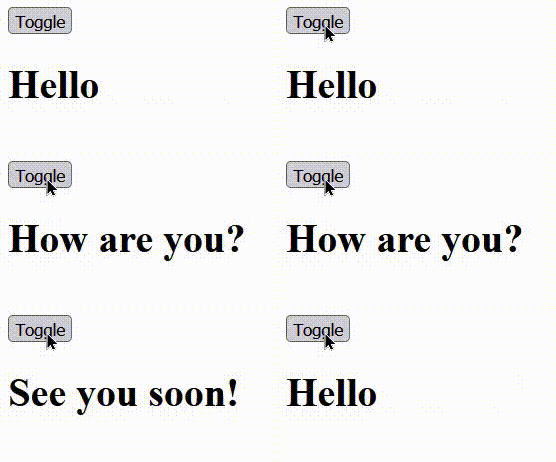
我正在寻找的是,在文本之间进行一个平稳的过渡(可能会逐渐淡出)。我不确定是写CSS还是写jQuery。
我试着写一个CSS类-
.smooth-fade {
    -webkit-animation: fadeIn 1s;
    animation: fadeIn 1s;
}并将这个类名smooth-fade提供给所有h1标记。它不起作用,做这个任务最好的解决办法是什么?
回答 3
Stack Overflow用户
回答已采纳
发布于 2021-06-22 17:04:21
您可以为此使用jquery:
  $( "#txt-1" ).fadeOut( "slow", function() {
     $("#txt-2").fadeIn();
  });
首先淡出所需的元素,然后使用回调函数将其他元素淡出。
function toggleText(){
  $( "#txt-1" ).fadeOut( "slow", function() {
     $("#txt-2").fadeIn();
  });
};<script src="https://cdnjs.cloudflare.com/ajax/libs/jquery/3.3.1/jquery.min.js"></script>
<button onclick="toggleText()">Toggle</button>
<p id="txt-1">Hello</p>
<p id="txt-2" style="display: none;">How are you?</p>
Stack Overflow用户
发布于 2021-06-22 17:17:25
你的代码有点乱。我会做一些更可重用的事情:
- 将所有内容封装在包装器中。
- 添加
.active类以知道什么是可见的。 - 使用
nextOrFirst()自定义的jquery函数
function toggleText() {
  var $active = $('.active');
  $active.removeClass('active').fadeOut(500, function() {
    $active.nextOrFirst().fadeIn().addClass('active');
  });
};

//Next or first function from https://stackoverflow.com/a/15959855/559079
$.fn.nextOrFirst = function(selector) {
  var next = this.next(selector);
  return (next.length) ? next : this.prevAll(selector).last();
};

$.fn.prevOrLast = function(selector) {
  var prev = this.prev(selector);
  return (prev.length) ? prev : this.nextAll(selector).last();
};<!DOCTYPE html>
<html>
<head>
<script src="https://ajax.googleapis.com/ajax/libs/jquery/3.5.1/jquery.min.js"></script>
<script>
</script>
</head>
<body>
<button onclick="toggleText()">Toggle</button>
<div class="wrapper">
<p id="txt-1" class="active">Hello</p>
<p id="txt-2" style="display: none;">How are you?</p>
<p id="txt-3" style="display: none;">See you soon!</p>
</div>
</body>
</html>
Stack Overflow用户
发布于 2021-06-22 17:45:27
你的代码很乱..。另外,当我们想要使用js改变元素的样式时,最好使用addClass或classList.add方法,而不是简单的style.background方法。
参见下面的示例=>
  <button onclick="toggleText()">Toggle</button>
  <p id="txt" class="fader">
    Hello
  </p>
CSS
.fader {
  opacity: 1;
  visibility: visible;
  transition: all  1s ease-in-out;
}
.fade-in {
  opacity: 0;
}
JS
  let textArray = ["Hello", "How are you ? ", "See you soon ! "]
  let id = 1;
  const text = document.querySelector('#txt');

  function toggleText() {
    if (id > textArray.length - 1) {
      id = 0;
    }
    text.classList.add('fade-in');
    setTimeout(function () {
      text.innerText = textArray[id]
      text.classList.remove('fade-in')
      id++
    }, 1000)
};页面原文内容由Stack Overflow提供。腾讯云小微IT领域专用引擎提供翻译支持
原文链接:
https://stackoverflow.com/questions/68087858
复制相关文章
相似问题
腾讯云开发者

Copyright © 2013 - 2026 Tencent Cloud. All Rights Reserved. 腾讯云 版权所有
深圳市腾讯计算机系统有限公司 ICP备案/许可证号:粤B2-20090059  粤公网安备44030502008569号
腾讯云计算(北京)有限责任公司 京ICP证150476号 | 京ICP备11018762号