
如何使rollup.js在安装时建立一个反应库(纱线添加ssh://git@my)
我用rollup.js创建了一个私有反应库(git ),它使用命令yarn add ssh://git@my-repo-url正确安装,但它没有在安装时构建(在节点_模块/库文件夹中创建build/dist )。我怎么才能修好它?替代创建-反应库背后的“魔力”是什么?npm是背后的吗?
这是我的rollup.con.js
import commonjs from "@rollup/plugin-commonjs";
import resolve from "@rollup/plugin-node-resolve";
import peerDepsExternal from "rollup-plugin-peer-deps-external";
import typescript from "@rollup/plugin-typescript";
import postcss from "rollup-plugin-postcss";

import packageJson from "./package.json";

export default {
  input: "./src/components/index.ts",
  output: [
    {
      file: packageJson.main,
      format: "cjs",
      sourcemap: true
    },
    {
      file: packageJson.module,
      format: "esm",
      sourcemap: true
    }
  ],
  plugins: [
    peerDepsExternal(),
    resolve(),
    commonjs(),
    typescript(),
    postcss()
  ]
};和我的package.json
{
  "name": "my-ui-lib",
  "version": "0.1.0",
  "private": true,
  "dependencies": {
    "@testing-library/jest-dom": "^5.11.4",
    "@testing-library/react": "^11.1.0",
    "@testing-library/user-event": "^12.1.10",
    "@types/jest": "^26.0.15",
    "@types/node": "^12.0.0",
    "@types/react": "^17.0.0",
    "@types/react-dom": "^17.0.0",
    "react-scripts": "4.0.3",
    "styled-components": "^5.3.0",
    "typescript": "^4.1.2",
    "web-vitals": "^1.0.1"
  },
  "main": "./build/index.js",
  "module": "./build/index.es.js",
  "scripts": {
    "test": "react-scripts test",
    "storybook": "start-storybook -p 6006 -s public",
    "build-storybook": "build-storybook -s public",
    "build": "rollup -c",
  },
  "peerDependencies": {
    "react": "^17.0.2",
    "react-dom": "^17.0.2"
  },
  "eslintConfig": {
    "extends": [
      "react-app",
      "react-app/jest"
    ],
    "overrides": [
      {
        "files": [
          "**/*.stories.*"
        ],
        "rules": {
          "import/no-anonymous-default-export": "off"
        }
      }
    ]
  },
  "browserslist": {
    "production": [
      ">0.2%",
      "not dead",
      "not op_mini all"
    ],
    "development": [
      "last 1 chrome version",
      "last 1 firefox version",
      "last 1 safari version"
    ]
  },
  "devDependencies": {
    "@rollup/plugin-commonjs": "^19.0.0",
    "@rollup/plugin-node-resolve": "^13.0.0",
    "@rollup/plugin-typescript": "^8.2.1",
    "@storybook/addon-actions": "^6.2.9",
    "@storybook/addon-essentials": "^6.2.9",
    "@storybook/addon-links": "^6.2.9",
    "@storybook/node-logger": "^6.2.9",
    "@storybook/preset-create-react-app": "^3.1.7",
    "@storybook/react": "^6.2.9",
    "postcss": "^8.3.2",
    "rollup": "^2.51.2",
    "rollup-plugin-peer-deps-external": "^2.2.4",
    "rollup-plugin-postcss": "^4.0.0",
    "react": "^17.0.2",
    "react-dom": "^17.0.2"
  }
}回答 1
Stack Overflow用户
发布于 2021-06-24 18:30:09
您不需要从本地/私有github安装任何专用包/样板代码。只需遵循以下简单步骤:
1.)确保您使用的是正确的github:git+ssh://git@github.com/<github_username>/<github_repo>
<github_username>应该是您的github用户名
<github_repo>应该是github存储库的名称
2.)用必要的字段准备package.json,但最重要的是将prepare或prepublish脚本添加到package.json中的脚本中
{
  "name": "@example/my-package",
  "version": "0.1.0",
  "description": "My package description.",
  // 'main' and 'module' are useful for bundlers (like webpack) to know which version to default import
  "main": "index.js",
  "module": "esm/index.mjs",
  // 'sideEffects' is optional, let's bundlers (like webpack) know that it's tree-shakeable
  "sideEffects": false,
  "homepage": "https://github.com/<github_username>/<github_repo>#readme",
  // 'files' is required to let your package manager know what should be installed in node_modules
  "files": [
    "index.js",
    "index.d.ts",
    "decrypt/index.js",
    "decrypt/index.d.ts",
    "encrypt/index.js",
    "encrypt/index.d.ts",
    "esm"
  ],
  // 'types' is optional, but useful for typescript typings
  "types": "./index.d.ts",
  // 'exports' is optional, but useful for submodule imports
  "exports": {
    ".": "./index.js",
    "./decrypt": "./decrypt/index.js",
    "./encrypt": "./encrypt/index.js",
    "./esm": "./esm/index.mjs",
    "./esm/decrypt": "./esm/decrypt/index.mjs",
    "./esm/encrypt": "./esm/encrypt/index.mjs"
  },
  // 'scripts' will be leveraged by adding a 'prepare' or `prepublish` script to let the package manager know what to run during dependency installation
  "scripts": {
    "build": tsc --p ./ts/tsconfig.cjs.json && ts-node ./utils/compress.ts",
    "build:esm": "rollup -c",
    "lint": "eslint ./ --ext .ts,.js && tsd",
    "prepare": "npm run build && npm run build:esm",
    "test": "jest --config ./jest.json --coverage",
  },
  // 'repository' is optional, but useful to tell developers/remote websites (like npmjs) where your code resides
  "repository": {
    "type": "git",
    "url": "git@github.<github_username>/<github_repo>.git"
  },
  "author": "Firstname Lastname",
  "license": "MIT",
  "bugs": {
    "url": "https://github.com/<github_username>/<github_repo>/issues"
  },
  // 'engines' is highly recommended as it lets the package manager know which versions of node will be able to run the package without issues
  "engines": {
    "node": ">=12"
  },
  "devDependencies": { ... },
}3.)使用npm或yarn安装软件包
# with npm
npm install git+ssh://git@github.com/<github_username>/<github_repo>

# or with yarn
yarn add git+ssh://git@github.com/<github_username>/<github_repo>4.)通过名称导入包,该名称在package.json中指定
const example = require("@example/my-package");
// import example from "@example/my-package";

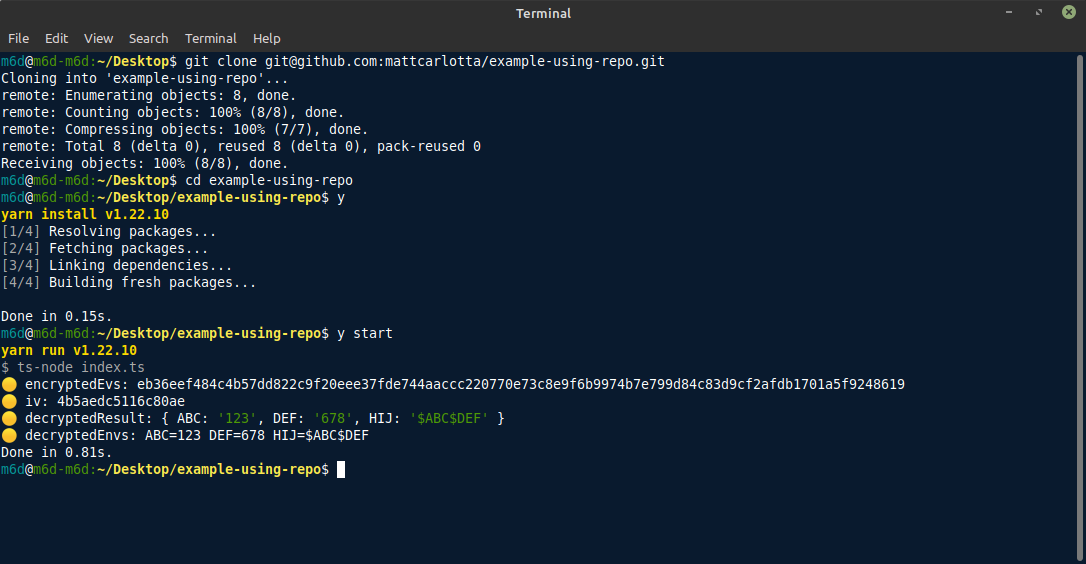
...etc示例包回购:https://github.com/mattcarlotta/example-env
使用package的示例:https://github.com/mattcarlotta/example-using-repo
结果:
https://stackoverflow.com/questions/68116346
复制相似问题
腾讯云开发者

Copyright © 2013 - 2026 Tencent Cloud. All Rights Reserved. 腾讯云 版权所有
深圳市腾讯计算机系统有限公司 ICP备案/许可证号:粤B2-20090059  粤公网安备44030502008569号
腾讯云计算(北京)有限责任公司 京ICP证150476号 | 京ICP备11018762号