
如何在Docker映像python:3上安装yq?
我想做什么
我希望安装yq来编辑Docker容器上的一些yaml文件。
Dockerfile
FROM python:3
RUN apt-get update

RUN apt-key adv --keyserver keyserver.ubuntu.com --keyserver-option http-proxy=http://xxxxxx.com:9999 --recv-keys CC86BB64
RUN apt-get install -y software-properties-common
RUN add-apt-repository ppa:rmescandon/yq
RUN apt update
RUN apt install yq -y
参考文献
https://github.com/mikefarah/yq#on-ubuntu-1604-or-higher-from-debian-package
构建日志
 => => transferring dockerfile: 486B                                                                                                                                                                                                          0.0s
 => [internal] load .dockerignore                                                                                                                                                                                                             0.0s
 => => transferring context: 2B                                                                                                                                                                                                               0.0s
 => [internal] load metadata for docker.io/library/python:3                                                                                                                                                                                   0.0s
 => CACHED [1/7] FROM docker.io/library/python:3                                                                                                                                                                                              0.0s
 => [2/7] RUN apt-get update                                                                                                                                                                                                                  2.7s
 => [3/7] RUN apt-key adv --keyserver keyserver.ubuntu.com --keyserver-option http-proxy=http://xxxxxx.com:9999 --recv-keys CC86BB64                                                                                                   1.2s
 => [4/7] RUN apt-get install -y software-properties-common                                                                                                                                                                                  11.4s
 => [5/7] RUN add-apt-repository ppa:rmescandon/yq                                                                                                                                                                                           13.3s
 => ERROR [6/7] RUN apt update                                                                                                                                                                                                                1.8s
------
 > [6/7] RUN apt update:
#9 0.159
#9 0.159 WARNING: apt does not have a stable CLI interface. Use with caution in scripts.
#9 0.159
#9 0.205 Hit:1 http://deb.debian.org/debian buster InRelease
#9 0.205 Hit:2 http://security.debian.org/debian-security buster/updates InRelease
#9 0.227 Hit:3 http://deb.debian.org/debian buster-updates InRelease
#9 0.870 Ign:4 http://ppa.launchpad.net/rmescandon/yq/ubuntu impish InRelease
#9 1.356 Err:5 http://ppa.launchpad.net/rmescandon/yq/ubuntu impish Release
#9 1.356   404  Not Found [IP: 91.189.95.85 80]
#9 1.381 Reading package lists...
#9 1.752 E: The repository 'http://ppa.launchpad.net/rmescandon/yq/ubuntu impish Release' does not have a Release file.
------
executor failed running [/bin/sh -c apt update]: exit code: 100
问题
我怎么才能修好它?
回答 2
Stack Overflow用户
发布于 2021-07-19 11:12:57
TL;博士
yq的PPA在python:3映像的Linux发行版上不可用。
将Dockerfile改为直接下载二进制文件:
FROM python:3

RUN apt-get update
RUN apt-get install -y wget

# Latest on https://launchpad.net/~rmescandon/+archive/ubuntu/yq is 4.9.6
ARG VERSION=v4.9.6
ARG BINARY=yq_linux_386
RUN wget https://github.com/mikefarah/yq/releases/download/${VERSION}/${BINARY} -O /usr/bin/yq \
    && chmod +x /usr/bin/yq
解释
上面提到的yq需要一个基于Ubuntu的映像,但是python:3 Docker映像基于Debian10/ Buster (在编写这个答案时):
FROM buildpack-deps:buster$ docker run -it python:3 bash
root@fa97b25dc0d3:/# cat /etc/os-release
PRETTY_NAME="Debian GNU/Linux 10 (buster)"
NAME="Debian GNU/Linux"
VERSION_ID="10"
VERSION="10 (buster)"
VERSION_CODENAME=buster
ID=debian
HOME_URL="https://www.debian.org/"
SUPPORT_URL="https://www.debian.org/support"
BUG_REPORT_URL="https://bugs.debian.org/"
root@fa97b25dc0d3:/# 误差
E:存储库'http://ppa.launchpad.net/rmescandon/yq/ubuntu激进型发行版‘没有发布文件。
意味着包ppa:rmescandon/yq 不支持您的分发。您可以检查来自http://ppa.launchpad.net/rmescandon/yq/ubuntu的支持发行版。
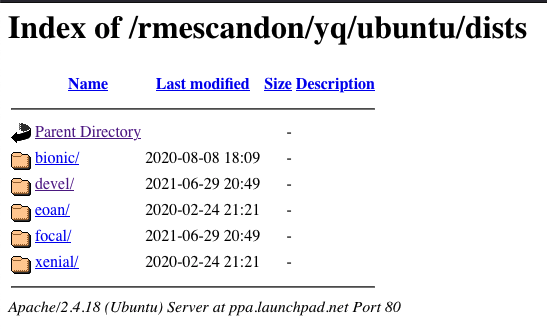
解决方法是只从源代码安装它,或者只是下载yq二进制文件本身。yq:https://github.com/mikefarah/yq#wget支持这一点。
惠特 使用wget下载预编译的二进制文件: 通过tar.gz压缩 wget https://github.com/mikefarah/yq/releases/download/${VERSION}/${BINARY}.tar.gz -O -真空焦油xz && mv ${二进制} /usr/bin/yq 普通二进制 wget https://github.com/mikefarah/yq/releases/download/${VERSION}/${BINARY} -O /usr/bin/yq && chmod +x /usr/bin/yq 例如,VERSION=v4.2.0和BINARY=yq_linux_amd64
从yq发布页面中选择一个特定的版本(最好匹配为Ubuntu分发的版本之一,与PPA中的版本相同),并将您的Dockerfile修改为:
FROM python:3

RUN apt-get update
RUN apt-get install -y wget

# Latest on https://launchpad.net/~rmescandon/+archive/ubuntu/yq is 4.9.6
ARG VERSION=v4.9.6
ARG BINARY=yq_linux_386
RUN wget https://github.com/mikefarah/yq/releases/download/${VERSION}/${BINARY} -O /usr/bin/yq \
&& chmod +x /usr/bin/yqStack Overflow用户
发布于 2022-02-20 20:07:27
以前的回答在我的情况下行不通。
所以这是我的另一种解决方案:
从GitHub下载yq的最新可执行文件:
RUN wget -qO /usr/local/bin/yq https://github.com/mikefarah/yq/releases/latest/download/yq_linux_amd64设置文件的执行权限:
RUN chmod a+x /usr/local/bin/yqhttps://stackoverflow.com/questions/68159658
复制相似问题
腾讯云开发者

Copyright © 2013 - 2026 Tencent Cloud. All Rights Reserved. 腾讯云 版权所有
深圳市腾讯计算机系统有限公司 ICP备案/许可证号:粤B2-20090059  粤公网安备44030502008569号
腾讯云计算(北京)有限责任公司 京ICP证150476号 | 京ICP备11018762号