
古巴地台图:垂直对准
古巴地台图:垂直对准
提问于 2021-06-29 09:49:37
你好,我为我的仪表板构建了古巴图表,并有两个问题:
,
- ,如何使系列图表垂直?
- ,如何删除红色气球?
- ,为什么x轴从10到20?应该有"dokumentiert“这一类别。
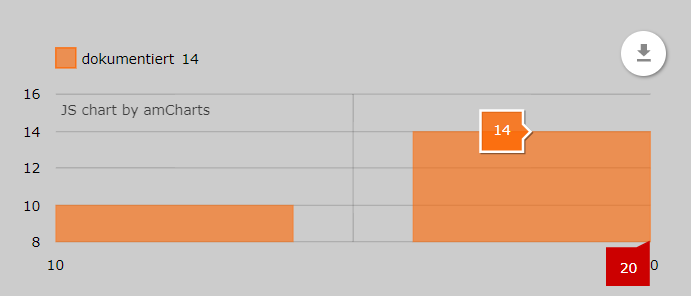
以下是我的XML:
 <chart:serialChart id="stackedArea"
                               height="100%"
                               marginLeft="0"
                               marginTop="10"
                               plotAreaBorderAlpha="0"
                               width="100%">
                <chart:chartCursor cursorAlpha="0"/>
                <chart:legend equalWidths="false"
                              periodValueText="total: [[value.sum]]"
                              position="TOP"
                              valueAlign="LEFT"
                              valueWidth="100"/>
                <chart:valueAxes>
                    <chart:axis axisAlpha="0"
                                position="LEFT"/>
                </chart:valueAxes>
                <chart:balloon adjustBorderColor="false"
                               color="WHITE"
                               horizontalPadding="10"
                               verticalPadding="8"/>
                <chart:graphs>
                    <chart:graph fillAlphas="0.6"
                                 type="COLUMN"
                                 lineAlpha="0.4"
                                 title="dokumentiert"
                                 valueField="anzahl"/>
                </chart:graphs>
                <chart:categoryAxis axisColor="#DADADA"
                                    axisAlpha="0"
                                    startOnAxis="true"
                                    gridPosition="START">
                </chart:categoryAxis>
                <chart:export/>
            </chart:serialChart>
这是我的控制器:
public class Balkendiagramm extends ScreenFragment {
    @Inject
    private SerialChart stackedArea;
    @Inject
    private KeyValueCollectionLoader filesDl;
    @Inject
    private KeyValueCollectionContainer filesDc;

    @Subscribe
    public void onInit(InitEvent event) {
        filesDl.load();
        stackedArea.setDataProvider(new ContainerDataProvider(filesDc));
        stackedArea.setCategoryField("dokStatus");
    }
}回答 1
Stack Overflow用户
发布于 2021-07-06 12:22:37
使用categoryBalloonEnabled="false"可以禁用红色气球
<charts:chartCursor categoryBalloonEnabled="false"/>或者直接删除<charts:chartCursor/>本身。
我假设dokStatus属性具有枚举类型。可以尝试在KeyValueCollection属性中定义枚举类:
<keyValueCollection id="keyValueDc">
    ...
    <properties>
        ...
        <property name="dokStatus" class="com.company.myapp.entity.Status"/>
    </properties>
</keyValueCollection>在这种情况下,您将在“图表”类别中获得一个本地化枚举值。另外,您不必在控制器中为KeyValueCollection设置数据提供程序,因为图表的dataContainer属性支持它:
<charts:serialChart id="stackedArea"
                    dataContainer="keyValueDc"
categoryField="docStatus"页面原文内容由Stack Overflow提供。腾讯云小微IT领域专用引擎提供翻译支持
原文链接:
https://stackoverflow.com/questions/68176343
复制相关文章
相似问题
腾讯云开发者

Copyright © 2013 - 2026 Tencent Cloud. All Rights Reserved. 腾讯云 版权所有
深圳市腾讯计算机系统有限公司 ICP备案/许可证号:粤B2-20090059  粤公网安备44030502008569号
腾讯云计算(北京)有限责任公司 京ICP证150476号 | 京ICP备11018762号