
基于多值滤波的JavaScript阵列
我试图过滤基于多个条件的Javascript字典。
我试着做这些步骤:
- I创建了一个空字典变量
- 选择了输入元素并获得原始的
节点
- 保存了作为变量
更改的元素的值。
- 将元素的id保存为另一个变量
。
- conditionally将值添加到筛选器对象
// 1.创建一个变量来跟踪作为对象的所有过滤器。var filters = {};// 3.使用此函数更新筛选器。函数updateFilters() { // 4a。将已更改的元素保存为变量。让changedElement =d3选择(This);// 4b。将已更改的值保存为变量。设elementValue = changedElement.property("value") console.log(elementValue);// 4c。将已更改的过滤器的id保存为变量。让filterId = changedElement.attr("id");console.log( filterId );// 5。如果输入了一个筛选值,那么将filterId和value //添加到筛选器列表中。否则,清除筛选器对象中的筛选器。if (elementValue != "") { filtersfilterId = elementValue;}filtersfilterId{ delete filtersfilterId;} // 6.调用函数应用所有筛选器并重新构建表filtersfilterId
在下一个函数中,我需要循环遍历筛选器列表,并保存与筛选值匹配的数据。
// 7. Use this function to filter the table when data is entered.
function filterTable() {

  // 8. Set the filtered data to the tableData.
  let filteredData = tableData;

  // 9. Loop through all of the filters and keep any data that
  // matches the filter values


Object.entries(filters).forEach(([filterId, elementValue]) => {
  if (filters[filterId] != "") {
    filteredData = filteredData.filter(entry => entry.datetime === elementValue);

}
if (filters[filterId] != "") {
        filteredData = filteredData.filter(entry => entry.city === elementValue);

    }
if (filters[filterId] != "") {
        filteredData = filteredData.filter(entry => entry.state === elementValue);

    }
if (filters[filterId] != "") {
        filteredData = filteredData.filter(entry => entry.country === elementValue);

    }
if (filters[filterId] != "") {
        filteredData = filteredData.filter(entry => entry.shape === elementValue);

    }


};
// 10. Finally, rebuild the table using the filtered data
    buildTable(filteredData);
  }

  // 2. Attach an event to listen for changes to each filter
  d3.selectAll("input").on("change", updateFilters);


  // Build the table when the page loads
  buildTable(tableData);
接口如下所示:
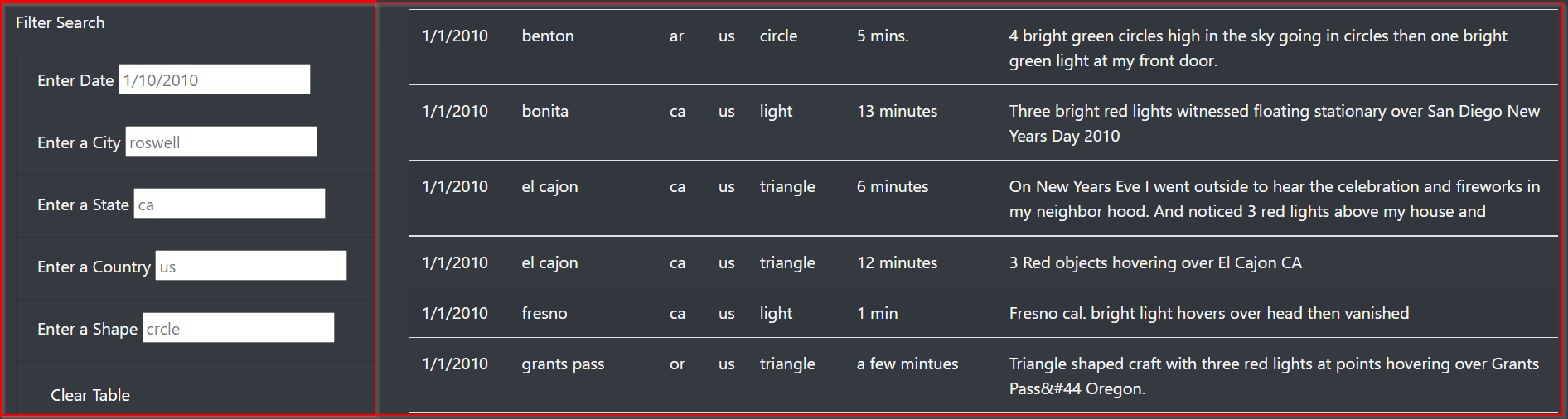
HTML
<!DOCTYPE html>
<html lang="en">
<head>
    <meta charset="UTF-8">
    <!-- <meta http-equiv="X-UA-Compatible" content="IE=edge"> -->
    <meta name="viewport" content="width=device-width, initial-scale=1.0">
    <!-- <link rel="stylesheet" href="https://maxcdn.bootstrapcdn.com/bootswatch/3.3.7/superhero/bootstrap.min.css"> -->
    <script src="https://ajax.googleapis.com/ajax/libs/jquery/3.3.1/jquery.min.js"></script>
    <link rel="stylesheet" type="text/css" href="https://cdn.datatables.net/1.10.16/css/jquery.dataTables.min.css">
    <script type="text/javascript" charset="utf8" src="https://cdn.datatables.net/1.10.16/js/jquery.dataTables.min.js"></script>
    <title>UFO Finder</title>
    <link
      rel="stylesheet"
      href="https://maxcdn.bootstrapcdn.com/bootstrap/4.0.0/css/bootstrap.min.css"
      integrity="sha384-Gn5384xqQ1aoWXA+058RXPxPg6fy4IWvTNh0E263XmFcJlSAwiGgFAW/dAiS6JXm"
      crossorigin="anonymous"
    />
    <link href="https://fonts.googleapis.com/css?family=Ubuntu" rel="stylesheet">
    <link rel="stylesheet" href="static/css/style.css">

</head>
<body class="bg-dark">
    <div class="wrapper">
        <nav class="navbar navbar-dark bg-dark navbar-expand-lg">
            <a class="navbar-brand" href="index.html">UFO Sightings</a>
        </nav>
        <div class="jumbotron">
            <h1 class="display-4">The Truth Is Out There</h1>
        </div>
        <div class="container-fluid">
            <div class="row">
                <div class="col-md-4">
                    <h3>UFO Sightings: Fact or Fancy? <small>Ufologists Weigh In</small></h3>
                </div>
                <div class="col-md-8">


                        <p>Some Text</p>

                </div>
                <div class="container-fluid">
                    <div class="row">
                        <div class="col-md-3">
                            <form class="bg-dark">
                                <p>Filter Search</p>
                                <ul class="list-group bg-dark">
                                    <li class="list-group-item bg-dark">
                                        <label for="date">Enter Date</label>
                                        <input type="text" placeholder="1/10/2010" id="datetime"/>
                                    </li>

                                    <li class="list-group-item bg-dark">
                                        <label for="city">Enter a City</label>
                                        <input type="text" placeholder="roswell" id="city">
                                    </li>
                                    <li class="list-group-item bg-dark">
                                        <label for="state">Enter a State</label>
                                        <input type="text" placeholder="ca" id="state">
                                    </li>
                                    <li class="list-group-item bg-dark">
                                        <label for="Country">Enter a Country</label>
                                        <input type="text" placeholder="us" id="country">
                                    </li>
                                    <li class="list-group-item bg-dark">
                                        <label for="Shape">Enter a Shape</label>
                                        <input type="text" placeholder="crcle" id="shape">
                                    </li>
                                    <!-- <li class="list-group-item bg-dark">
                                        <button id="filter-btn" type="button" class="btn btn-dark" >Clear Table</button>
                                    </li> -->
                                </ul>
                            </form>

                        </div>
                        <div class="col-md-9">
                            <table class="table table-striped">
                                <thead>
                                    <tbody>
                                        <tr>
                                            <th>Date</th>
                                            <th>City</th>
                                            <th>State</th>
                                            <th>Country</th>
                                            <th>Shape</th>
                                            <th>Duration</th>
                                            <th>Comments</th>
                                        </tr>

                                    </tbody>
                                </thead>

                            </table>
                        </div>
                    </div>
                </div>
            </div>
        </div>
    </div>


    <script src="https://cdnjs.cloudflare.com/ajax/libs/d3/4.11.0/d3.js"></script>
    <script type="text/javascript" src="./static/js/data.js"></script>
    <script type="text/javascript" src="./static/js/ufo_starterCode.js"></script>
</body>
</html>
data.js
var data = [
  {
    datetime: "1/1/2010",
    city: "benton",
    state: "ar",
    country: "us",
    shape: "circle",
    durationMinutes: "5 mins.",
    comments: "4 bright green circles high in the sky going in circles then one bright green light at my front door."
  },
  {
    datetime: "1/1/2010",
    city: "bonita",
    state: "ca",
    country: "us",
    shape: "light",
    durationMinutes: "13 minutes",
    comments: "Three bright red lights witnessed floating stationary over San Diego New Years Day 2010"
  }
  ];
目标是能够根据用户输入的筛选搜索条件过滤表中的记录。请注意,我对Javascript非常陌生。任何帮助都是非常感谢的。
回答 1
Stack Overflow用户
发布于 2021-07-05 19:45:35
原始代码试图在循环筛选器时过滤数据对象;下面的代码实现在遍历数据对象时循环遍历筛选器对象。
因为我总是有更多的行而不是过滤器,所以我只运行了一次.filter方法,而不是最初尝试的每个过滤器。
// 9. Loop through all of the filters and keep any data that matches the filter values
let filteredData = tableData.filter((obj) => {
    for(filterId in filters) {
        if(obj[filterId] !== filters[filterId]) {
          return false;
        }
    }
    return true;
});https://stackoverflow.com/questions/68230024
复制相似问题
腾讯云开发者

Copyright © 2013 - 2026 Tencent Cloud. All Rights Reserved. 腾讯云 版权所有
深圳市腾讯计算机系统有限公司 ICP备案/许可证号:粤B2-20090059  粤公网安备44030502008569号
腾讯云计算(北京)有限责任公司 京ICP证150476号 | 京ICP备11018762号