
我很难找到如何在WPF中创建样式资源
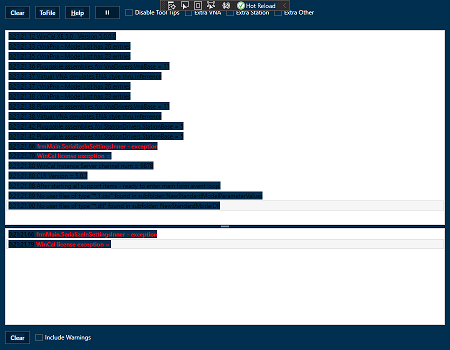
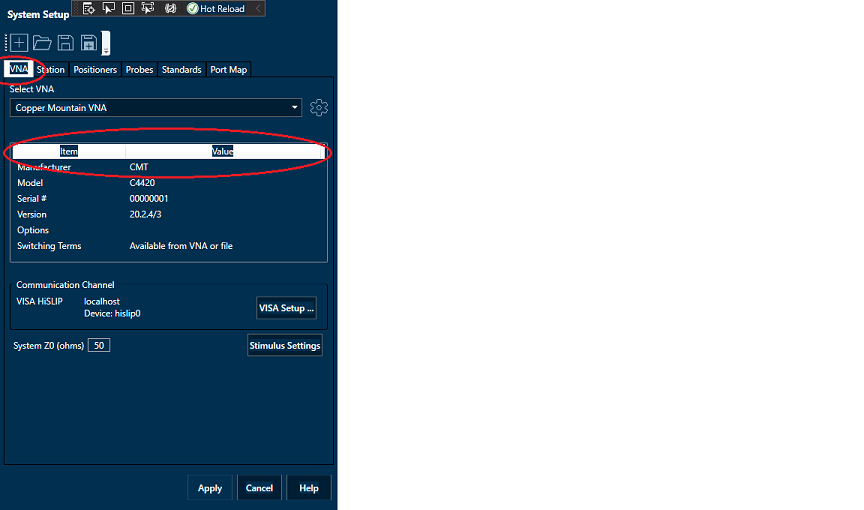
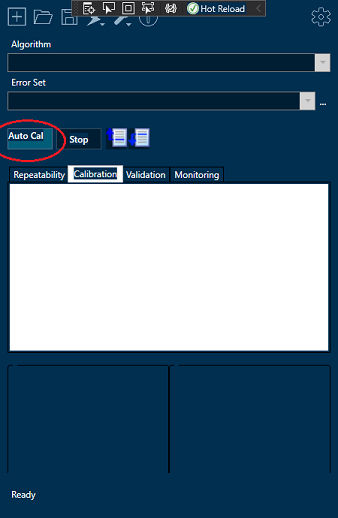
我尝试为我正在开发的WPF应用程序创建样式资源,这是基于UI/UX设计公司提供给我的样式指南。在设置窗口并将背景色控制到所需的蓝色阴影后,我将看到以下内容:
- ListView标题具有一个TabControl的白色背景
- ,所选的TabItem标题背景为白色,而我需要将其设置为蓝色
- 的不同颜色--按钮上下文菜单的PopUp边框很厚,任意灰色
- I成功创建了默认按钮样式资源,该资源排除了"x:Key“属性,然后为”主“按钮创建了不同的按钮样式。但是,主按钮样式不能完全工作,因为文本背景色是错误的,文本位于按钮左上角。
- 对于ToolBar控件,溢出按钮是白色的,而不是我为ToolBar背景
设置的蓝色。
我执行了详尽的搜索,以找到解决这些问题的样式资源示例,但没有一个解决了这些问题。我发现的唯一事情是我将在窗口中为声明的控件调用内联样式。我试图从这些示例中复制ControlTemplates,以便在我的全局资源风格中使用,但没有效果。
我要指出的是,大多数WPF控件都有多个“部件”,需要设置它们的ContentPresenter。我没有从微软或任何其他地方找到任何能解释每种类型的WPF控件的原因。
我附上了几张图片,显示了我遇到的问题。
下面是用于我的控件ResourceDictionary的xaml
<ResourceDictionary xmlns="http://schemas.microsoft.com/winfx/2006/xaml/presentation"
xmlns:x="http://schemas.microsoft.com/winfx/2006/xaml">
<ResourceDictionary.MergedDictionaries>
<ResourceDictionary Source="Colors.xaml" />
</ResourceDictionary.MergedDictionaries>
<!--The Primary Button Variant-->
<Style TargetType="Button" x:Key="PrimaryButton">
<Setter Property="Padding" Value="1" />
<Setter Property="OverridesDefaultStyle" Value="True"/>
<Setter Property="Foreground" Value="{StaticResource whiteBrush}" />
<Setter Property="Background" Value="{StaticResource teal-1Brush}" />
<Setter Property="BorderBrush" Value="{StaticResource button-priimary-borderBrush}" />
<Setter Property="FontWeight" Value="SemiBold"/>
<Setter Property="BorderThickness" Value="1" />
<Setter Property="Template">
<Setter.Value>
<ControlTemplate TargetType="{x:Type Button}">
<Grid>
<Border
x:Name="Border"
Background="{TemplateBinding Background}"
BorderBrush="{TemplateBinding BorderBrush}"
BorderThickness="{TemplateBinding BorderThickness}"
CornerRadius="0"/>
<ContentPresenter
x:Name="cp"
HorizontalAlignment="{TemplateBinding HorizontalContentAlignment}"
Margin="{TemplateBinding Padding}"
VerticalAlignment="{TemplateBinding VerticalContentAlignment}"
RecognizesAccessKey="True" />
</Grid>
<ControlTemplate.Triggers>
<Trigger Property="IsMouseOver" Value="True">
<Setter Property="Background" Value="{StaticResource bluegreenBrush}"/>
</Trigger>
<Trigger Property="IsPressed" Value="True">
<Setter Property="Background" Value="{StaticResource bluegreenBrush}" />
</Trigger>
<Trigger Property="IsEnabled" Value="False">
<Setter Property="Background" Value="{StaticResource petrolBrush}" />
<Setter Property="BorderBrush" Value="{StaticResource metallic-blueBrush}"/>
</Trigger>
</ControlTemplate.Triggers>
</ControlTemplate>
</Setter.Value>
</Setter>
</Style>
<!--The Standard Button Variant-->
<Style TargetType="Button">
<Setter Property="Padding" Value="1" />
<Setter Property="Foreground" Value="{StaticResource whiteBrush}" />
<Setter Property="Background" Value="{StaticResource teal-3Brush}" />
<Setter Property="BorderBrush" Value="{StaticResource button-standard-borderBrush}" />
<Setter Property="FontWeight" Value="SemiBold"/>
<Setter Property="BorderThickness" Value="1" />
<Setter Property="Template">
<Setter.Value>
<ControlTemplate TargetType="{x:Type Button}">
<Grid>
<Border
x:Name="Border"
Background="{TemplateBinding Background}"
BorderBrush="{TemplateBinding BorderBrush}"
BorderThickness="{TemplateBinding BorderThickness}"
CornerRadius="0"/>
<ContentPresenter
x:Name="cp"
HorizontalAlignment="{TemplateBinding HorizontalContentAlignment}"
Margin="{TemplateBinding Padding}"
VerticalAlignment="{TemplateBinding VerticalContentAlignment}"
RecognizesAccessKey="True" />
</Grid>
<ControlTemplate.Triggers>
<Trigger Property="IsMouseOver" Value="True">
<Setter Property="Background" Value="{StaticResource dark-tealBrush}"/>
<Setter Property="BorderBrush" Value="{StaticResource button-standard-borderBrush}"/>
</Trigger>
<Trigger Property="IsPressed" Value="True">
<Setter Property="Background" Value="{StaticResource deep-tealBrush}" />
<Setter Property="BorderBrush" Value="{StaticResource steel-greyBrush}"/>
</Trigger>
<Trigger Property="IsEnabled" Value="False">
<Setter Property="Background" Value="{StaticResource teal-3Brush}" />
<Setter Property="BorderBrush" Value="{StaticResource dark-grey-blueBrush}"/>
</Trigger>
<Trigger Property="IsFocused" Value="True">
<Setter Property="Background" Value="{StaticResource teal-3Brush}" />
</Trigger>
</ControlTemplate.Triggers>
</ControlTemplate>
</Setter.Value>
</Setter>
</Style>
<!--The Image Radius Button-->
<Style x:Key="ImageRadiusButton"
TargetType="Button">
<Setter Property="Background" Value="Transparent"/>
<Setter Property="BorderBrush" Value="Transparent"/>
<Setter Property="BorderThickness" Value="0"/>
<Setter Property="Template">
<Setter.Value>
<ControlTemplate TargetType="{x:Type Button}">
<Grid>
<Border
x:Name="Border"
Background="{TemplateBinding Background}"
BorderBrush="{TemplateBinding BorderBrush}"
BorderThickness="{TemplateBinding BorderThickness}"
CornerRadius="5"/>
<ContentPresenter
x:Name="cp"
HorizontalAlignment="{TemplateBinding HorizontalContentAlignment}"
Margin="{TemplateBinding Padding}"
VerticalAlignment="{TemplateBinding VerticalContentAlignment}"
RecognizesAccessKey="True" />
</Grid>
<ControlTemplate.Triggers>
<Trigger Property="IsMouseOver" Value="True">
<Setter TargetName="Border" Property="Background" Value="Transparent"/>
</Trigger>
</ControlTemplate.Triggers>
</ControlTemplate>
</Setter.Value>
</Setter>
</Style>
<!--The Image Button-->
<Style x:Key="ImageButton"
TargetType="Button">
<Setter Property="Background" Value="Transparent"/>
<Setter Property="BorderBrush" Value="Transparent"/>
<Setter Property="BorderThickness" Value="0"/>
<Setter Property="Template">
<Setter.Value>
<ControlTemplate TargetType="{x:Type Button}">
<Grid>
<Border
x:Name="Border"
Background="{TemplateBinding Background}"
BorderBrush="{TemplateBinding BorderBrush}"
BorderThickness="{TemplateBinding BorderThickness}" />
<ContentPresenter
x:Name="cp"
HorizontalAlignment="{TemplateBinding HorizontalContentAlignment}"
Margin="{TemplateBinding Padding}"
VerticalAlignment="{TemplateBinding VerticalContentAlignment}"
RecognizesAccessKey="True" />
</Grid>
<ControlTemplate.Triggers>
<Trigger Property="IsMouseOver" Value="True">
<Setter TargetName="Border" Property="Background" Value="Transparent"/>
</Trigger>
</ControlTemplate.Triggers>
</ControlTemplate>
</Setter.Value>
</Setter>
</Style>
<!--The Combo Box-->
<ControlTemplate x:Key="ComboBoxToggleButton" TargetType="ToggleButton">
<Grid>
<Grid.ColumnDefinitions>
<ColumnDefinition />
<ColumnDefinition Width="20" />
</Grid.ColumnDefinitions>
<Border
x:Name="Border"
Grid.ColumnSpan="2"
CornerRadius="0"
Background="{StaticResource blue-2Brush}"
BorderBrush="{StaticResource button-standard-borderBrush}"
BorderThickness="1" />
<Border
Grid.Column="0"
CornerRadius="0,0,0,0"
Background="{StaticResource blue-2Brush}"
BorderBrush="Transparent"
BorderThickness="1" />
<Path
x:Name="Arrow"
Grid.Column="1"
Fill="{StaticResource whiteBrush}"
HorizontalAlignment="Center"
VerticalAlignment="Center"
Data="M 0 0 L 4 4 L 8 0 Z"/>
</Grid>
<ControlTemplate.Triggers>
<Trigger Property="IsEnabled" Value="False">
<Setter TargetName="Border" Property="Background" Value="LightGray" />
<Setter TargetName="Border" Property="BorderBrush" Value="Gray" />
<Setter Property="Foreground" Value="DarkGray"/>
<Setter TargetName="Arrow" Property="Fill" Value="DarkGray" />
</Trigger>
</ControlTemplate.Triggers>
</ControlTemplate>
<ControlTemplate x:Key="ComboBoxTextBox" TargetType="TextBox">
<Border x:Name="PART_ContentHost" Focusable="False" Height="25" BorderThickness="0" Background="Transparent" />
</ControlTemplate>
<Style TargetType="ComboBox">
<Setter Property="SnapsToDevicePixels" Value="True"/>
<Setter Property="OverridesDefaultStyle" Value="True"/>
<Setter Property="ScrollViewer.HorizontalScrollBarVisibility" Value="Auto"/>
<Setter Property="ScrollViewer.VerticalScrollBarVisibility" Value="Auto"/>
<Setter Property="ScrollViewer.CanContentScroll" Value="True"/>
<Setter Property="Template">
<Setter.Value>
<ControlTemplate TargetType="ComboBox">
<Grid>
<ToggleButton
Name="ToggleButton"
Template="{StaticResource ComboBoxToggleButton}"
Grid.Column="2"
Focusable="False"
IsChecked="{Binding Path=IsDropDownOpen,Mode=TwoWay,RelativeSource={RelativeSource TemplatedParent}}"
ClickMode="Press">
</ToggleButton>
<ContentPresenter
Name="ContentSite"
IsHitTestVisible="False"
Content="{TemplateBinding SelectionBoxItem}"
ContentTemplate="{TemplateBinding SelectionBoxItemTemplate}"
ContentTemplateSelector="{TemplateBinding ItemTemplateSelector}"
Margin="8,0,0,0"
VerticalAlignment="Center"
HorizontalAlignment="Left" />
<TextBox x:Name="PART_EditableTextBox"
Style="{x:Null}"
Template="{StaticResource ComboBoxTextBox}"
HorizontalAlignment="Left"
VerticalAlignment="Center"
Text="{TemplateBinding Text}"
Focusable="True"
Background="Transparent"
Visibility="Hidden"
Foreground="{StaticResource whiteBrush}"
IsReadOnly="{TemplateBinding IsReadOnly}"/>
<Popup
Name="Popup"
Placement="Bottom"
IsOpen="{TemplateBinding IsDropDownOpen}"
AllowsTransparency="True"
Focusable="False"
PopupAnimation="Slide">
<Grid
Name="DropDown"
SnapsToDevicePixels="True"
MinWidth="{TemplateBinding ActualWidth}"
MaxHeight="{TemplateBinding MaxDropDownHeight}">
<Border
x:Name="DropDownBorder"
Background="{StaticResource blue-2Brush}"
BorderThickness="1"
BorderBrush="{StaticResource button-standard-borderBrush}"/>
<ScrollViewer Margin="4,0,0,0" SnapsToDevicePixels="True">
<StackPanel IsItemsHost="True" KeyboardNavigation.DirectionalNavigation="Contained" />
</ScrollViewer>
</Grid>
</Popup>
</Grid>
<ControlTemplate.Triggers>
<Trigger Property="HasItems" Value="False">
<Setter TargetName="DropDownBorder" Property="MinHeight" Value="95"/>
</Trigger>
<Trigger Property="IsEnabled" Value="False">
<Setter Property="Foreground" Value="LightGray"/>
</Trigger>
<Trigger Property="IsGrouping" Value="True">
<Setter Property="ScrollViewer.CanContentScroll" Value="False"/>
</Trigger>
<Trigger SourceName="Popup" Property="Popup.AllowsTransparency" Value="True">
<Setter TargetName="DropDownBorder" Property="CornerRadius" Value="0,0,0,0"/>
<Setter TargetName="DropDownBorder" Property="Margin" Value="0"/>
</Trigger>
<Trigger Property="IsEditable" Value="True">
<Setter Property="IsTabStop" Value="False"/>
<Setter TargetName="PART_EditableTextBox" Property="Visibility" Value="Visible"/>
<Setter TargetName="ContentSite" Property="Visibility" Value="Hidden"/>
</Trigger>
</ControlTemplate.Triggers>
</ControlTemplate>
</Setter.Value>
</Setter>
<Style.Triggers>
<Trigger Property="IsEnabled" Value="False">
<Setter Property="Background" Value="{StaticResource navyBrush}"/>
<Setter Property="BorderBrush" Value="{StaticResource dark-grey-blueBrush}"/>
</Trigger>
<Trigger Property="IsMouseOver" Value="True">
<Setter Property="Background" Value="{StaticResource dark-tealBrush}"/>
<Setter Property="BorderBrush" Value="{StaticResource button-standard-borderBrush}"/>
</Trigger>
<Trigger Property="IsFocused" Value="True">
<Setter Property="Background" Value="{StaticResource teal-3Brush}"/>
<Setter Property="BorderBrush" Value="{StaticResource whiteBrush}"/>
</Trigger>
</Style.Triggers>
</Style>
<!--The ToolBar-->
<Style TargetType="ToolBar">
<Setter Property="Background" Value="{StaticResource WindowBackgroundBrush}"/>
</Style>
<!--The TextBlock-->
<Style TargetType="TextBlock">
<Setter Property="Background" Value="{StaticResource WindowBackgroundBrush}"/>
<Setter Property="Foreground" Value="{StaticResource whiteBrush}"/>
</Style>
<!--The TextBox-->
<Style TargetType="TextBox">
<Setter Property="Background" Value="{StaticResource WindowBackgroundBrush}"/>
<Setter Property="Foreground" Value="{StaticResource whiteBrush}"/>
</Style>
<!--The CheckBox-->
<Style TargetType="CheckBox">
<Setter Property="Background" Value="{StaticResource WindowBackgroundBrush}"/>
<Setter Property="Foreground" Value="{StaticResource whiteBrush}"/>
</Style>
<Style TargetType="StackPanel">
<Setter Property="Background" Value="{StaticResource WindowBackgroundBrush}"/>
</Style>
<Style TargetType="TabControl">
<Setter Property="Background" Value="{StaticResource WindowBackgroundBrush}"/>
<Setter Property="BorderBrush" Value="{StaticResource blackBrush}"/>
</Style>
<Style TargetType="TabPanel">
<Setter Property="Background" Value="{StaticResource WindowBackgroundBrush}"/>
</Style>
<Style TargetType="TabItem">
<Setter Property="Background" Value="{StaticResource WindowBackgroundBrush}"/>
<Setter Property="BorderBrush" Value="{StaticResource blackBrush}"/>
</Style>
<BorderGapMaskConverter x:Key="BorderGapMaskConverter"/>
<Style TargetType="{x:Type GroupBox}">
<Setter Property="BorderBrush" Value="{StaticResource blackBrush}" />
<Setter Property="Background" Value="{StaticResource WindowBackgroundBrush}"/>
<Setter Property="BorderThickness" Value="1" />
<Setter Property="Template">
<Setter.Value>
<ControlTemplate TargetType="{x:Type GroupBox}">
<Grid SnapsToDevicePixels="true">
<Grid.ColumnDefinitions>
<ColumnDefinition Width="6" />
<ColumnDefinition Width="Auto" />
<ColumnDefinition Width="*" />
<ColumnDefinition Width="6" />
</Grid.ColumnDefinitions>
<Grid.RowDefinitions>
<RowDefinition Height="Auto" />
<RowDefinition Height="Auto" />
<RowDefinition Height="*" />
<RowDefinition Height="6" />
</Grid.RowDefinitions>
<Border CornerRadius="4" Grid.Row="1" Grid.RowSpan="3" Grid.Column="0" Grid.ColumnSpan="4" BorderThickness="{TemplateBinding BorderThickness}" BorderBrush="Transparent" Background="{TemplateBinding Background}" />
<Border Name="Header" Padding="3,1,3,0" Grid.Row="0" Grid.RowSpan="2" Grid.Column="1">
<ContentPresenter ContentSource="Header" RecognizesAccessKey="true" SnapsToDevicePixels="{TemplateBinding SnapsToDevicePixels}" />
</Border>
<ContentPresenter Grid.Row="2" Grid.Column="1" Grid.ColumnSpan="2" Margin="{TemplateBinding Padding}" SnapsToDevicePixels="{TemplateBinding SnapsToDevicePixels}" />
<Border Grid.Row="1" Grid.RowSpan="3" Grid.ColumnSpan="4" BorderThickness="{TemplateBinding BorderThickness}" BorderBrush="{TemplateBinding BorderBrush}" CornerRadius="3">
<Border.OpacityMask>
<MultiBinding Converter="{StaticResource BorderGapMaskConverter}" ConverterParameter="7">
<Binding ElementName="Header" Path="ActualWidth" />
<Binding Path="ActualWidth" RelativeSource="{RelativeSource Self}" />
<Binding Path="ActualHeight" RelativeSource="{RelativeSource Self}" />
</MultiBinding>
</Border.OpacityMask>
</Border>
</Grid>
</ControlTemplate>
</Setter.Value>
</Setter>
</Style>这是彩色ResourceDictionary
<ResourceDictionary xmlns="http://schemas.microsoft.com/winfx/2006/xaml/presentation"
                xmlns:x="http://schemas.microsoft.com/winfx/2006/xaml">

<Color x:Key="black">#FF000000</Color>
<Color x:Key="blue-1">#FF002F50</Color>
<Color x:Key="blue-2">#FF001E33</Color>
<Color x:Key="blue-3">#FF00121D</Color>
<Color x:Key="bluegreen">#FF007080</Color>
<Color x:Key="button-priimary-border">#FFA3B6C3</Color>
<Color x:Key="button-standard-border">#FF61686C</Color>
<Color x:Key="dark-grey-blue">#FF314C5E</Color>
<Color x:Key="dark-teal">#FF003B51</Color>
<Color x:Key="deep-teal">#FF004B61</Color>
<Color x:Key="green">#FF6DD400</Color>
<Color x:Key="light-blue">#FF90AFC4</Color>
<Color x:Key="marine-blue">#FF002F50</Color>
<Color x:Key="metallic-blue">#FF527389</Color>
<Color x:Key="navy">#FF002741</Color>
<Color x:Key="petrol">#FF005D77</Color>
<Color x:Key="pinkish-grey-78">#C8BFBFBF</Color>
<Color x:Key="red-1">#FFFF001B</Color>
<Color x:Key="red-2">#FFFF5466</Color>
<Color x:Key="steel-grey">#FF80868A</Color>
<Color x:Key="teal-1">#FF008B9F</Color>
<Color x:Key="teal-2">#FF006F7F</Color>
<Color x:Key="teal-3">#FF001E33</Color>

<SolidColorBrush x:Key="WindowBackgroundBrush" Color="{StaticResource blue-1}"/>
<SolidColorBrush x:Key="blackBrush"
                 Color="{StaticResource black}" />
<SolidColorBrush x:Key="blue-1Brush"
                 Color="{StaticResource blue-1}" />
<SolidColorBrush x:Key="blue-2Brush"
                 Color="{StaticResource blue-2}" />
<SolidColorBrush x:Key="blue-3Brush"
                 Color="{StaticResource blue-3}" />
<SolidColorBrush x:Key="bluegreenBrush"
                 Color="{StaticResource bluegreen}" />
<SolidColorBrush x:Key="button-priimary-borderBrush"
                 Color="{StaticResource button-priimary-border}" />
<SolidColorBrush x:Key="button-standard-borderBrush"
                 Color="{StaticResource button-standard-border}" />
<SolidColorBrush x:Key="dark-grey-blueBrush"
                 Color="{StaticResource dark-grey-blue}" />
<SolidColorBrush x:Key="dark-tealBrush"
                 Color="{StaticResource dark-teal}" />
<SolidColorBrush x:Key="deep-tealBrush"
                 Color="{StaticResource deep-teal}" />
<SolidColorBrush x:Key="greenBrush"
                 Color="{StaticResource green}" />
<SolidColorBrush x:Key="light-blueBrush"
                 Color="{StaticResource light-blue}" />
<SolidColorBrush x:Key="marine-blueBrush"
                 Color="{StaticResource marine-blue}" />
<SolidColorBrush x:Key="metallic-blueBrush"
                 Color="{StaticResource metallic-blue}" />
<SolidColorBrush x:Key="navyBrush"
                 Color="{StaticResource navy}" />
<SolidColorBrush x:Key="petrolBrush"
                 Color="{StaticResource petrol}" />
<SolidColorBrush x:Key="pinkish-grey-78Brush"
                 Color="{StaticResource pinkish-grey-78}" />
<SolidColorBrush x:Key="red-1Brush"
                 Color="{StaticResource red-1}" />
<SolidColorBrush x:Key="red-2Brush"
                 Color="{StaticResource red-2}" />
<SolidColorBrush x:Key="steel-greyBrush"
                 Color="{StaticResource steel-grey}" />
<SolidColorBrush x:Key="teal-1Brush"
                 Color="{StaticResource teal-1}" />
<SolidColorBrush x:Key="teal-2Brush"
                 Color="{StaticResource teal-2}" />
<SolidColorBrush x:Key="teal-3Brush"
                 Color="{StaticResource teal-3}" />
<SolidColorBrush x:Key="whiteBrush" Color="White"/>回答 1
Stack Overflow用户
发布于 2021-07-13 02:21:02
我成功地接受了@AndrewStevens的建议,并成功地重新设计了所有全局控件,除了之外,我的Button风格有两个问题:
最奇怪的是,到目前为止,我应用程序中的几十个按钮中有一个没有模板应用。当IsEnabled="False".时,
- 我无法设置按钮的文本颜色
我已经做了我通常过多的谷歌搜索,但这两个问题都没有用。
如果有人对这两件事有任何线索的话,我会很感激你的帮助。
下面是Button样式:
<Style TargetType="Button">
    <Setter Property="Padding" Value="1" />
    <Setter Property="Foreground" Value="{StaticResource StandardButtonRestTextBrush}" />
    <Setter Property="Background" Value="{StaticResource StandardButtonRestBackGroundBrush}" />
    <Setter Property="BorderBrush" Value="{StaticResource StandardButtonRestBorderBrush}" />
    <Setter Property="FontWeight" Value="SemiBold"/>
    <Setter Property="BorderThickness" Value="1" />
    <Setter Property="Template">
        <Setter.Value>
            <ControlTemplate TargetType="{x:Type Button}">
                <Border
                    x:Name="Border"
                    Background="{TemplateBinding Background}"
                    BorderBrush="{TemplateBinding BorderBrush}"
                    BorderThickness="{TemplateBinding BorderThickness}"
                    CornerRadius="0">
                    <ContentPresenter x:Name="contentPresenter"
                                        ContentTemplate="{TemplateBinding ContentTemplate}"
                                        Content="{TemplateBinding Content}"
                                        ContentStringFormat="{TemplateBinding ContentStringFormat}"
                                        Focusable="False"
                                        HorizontalAlignment="{TemplateBinding HorizontalContentAlignment}"
                                        Margin="{TemplateBinding Padding}"
                                        RecognizesAccessKey="True" SnapsToDevicePixels="{TemplateBinding SnapsToDevicePixels}"
                                        VerticalAlignment="{TemplateBinding VerticalContentAlignment}"/>
                </Border>

                <ControlTemplate.Triggers>
                    <Trigger Property="IsMouseOver" Value="True">
                        <Setter Property="Background" Value="{StaticResource StandardButtonHoverBackgroundBrush}"/>
                        <Setter Property="BorderBrush" Value="{StaticResource StandardButtonHoverBorderBrush}"/>
                    </Trigger>
                    <Trigger Property="IsPressed" Value="True">
                        <Setter Property="Background" Value="{StaticResource StandardButtonPressedBackgroundBrush}" />
                        <Setter Property="BorderBrush" Value="{StaticResource StandardButtonPressedBorderBrush}"/>
                    </Trigger>
                    <Trigger Property="IsFocused" Value="True">
                        <Setter Property="Background" Value="{StaticResource StandardButtonFocusBackgroundBrush}" />
                        <Setter Property="BorderBrush" Value="{StaticResource WhiteBrush}"/>
                    </Trigger>
                    <Trigger Property="IsEnabled" Value="False">
                        <Setter Property="Background" Value="{StaticResource StandardButtonDisabledBackgroundBrush}" />
                        <Setter Property="BorderBrush" Value="{StaticResource StandardButtonDisabledBorderBrush}" />
                    </Trigger>
                </ControlTemplate.Triggers>
            </ControlTemplate>
        </Setter.Value>
    </Setter>
</Style>
下面是颜色ResourceDictionary:
<ResourceDictionary xmlns="http://schemas.microsoft.com/winfx/2006/xaml/presentation"
                    xmlns:x="http://schemas.microsoft.com/winfx/2006/xaml">

    <Color x:Key="black">#FF000000</Color>
    <Color x:Key="blue-1">#FF002F50</Color>
    <Color x:Key="blue-2">#FF001E33</Color>
    <Color x:Key="blue-3">#FF00121D</Color>
    <Color x:Key="bluegreen">#FF007080</Color>
    <Color x:Key="button-priimary-border">#FFA3B6C3</Color>
    <Color x:Key="button-standard-border">#FF61686C</Color>
    <Color x:Key="dark-grey-blue">#FF314C5E</Color>
    <Color x:Key="dark-teal">#FF003B51</Color>
    <Color x:Key="deep-teal">#FF004B61</Color>
    <Color x:Key="green">#FF6DD400</Color>
    <Color x:Key="light-blue">#FF90AFC4</Color>
    <Color x:Key="marine-blue">#FF002F50</Color>
    <Color x:Key="metallic-blue">#FF527389</Color>
    <Color x:Key="navy">#FF002741</Color>
    <Color x:Key="petrol">#FF005D77</Color>
    <Color x:Key="pinkish-grey-78">#C8BFBFBF</Color>
    <Color x:Key="red-1">#FFFF001B</Color>
    <Color x:Key="red-2">#FFFF5466</Color>
    <Color x:Key="steel-grey">#FF80868A</Color>
    <Color x:Key="teal-1">#FF008B9F</Color>
    <Color x:Key="teal-2">#FF006F7F</Color>
    <Color x:Key="teal-3">#FF001E33</Color>
    <Color x:Key="defaultTextColor">#FFFFFFFF</Color>
    <Color x:Key="disabledTextColor">#A19F9D</Color>
    <Color x:Key="windowSectionBorderColor">#001E33</Color>
    <Color x:Key="transparentColor">Transparent</Color>
    <Color x:Key="disabledBackgroundColor">#FF001E33</Color>
    <Color x:Key="windowBackgroundColor">#FF002F50</Color>
    <Color x:Key="defaultFocusBorder">White</Color>

    <SolidColorBrush x:Key="WindowBackgroundBrush" Color="{StaticResource blue-1}"/>
    <SolidColorBrush x:Key="TransparentBrush" Color="{StaticResource transparentColor}"/>
    <SolidColorBrush x:Key="WhiteBrush" Color="White"/>
    <SolidColorBrush x:Key="disabledBorderBrush" Color="#A19F9D"/>
    <SolidColorBrush x:Key="DefaultHeaderGroundBrush" Color="{StaticResource teal-3}"/>
    <SolidColorBrush x:Key="defaultTextBrush" Color="{StaticResource defaultTextColor}"/>
    <SolidColorBrush x:Key="disabledTextBrush" Color="{StaticResource disabledTextColor}"/>
    <SolidColorBrush x:Key="windowSectionBorderBrush" Color="{StaticResource windowSectionBorderColor}"/>

    <!--The Primary Button Brushes-->
    <SolidColorBrush x:Key="PrimaryButtonRestBackGroundBrush" Color="{StaticResource teal-1}"/>
    <SolidColorBrush x:Key="PrimaryButtonRestBorderBrush" Color="{StaticResource button-priimary-border}"/>
    <SolidColorBrush x:Key="PrimaryButtonRestTextBrush" Color="{StaticResource defaultTextColor}"/>

    <SolidColorBrush x:Key="PrimaryButtonFocusBackgroundBrush" Color="{StaticResource teal-1}"/>
    <SolidColorBrush x:Key="PrimaryButtonFocusBorderBrush" Color="{StaticResource defaultTextColor}"/>
    <SolidColorBrush x:Key="PrimaryButtonFocusTextBrush" Color="{StaticResource defaultTextColor}"/>

    <SolidColorBrush x:Key="PrimaryButtonPressedBorderBrush" Color="{StaticResource button-priimary-border}"/>
    <SolidColorBrush x:Key="PrimaryButtonPressedBackgroundBrush" Color="{StaticResource bluegreen}"/>
    <SolidColorBrush x:Key="PrimaryButtonPressedTextBrush" Color="{StaticResource defaultTextColor}"/>

    <SolidColorBrush x:Key="PrimaryButtonHoverBorderBrush" Color="{StaticResource button-priimary-border}"/>
    <SolidColorBrush x:Key="PrimaryButtonHoverBackgroundBrush" Color="{StaticResource bluegreen}"/>
    <SolidColorBrush x:Key="PrimaryButtonHoverTextBrush" Color="{StaticResource defaultTextColor}"/>

    <SolidColorBrush x:Key="PrimaryButtonDisabledBorderBrush" Color="{StaticResource button-priimary-border}"/>
    <SolidColorBrush x:Key="PrimaryButtonDisabledBackgroundBrush" Color="{StaticResource petrol}"/>
    <SolidColorBrush x:Key="PrimaryButtonDisabledTextBrush" Color="{StaticResource disabledTextColor}"/>

    <!--The Standard Button Brushes-->
    <SolidColorBrush x:Key="StandardButtonRestBackGroundBrush" Color="{StaticResource teal-3}"/>
    <SolidColorBrush x:Key="StandardButtonRestBorderBrush" Color="{StaticResource button-standard-border}"/>
    <SolidColorBrush x:Key="StandardButtonRestTextBrush" Color="{StaticResource defaultTextColor}"/>

    <SolidColorBrush x:Key="StandardButtonFocusBackgroundBrush" Color="{StaticResource teal-3}"/>
    <SolidColorBrush x:Key="StandardButtonFocusBorderBrush" Color="White"/>
    <SolidColorBrush x:Key="StandardButtonFocusTextBrush" Color="{StaticResource defaultTextColor}"/>

    <SolidColorBrush x:Key="StandardButtonPressedBorderBrush" Color="{StaticResource steel-grey}"/>
    <SolidColorBrush x:Key="StandardButtonPressedBackgroundBrush" Color="{StaticResource teal-2}"/>
    <SolidColorBrush x:Key="StandardButtonPressedTextBrush" Color="White"/>

    <SolidColorBrush x:Key="StandardButtonHoverBorderBrush" Color="{StaticResource button-standard-border}"/>
    <SolidColorBrush x:Key="StandardButtonHoverBackgroundBrush" Color="{StaticResource dark-teal}"/>
    <SolidColorBrush x:Key="StandardButtonHoverTextBrush" Color="{StaticResource defaultTextColor}"/>

    <SolidColorBrush x:Key="StandardButtonDisabledBorderBrush" Color="{StaticResource dark-grey-blue}"/>
    <SolidColorBrush x:Key="StandardButtonDisabledBackgroundBrush" Color="{StaticResource teal-3}"/>
    <SolidColorBrush x:Key="StandardButtonDisabledTextBrush" Color="{StaticResource disabledTextColor}"/>

    <!--The ComboBox Colors-->
    <SolidColorBrush x:Key="ComboBoxRestBackgroundBrush" Color="{StaticResource blue-2}"/>
    <SolidColorBrush x:Key="ComboBoxRestBorderBrush" Color="{StaticResource button-standard-border}"/>
    <SolidColorBrush x:Key="ComboBoxRestTextBrush" Color="{StaticResource defaultTextColor}"/>

    <SolidColorBrush x:Key="ComboBoxFocusBackgroundBrush" Color="{StaticResource teal-3}"/>
    <SolidColorBrush x:Key="ComboBoxFocusBorderBrush" Color="White"/>
    <SolidColorBrush x:Key="ComboBoxFocusTextBrush" Color="{StaticResource defaultTextColor}"/>

    <SolidColorBrush x:Key="ComboBoxHoverBackgroundBrush" Color="{StaticResource dark-teal}"/>
    <SolidColorBrush x:Key="ComboBoxHoverBorderBrush" Color="{StaticResource button-standard-border}"/>
    <SolidColorBrush x:Key="ComboBoxHoverTextrush" Color="{StaticResource defaultTextColor}"/>

    <SolidColorBrush x:Key="ComboBoxPressedBackgroundBrush" Color="{StaticResource deep-teal}"/>
    <SolidColorBrush x:Key="ComboBoxPressedBorderBrush" Color="{StaticResource steel-grey}"/>
    <SolidColorBrush x:Key="ComboBoxPressedTextBrush" Color="{StaticResource defaultTextColor}"/>

    <SolidColorBrush x:Key="ComboBoxDiabledBackgroundBrush" Color="{StaticResource navy}"/>
    <SolidColorBrush x:Key="ComboBoxDiabledBorderBrush" Color="{StaticResource dark-grey-blue}"/>
    <SolidColorBrush x:Key="ComboBoxDisabledTextBrush" Color="{StaticResource disabledTextColor}"/>

    <!--The root brushes-->
    <SolidColorBrush x:Key="blackBrush"
                     Color="{StaticResource black}" />
    <SolidColorBrush x:Key="blue-1Brush"
                     Color="{StaticResource blue-1}" />
    <SolidColorBrush x:Key="blue-2Brush"
                     Color="{StaticResource blue-2}" />
    <SolidColorBrush x:Key="blue-3Brush"
                     Color="{StaticResource blue-3}" />
    <SolidColorBrush x:Key="bluegreenBrush"
                     Color="{StaticResource bluegreen}" />
    <SolidColorBrush x:Key="button-priimary-borderBrush"
                     Color="{StaticResource button-priimary-border}" />
    <SolidColorBrush x:Key="button-standard-borderBrush"
                     Color="{StaticResource button-standard-border}" />
    <SolidColorBrush x:Key="dark-grey-blueBrush"
                     Color="{StaticResource dark-grey-blue}" />
    <SolidColorBrush x:Key="dark-tealBrush"
                     Color="{StaticResource dark-teal}" />
    <SolidColorBrush x:Key="deep-tealBrush"
                     Color="{StaticResource deep-teal}" />
    <SolidColorBrush x:Key="greenBrush"
                     Color="{StaticResource green}" />
    <SolidColorBrush x:Key="light-blueBrush"
                     Color="{StaticResource light-blue}" />
    <SolidColorBrush x:Key="marine-blueBrush"
                     Color="{StaticResource marine-blue}" />
    <SolidColorBrush x:Key="metallic-blueBrush"
                     Color="{StaticResource metallic-blue}" />
    <SolidColorBrush x:Key="navyBrush"
                     Color="{StaticResource navy}" />
    <SolidColorBrush x:Key="petrolBrush"
                     Color="{StaticResource petrol}" />
    <SolidColorBrush x:Key="pinkish-grey-78Brush"
                     Color="{StaticResource pinkish-grey-78}" />
    <SolidColorBrush x:Key="red-1Brush"
                     Color="{StaticResource red-1}" />
    <SolidColorBrush x:Key="red-2Brush"
                     Color="{StaticResource red-2}" />
    <SolidColorBrush x:Key="steel-greyBrush"
                     Color="{StaticResource steel-grey}" />
    <SolidColorBrush x:Key="teal-1Brush"
                     Color="{StaticResource teal-1}" />
    <SolidColorBrush x:Key="teal-2Brush"
                     Color="{StaticResource teal-2}" />
    <SolidColorBrush x:Key="teal-3Brush"
                     Color="{StaticResource teal-3}" />
</ResourceDictionary>https://stackoverflow.com/questions/68326017
复制相似问题
腾讯云开发者

Copyright © 2013 - 2026 Tencent Cloud. All Rights Reserved. 腾讯云 版权所有
深圳市腾讯计算机系统有限公司 ICP备案/许可证号:粤B2-20090059  粤公网安备44030502008569号
腾讯云计算(北京)有限责任公司 京ICP证150476号 | 京ICP备11018762号