
带边框的菱形按钮
带边框的菱形按钮
提问于 2021-07-20 12:03:56
有人知道如何设计这个扣子吗?这是一个镶有边框颜色的菱形按钮。

回答 3
Stack Overflow用户
回答已采纳
发布于 2021-07-20 18:14:19
结果
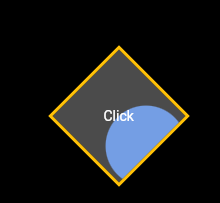
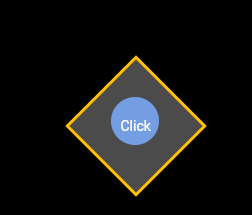
全码
import 'dart:math' as math;

import 'package:flutter/material.dart';

class DimondButton extends StatelessWidget {
  const DimondButton({Key? key}) : super(key: key);

  @override
  Widget build(BuildContext context) {
    return Scaffold(
      backgroundColor: Colors.black,
      body: Center(
        child: Transform(
          alignment: Alignment.center,
          transform: Matrix4.rotationZ(
            math.pi / 4,
          ),
          child: Container(
            width: 100,
            height: 100,
            decoration: BoxDecoration(
              color: Colors.transparent,
              border: Border.all(
                width: 3,
                color: Colors.amber,
              ),
            ),
            child: InkWell(
              splashColor: Colors.blueAccent,
              onTap: () {},
              child: Center(
                child: Transform(
                  alignment: Alignment.center,
                  transform: Matrix4.rotationZ(
                    -math.pi / 4,
                  ),
                  child: Text(
                    "Click",
                    style: TextStyle(color: Colors.white),
                  ),
                ),
              ),
            ),
          ),
        ),
      ),
    );
  }
}Stack Overflow用户
发布于 2021-07-20 12:11:53
您有多种方法,您可以创建一个具有边框颜色和透明内部的容器,并使用transform.translate对其进行转换;另一种方法是使用定制的画图,这有点困难。
Stack Overflow用户
发布于 2021-07-20 12:24:11
您应该尝试使用下面的代码,将此依赖项添加到pubspec.yaml文件flutter_custom_clippers:^1.1.2 在这里找到的包裹
          ClipPath(
            clipper: ParallelogramClipper(),
            child: Container(
              height: 50,
              width: 50,
              color: Colors.pinkAccent,
              child: TextButton(
                onPressed: () {
                  print('object');
                },
                child: Text('OK'),
              ),
            ),
), 页面原文内容由Stack Overflow提供。腾讯云小微IT领域专用引擎提供翻译支持
原文链接:
https://stackoverflow.com/questions/68454576
复制相关文章
相似问题
腾讯云开发者

Copyright © 2013 - 2026 Tencent Cloud. All Rights Reserved. 腾讯云 版权所有
深圳市腾讯计算机系统有限公司 ICP备案/许可证号:粤B2-20090059  粤公网安备44030502008569号
腾讯云计算(北京)有限责任公司 京ICP证150476号 | 京ICP备11018762号