
在.Net内核3.1中使用MicrosoftGraph6.0获取用户信息时获取异常
在.Net内核3.1中使用MicrosoftGraph6.0获取用户信息时获取异常
提问于 2021-07-23 10:50:20
我在.net核心3.1中创建了一个web应用程序,并通过Azure认证用户。在成功的身份验证之后,我将从Microsoft获取用户信息。所有这些都在本地运行良好,但每当我将其发布到Azure时,对于第一次登录的用户也很好,但是如果用户已经登录(以前登录)到web应用程序,则会出现异常。如果用户已经登录并再次登录,则此应用程序也可以正常工作。如果用户已经登录并试图通过MicrosoftGraph获取用户详细信息,则获取异常:
Code: generalException
Message: An error occurred sending the request.
 (1b2e028d)
2021-07-23T03:33:27.7510101+00:00 80010cc2-0000-da00-b63f-84710c7967bb [INF]    at Microsoft.Graph.HttpProvider.SendRequestAsync(HttpRequestMessage request, HttpCompletionOption completionOption, CancellationToken cancellationToken)
   at Microsoft.Graph.HttpProvider.SendAsync(HttpRequestMessage request, HttpCompletionOption completionOption, CancellationToken cancellationToken)
   at Microsoft.Graph.BaseRequest.SendRequestAsync(Object serializableObject, CancellationToken cancellationToken, HttpCompletionOption completionOption)
   at Microsoft.Graph.BaseRequest.SendAsync[T](Object serializableObject, CancellationToken cancellationToken, HttpCompletionOption completionOption)
   at Microsoft.Graph.UserRequest.GetAsync(CancellationToken cancellationToken)
   at SentimentAnalysisApp.Controllers.HomeController.Index() in D:\Workspaces\Controllers\HomeController.cs:line 70 (15cafa0a)
这是我的Startup.cs:
public class Startup
    {
        public Startup(IConfiguration configuration)
        {
            Configuration = configuration;
        }

        public IConfiguration Configuration { get; }

        // This method gets called by the runtime. Use this method to add services to the container.
        public void ConfigureServices(IServiceCollection services)
        {
            string[] initialScopes = Configuration.GetValue<string>("DownstreamApi:Scopes")?.Split(' ');

            services
            // Use OpenId authentication
            .AddAuthentication(OpenIdConnectDefaults.AuthenticationScheme)
            // Specify this is a web app and needs auth code flow
            .AddMicrosoftIdentityWebApp(Configuration)
            // Add ability to call web API (Graph)
            // and get access tokens
            .EnableTokenAcquisitionToCallDownstreamApi(options =>
            {
                Configuration.Bind("AzureAd", options);
            }, initialScopes)
            // Use in-memory token cache
            // See https://github.com/AzureAD/microsoft-identity-web/wiki/token-cache-serialization
            .AddInMemoryTokenCaches()
            .AddMicrosoftGraph(Configuration.GetSection("DownstreamApi"));

            // Require authentication
            services.AddControllersWithViews(options =>
            {
                var policy = new AuthorizationPolicyBuilder()
                    .RequireAuthenticatedUser()
                    .Build();
                options.Filters.Add(new AuthorizeFilter(policy));
            })
            // Add the Microsoft Identity UI pages for signin/out
            .AddMicrosoftIdentityUI();

            //services.AddSingleton<AppData>();
            services.AddScoped<AppData>();


            services.AddRazorPages();

            var path = Directory.GetCurrentDirectory();
            services.AddDataProtection().PersistKeysToFileSystem(new DirectoryInfo($"{path}\\DataProtectionKeys\\Keys.xml"));

        }

        // This method gets called by the runtime. Use this method to configure the HTTP request pipeline.
        public void Configure(IApplicationBuilder app, IWebHostEnvironment env, ILoggerFactory loggerFactory)
        {
            var path = Directory.GetCurrentDirectory();
            loggerFactory.AddFile($"{path}\\SentimentLogs\\Sentiment_Log.txt");

            if (env.IsDevelopment())
            {
                app.UseDeveloperExceptionPage();
            }
            else
            {
                app.UseExceptionHandler("/Home/Error");
                // The default HSTS value is 30 days. You may want to change this for production scenarios, see https://aka.ms/aspnetcore-hsts.
                app.UseHsts();
            }
            app.UseHttpsRedirection();
            app.UseStaticFiles();

            app.UseRouting();

            app.UseAuthentication();
            app.UseAuthorization();

            app.UseEndpoints(endpoints =>
            {
                endpoints.MapControllerRoute(
                    name: "default",
                    pattern: "{controller=Home}/{action=Index}/{id?}");
                endpoints.MapRazorPages();
            });
        }
    }
以下是我的控制器类:
    [Authorize]
    public class HomeController : Controller
    {
    public HomeController(IConfiguration config, ILogger<HomeController> logger,
                              GraphServiceClient graphServiceClient,
                              ITokenAcquisition tokenAcquisition,
                              IDataProtectionProvider provider, AppData appData,
                               IMemoryCache memoryCache)
            {
                _logger = logger;
                _graphServiceClient = graphServiceClient;
                _tokenAcquisition = tokenAcquisition;
                _protector = provider.CreateProtector("Encrypt");
                _appData = appData;
                _config = config;

            }

            [AuthorizeForScopes(ScopeKeySection = "DownstreamApi:Scopes")]
            public async Task<IActionResult> Index()
            {
                try
                {
                    //Here I'm fetching logged in user details and getting exception if the user
                    //already logged in.
                    LoggedInUser = await _graphServiceClient.Me.Request().GetAsync();
                    _appData.LoggedInUser = LoggedInUser.DisplayName;
                    string token = await _tokenAcquisition.GetAccessTokenForUserAsync(GraphConstants.Scopes);
                }
                catch (MicrosoftIdentityWebChallengeUserException)
                {
                    return Challenge();
                }
                catch (Exception ex)
                {
                    _logger.LogInformation(ex.Message);
                    _logger.LogInformation(ex.StackTrace);
                    Console.WriteLine(ex.Message);
                    //return Challenge();
                }

                return View(_appData);
            }
}
任何帮助都将不胜感激!
回答 1
Stack Overflow用户
回答已采纳
发布于 2021-07-26 07:30:42
我无法根据官方的示例代码重现您的问题。但是从您的错误信息中,我看到您的错误消息来自您的本地pc。
SentimentAnalysisApp.Controllers.HomeController.Index() in D:\Workspaces\Controllers\HomeController.cs:line 70的
(15 Caa0a)
您的描述是,在本地一切都是正常的,但是在发布之后,问题出现了。
,所以我给出以下建议并建议排除故障:
- 确认门户
中是否存在本地和事后发布的URL。
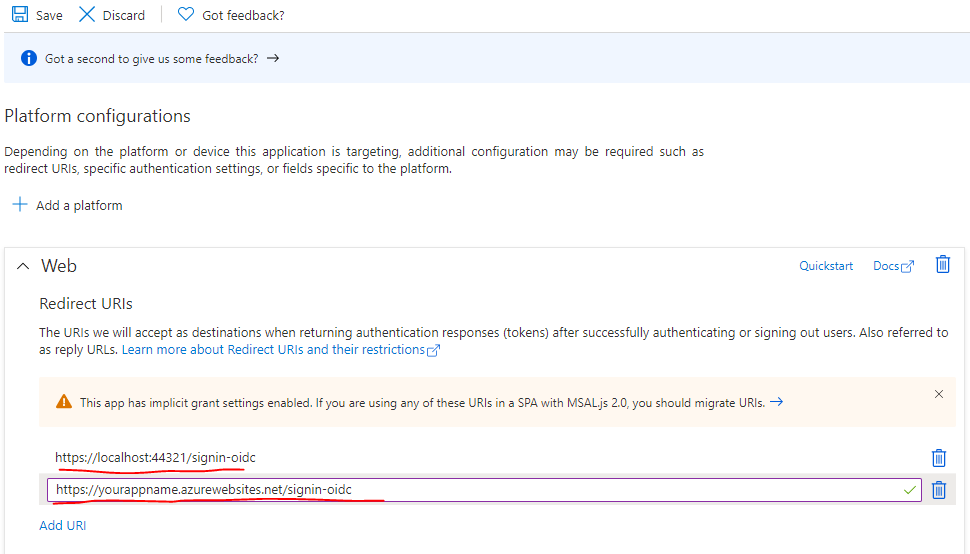
- 当程序发布时会话将被清除,所以在测试该功能时,在webapp重新发布之前登录的用户将遇到问题。这是正常的。
页面原文内容由Stack Overflow提供。腾讯云小微IT领域专用引擎提供翻译支持
原文链接:
https://stackoverflow.com/questions/68498026
复制相关文章
相似问题
腾讯云开发者

Copyright © 2013 - 2026 Tencent Cloud. All Rights Reserved. 腾讯云 版权所有
深圳市腾讯计算机系统有限公司 ICP备案/许可证号:粤B2-20090059  粤公网安备44030502008569号
腾讯云计算(北京)有限责任公司 京ICP证150476号 | 京ICP备11018762号