
如何在HTML和CSS中裁剪大小调整的图像?
如何在HTML和CSS中裁剪大小调整的图像?
提问于 2021-07-23 02:44:19
我试图在CSS和HTML中调整图像的大小--这是我当前用来调整图像大小的CSS代码:
.resize-image {
    border:1px solid #021a40;
    display: block;
    width: auto;
    max-width: 100%;
    max-height: 1442px;
}
使用该CSS,我将如何裁剪任何图像,以便只显示图像的前250 px,或20%等?我的意思是:
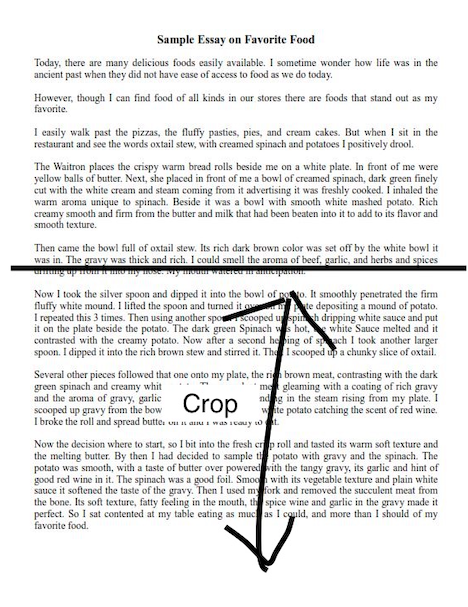
带箭头的区域是我想要删除的部分--我只想保留图片的前四分之一。如何在CSS或HTML中完成这一点?
编辑:这是我的HTML:
<!DOCTYPE html>
<html>
<head>
<style>
.resize-image {
    border:1px solid #021a40;
    display: block;
    width: auto;
    max-width: 100%;
    max-height: 1442px;
    overflow: hidden;
}
</style>
</head>
<body>

<div class= "img-container">
    <img class = "resize-image" src="https://i.imgur.com/DJPXuPZ.png">
</div>
</body>
</html>回答 2
Stack Overflow用户
回答已采纳
发布于 2021-07-23 04:18:15
您需要将overflow添加到父服务器,并将其height设置为您希望的。
.resize-image {
  border: 1px solid #021a40;
  display: block;
  max-width: 100%;
  max-height: 1442px;
}

.img-container {
  width: auto;
  height: 250px;
  overflow: hidden;
}<div class="img-container">
<img class="resize-image" src="https://i.imgur.com/DJPXuPZ.png">
</div>
Stack Overflow用户
发布于 2021-07-23 04:13:11
你必须使用height和overflow: hidden对父母div的希望!它起作用了
.img-container{
    height: 300px;
    overflow: hidden;
}
.resize-image {
    border:1px solid #021a40;
    display: block;
    width: auto;
    max-width: 100%;
    height: auto;
    overflow: hidden;
}<!DOCTYPE html>
<html>
<head>
</head>
<body>
<div class= "img-container">
<img class = "resize-image" src="https://i.imgur.com/DJPXuPZ.png">
</div>
</body>
</html>
页面原文内容由Stack Overflow提供。腾讯云小微IT领域专用引擎提供翻译支持
原文链接:
https://stackoverflow.com/questions/68493449
复制相关文章
相似问题
腾讯云开发者

Copyright © 2013 - 2026 Tencent Cloud. All Rights Reserved. 腾讯云 版权所有
深圳市腾讯计算机系统有限公司 ICP备案/许可证号:粤B2-20090059  粤公网安备44030502008569号
腾讯云计算(北京)有限责任公司 京ICP证150476号 | 京ICP备11018762号