
根据2种不同情况改变潘达斯行背景颜色和字体颜色
根据2种不同情况改变潘达斯行背景颜色和字体颜色
提问于 2021-07-27 14:02:29
如果Rising是假的,我有一个代码来更改单元格背景颜色。如果单元格中的值为Nifty 50,则要将Index单元格的颜色更改为绿色。
因此,如果任何行来自Nifty 50,但Rising是假的,那么Nifty 50单元格应该位于该单元格的绿色背景中,而所有其他单元格都应该是红色的。
这就是我希望Dataframe看起来的样子:如果Rising是False or 0,那么整个行就是红色的。Index的颜色取决于它是否来自Nifty-50/100/200
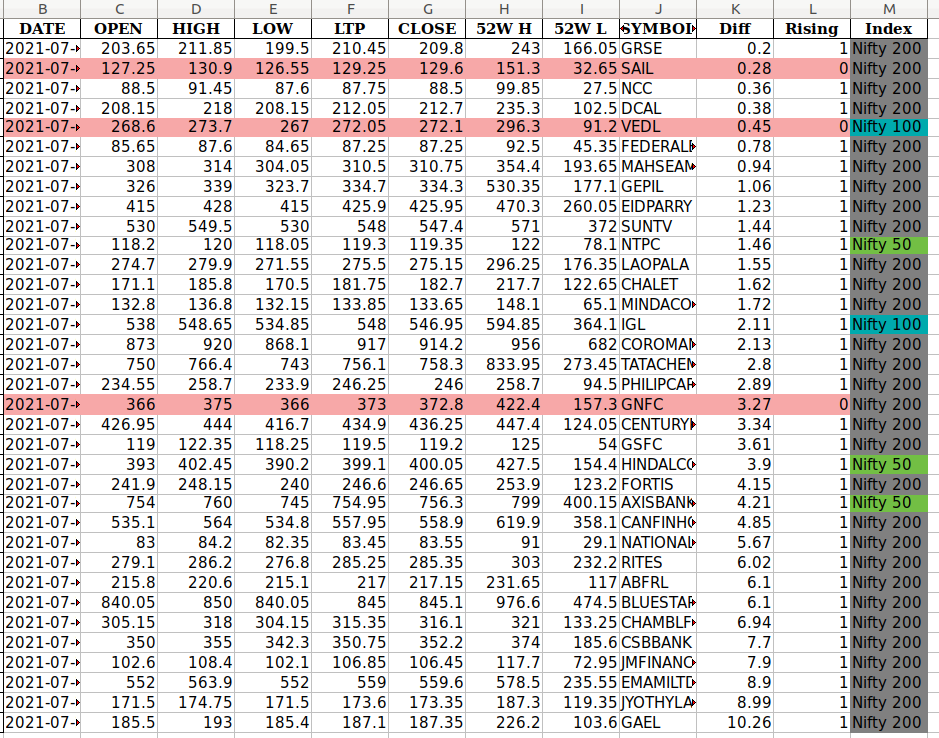
改变颜色的代码如下:
def highlight_falling(s, column:str):
        '''
        Highlight The rows where average is falling
        args:
            s: Series
            column: Column name(s)
        '''
        is_max = pd.Series(data=False, index=s.index)
        is_max[column] = s.loc[column] == True
        return ['' if is_max.any() else 'background-color: #f7a8a8' for v in is_max]

picked.style.apply(highlight_falling, column=['Rising'], axis=1) # picked is the DF在这里,我想给出50,100,200,500单元格的指数作为[Green,Blue,Magenta. White] (仅以tan为例)
回答 1
Stack Overflow用户
回答已采纳
发布于 2021-07-27 19:05:22
我们可以使用Series.map将列中的值与新的颜色样式相关联。然后,我们将在行样式之后应用Index列样式,以覆盖先前放置的红色:
def highlight_falling(f: pd.DataFrame, column: str):
    # Create an Empty DataFrame
    f_styles = pd.DataFrame('', index=f.index, columns=f.columns)
    # Apply Styles based on column. (Set red where not Truthy)
    f_styles.loc[~(f[column].astype(bool)), :] = 'background-color: #f7a8a8'
    return f_styles


def highlight_nifty(s: pd.Series):
    return 'background-color: ' + s.map({
        'Nifty 50': 'green',
        'Nifty 100': 'blue',
        'Nifty 200': '#888888'
    })  # Map to colour codes


# Save Styler To Re-use (can also Chain)
styler = picked.style
# Apply Row Colour (Do not pass column as List[str] use str!!)
styler.apply(highlight_falling, column='Rising', axis=None)
# Apply Index Column Colours
styler.apply(highlight_nifty, subset='Index')
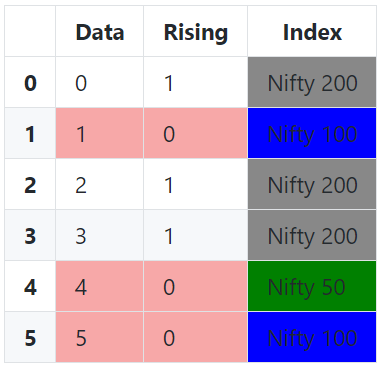
还可以使用dict和zip创建映射字典,如果要指定颜色列表,可以使用unique从索引列获取所有唯一值,然后可以使用natsorted对它们进行排序(安全的字母数字排序):
from natsort import natsorted
from typing import List


def highlight_falling(f: pd.DataFrame, column: str):
    # Create an Empty DataFrame
    f_styles = pd.DataFrame('', index=f.index, columns=f.columns)
    # Apply Styles based on column. (Set red where not Truthy)
    f_styles.loc[~(f[column].astype(bool)), :] = 'background-color: #f7a8a8'
    return f_styles


def highlight_nifty(s: pd.Series, colours: List[str]):
    return 'background-color: ' + s.map(
        # Build Colour Map Dynamically based on unique values from column
        dict(zip(natsorted(s.unique()), colours))
    )  # Map to colour codes


# Save Styler To Re-use (can also Chain)
styler = picked.style
# Apply Row Colour (Do not pass column as List[str] use str!!)
styler.apply(highlight_falling, column='Rising', axis=None)
# Apply Index Column Colours
styler.apply(highlight_nifty, subset='Index',
             colours=['green', 'blue', '#888888'])
页面原文内容由Stack Overflow提供。腾讯云小微IT领域专用引擎提供翻译支持
原文链接:
https://stackoverflow.com/questions/68546372
复制相关文章
相似问题
腾讯云开发者

Copyright © 2013 - 2026 Tencent Cloud. All Rights Reserved. 腾讯云 版权所有
深圳市腾讯计算机系统有限公司 ICP备案/许可证号:粤B2-20090059  粤公网安备44030502008569号
腾讯云计算(北京)有限责任公司 京ICP证150476号 | 京ICP备11018762号